

On this page
- Getting the chat widget onto your site
- What the bot actually answers from
- Keeping the bot in its lane
- From a conversation to a booked job
- Where the conversation goes afterwards
- The spoken version of the same widget
- What an AI chatbot for a website costs
- What this looks like in practice
- Frequently asked questions
An AI chatbot for your website is a chat widget on your pages with a bot behind it that answers from your own material. Clientflow includes the widget, the knowledge base that feeds it and Conversation AI, which can hold the conversation and book the appointment. Conversation AI messages cost US$0.03 each on top of the flat $345 per month.
A tenant fills in your enquiry form at 9.40pm asking whether you cover end-of-lease cleans in Salisbury. Nobody sees it until 7.15 the next morning, and by then she has messaged two other businesses. One of them answered the same evening, because there was a chat window on the page.
Sixty-two per cent of enquiries go unanswered within five minutes, which is why Response sits second in the Core 5 Marketing Automations. A visitor on your pricing page is already interested and already holding the question. A form asks them to wait for an answer. A chat window gives them one. What follows is the progression, from getting the widget onto the page to a bot that books a job, including the parts where it should keep quiet.
Getting the chat widget onto your site
The live chat widget can float as a bubble in the corner or sit inline inside your page content. The embedded version lets you put it where people actually have questions: beside a pricing table, next to a call-to-action button, or inside a service description.
A chat widget is also one of the heavier things on a page, which is the usual objection from anyone who has worked on their site speed. A “Load on user interaction” toggle holds it back until a visitor scrolls, clicks or touches the page, with a fallback load after about eight seconds. It sits under Sites, Chat Widget Builder, Chat Window tab, Additional Options.
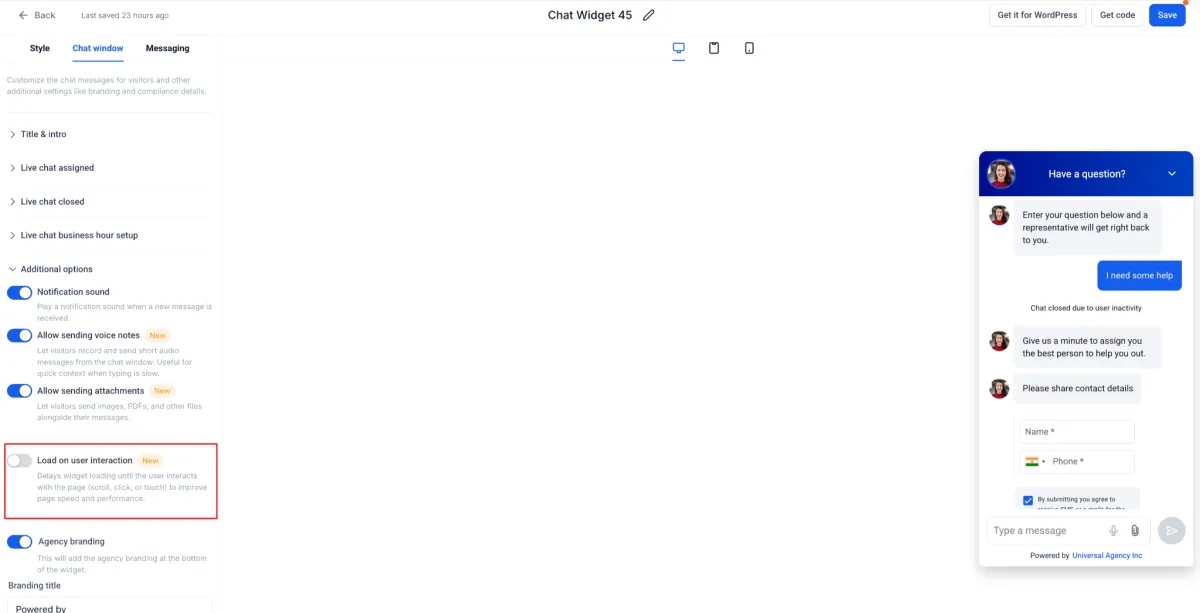
The window can open with default text already in the visitor’s message box, along the lines of “Hi, I’d like to ask about…”, which they edit or send as-is. It supports merge fields and up to 255 characters, and visitor contact details are stored privately in the CRM rather than in the chat transcript. Any field on the contact form can be marked mandatory, including custom and dropdown fields.
Visitors can attach up to five files per message, each under 20 MB, as JPG, JPEG, PNG, HEIC or PDF, from the paperclip or their camera roll. Images preview inline in your inbox, while HEIC and PDF show a download link. A photo of the damaged gutter on the first message can save a site visit. A notification sound, on by default, alerts the visitor when your reply arrives.
If you register a chat widget messaging campaign, the compliance review scans the site you enter to confirm the widget script is present and live, and blocks submission until it is.
What the bot actually answers from
A bot answering from a knowledge base is only as good as the knowledge base. This is where a website chatbot either earns trust or loses it in one exchange.
Knowledge bases accept a Table Source: upload a CSV of up to 50,000 rows, 500 columns and 50 MB, with the 20 most relevant columns indexed, and your AI agents answer natural-language questions about the data in it. Rows are converted to embeddings, so the agent works on meaning rather than exact keyword matching, and the rows behind an answer are cited. Filtering, comparison and sorting queries are noted as coming.
For anything that changes, connect a Google Sheet instead. Go to AI Agents, then Knowledge Base, then Tables, then Import from Google Sheets. Changes sync about every 15 minutes, covering new rows, edited cells and added or removed columns, and a manual refresh forces it through.
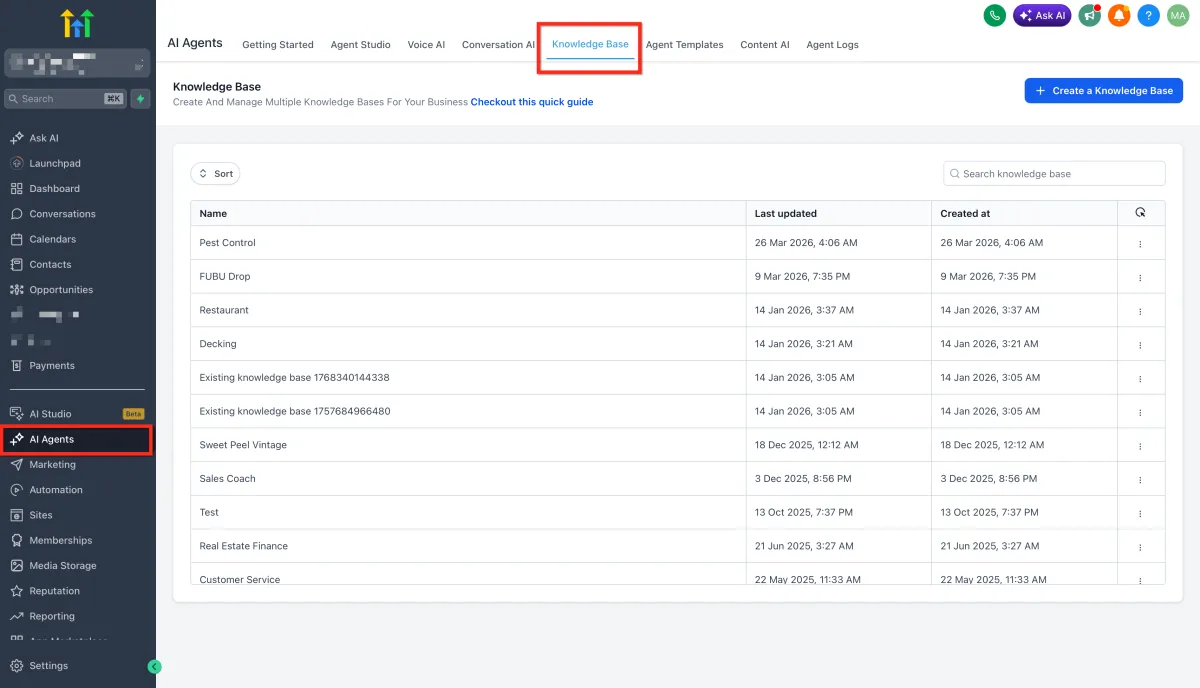
If your callout fees, service list, suburb coverage or opening hours move around, that sheet becomes the source of truth and every AI agent follows it.
You can also tell the bot when to consult a particular knowledge base instead of leaving it to decide. Set up to four triggers, each with up to seven knowledge bases attached, and the AI prioritises that source when a trigger matches.
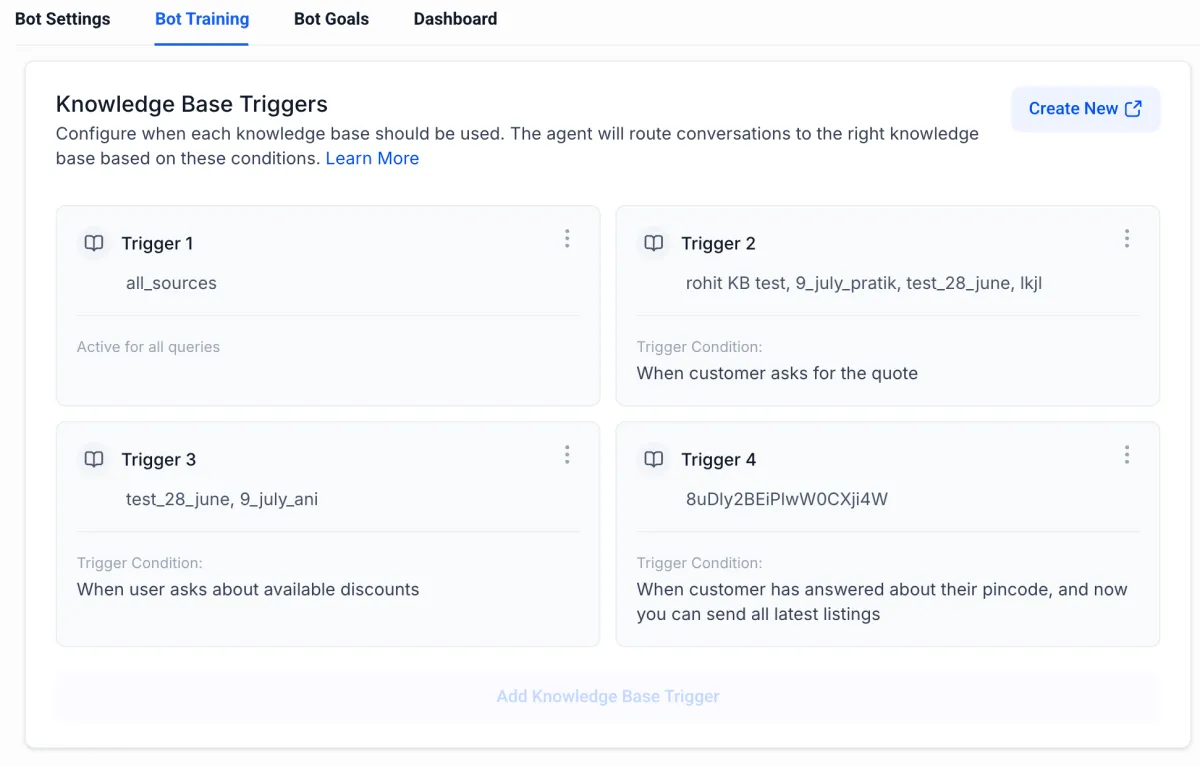
That is the fix for a bot that goes vague on your pricing or your cancellation policy.
Bots can also read images customers send, several in one exchange, across live chat, Facebook Messenger, Instagram, WhatsApp and SMS. That runs through Labs and covers images rather than PDFs. Voice note transcription handles accents and noisy recordings better wherever Respond to Audio is on, and the bot replies in the language of the inbound message.
Keeping the bot in its lane
Autopilot or Suggestive
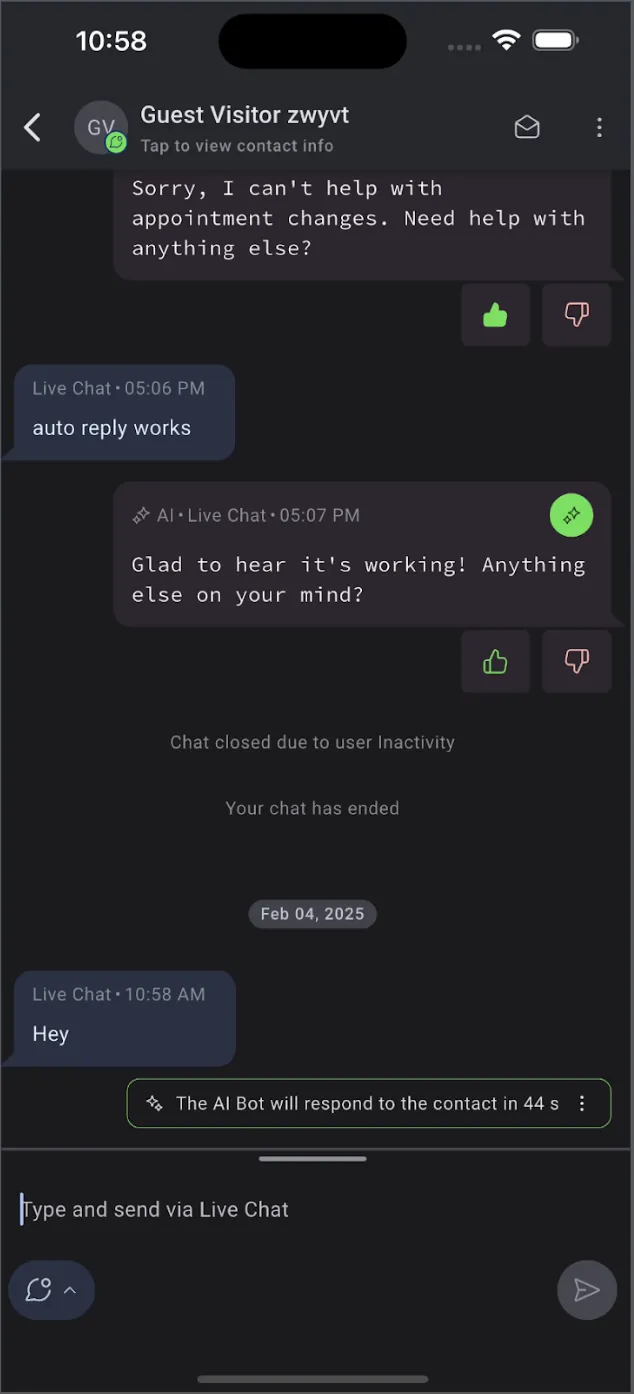
Autopilot replies on its own after a preset delay. Suggestive drafts a reply and waits for a person. That draft is now written in the background the moment a message arrives, so the suggestion is already sitting there when you open the thread, and nothing is ever sent automatically. Both modes run in the mobile app, in public beta from version 3.96.5, where you can pause, resume or schedule the bot’s reactivation from any conversation screen.
How much the bot says
Response style is set per bot in Autopilot mode: Concise at around 30 words, Balanced at around 80, Detailed at up to 200. Treat it as a strong steer rather than a hard cap, since conflicting length instructions in a custom prompt override it. In a narrow chat window, Concise reads better than Detailed.
When the bot should go quiet
Two independent sleep settings cover this, one for manual messages and one for workflow messages. An automated follow-up SMS can leave the bot awake while a personal reply from you puts it to sleep, or the reverse. Existing configurations stay as they are unless you change them.
Any bot can also be assigned to specific channels, covering SMS, email, Facebook, Instagram, WhatsApp, live chat and web chat, and respond independently on each. Assignment works by channel, by account or number, and by contact tags, so the bot answering website chat can behave differently from the one answering WhatsApp. This is a Labs feature, toggled on as Conversations AI Channel Management.
Testing it before a customer sees it
The Prompt Optimiser generates realistic customer scenarios from your agent’s prompt, knowledge base and settings, then runs actual conversations against a cloned copy. It tracks actions including appointment booking, handovers and workflow triggers, scores the transcripts, then rewrites the prompts where they failed.
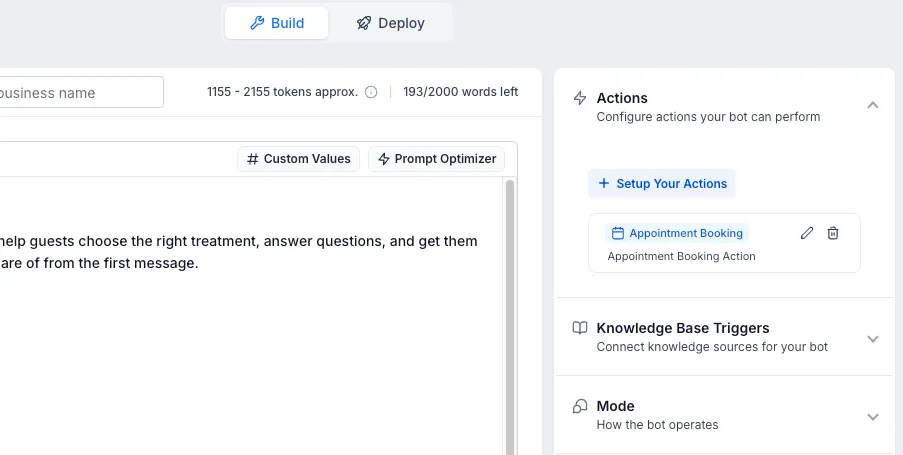
Two caveats: real actions do execute during testing, so appointments genuinely get booked, and the scores are directional rather than precise. The live agent changes only on your approval.
From a conversation to a booked job
Conversation AI books directly into the Services calendar from live chat, as well as SMS, Facebook, Instagram and WhatsApp. The customer describes what they need, the AI checks availability and confirms the booking with no manual step in between.
A single bot can book across several calendars, routing each request on rules you set, with a fallback calendar for anything that does not match. Cancellation, rescheduling, calendar links and post-booking workflows all keep working. A booking bot can also be set to pause after booking, allow rescheduling, or cap how many messages it sends. The calendars themselves are covered in our online booking system deep dive.
For anything the bot should not finish alone, the Customer Replied trigger accepts All-in-One Chat as a reply channel, then filters by chat type, either Chat Widget or Live Chat, and then by the specific widget, so workflows fire only for the interaction you meant. Workflows can also act on inbox events, routing an incoming message, assigning it to a team member or answering with a follow-up.
Where the conversation goes afterwards
Conversation AI can produce a structured summary and a full transcript at the end of each session, triggered by inactivity, a bot sleep event or a manual message. The summary can be written to a contact field, used to start a workflow or emailed to whoever needs it, and both are available as workflow variables. Enable it in Labs, then configure it per bot under Bot Goals.
Everything lands in one Conversations inbox: a four-panel layout, tag filtering with AND/OR operators, filter combinations saved as named views, and an unread counter that updates in real time.
The contact page has been rebuilt around a unified layout, with core details upfront, companies, opportunities and custom objects grouped in one Associations panel and conversations in the centre. It is in early access, so ask us to switch it on. A 9.40pm chat about an end-of-lease clean then becomes a contact, an opportunity on a pipeline and a follow-up sequence.
The spoken version of the same widget
Visitors can also speak to an agent in the browser. Create a chat widget, select Voice AI as the type, assign an agent and embed the code, and visitors talk to it in real time using their microphone, with no phone call and no download. Built-in reCAPTCHA keeps bots out. This is in early access; contact us and we will enable it. It draws on the same knowledge bases as the text bot, and our AI receptionist deep dive covers how voice agents are built and tested.
What an AI chatbot for a website costs
The widget, the knowledge base, the bots and the calendars they book into all sit inside the platform rather than being sold separately. Clientflow is AUD $345 per month including GST, flat, with unlimited users and contacts, or $3,450 per year, twelve months for the price of ten. The pricing page sets out what else is included.
Conversation AI is charged on usage at US$0.03 per message, so a thousand messages in a month is about US$30. That is worth modelling before you switch a bot to Autopilot, because Detailed responses across a busy site use more messages than Concise ones.
A five-user Australian services business running the equivalent scattered stack, a CRM plus a chat tool plus a scheduler plus an email platform, is looking at roughly $2,300 to $2,600 a month on our estimate. Clientflow’s $345 includes GST, which is $313.64 ex GST if you are lining it up against tools quoted ex GST. Consolidating into one platform is where the arithmetic changes.
White-glove onboarding covers data migration, five hours of one-to-one setup and regular live group training. Expert implementation runs at $30 per hour in blocks of 10 to 100 hours with no lock-in, against the $150 to $350 an hour Australian consultants typically charge.
What this looks like in practice
Steph runs a seven-person end-of-lease cleaning business across Adelaide’s northern suburbs. Most of her traffic arrives between 8pm and 11pm, when tenants are working through a vacate checklist and her team is asleep.
She puts the widget in two places: the floating bubble sitewide, and an embedded version beside the pricing table on her end-of-lease page. Load on user interaction is on, so it waits for a scroll or a tap rather than dragging her mobile page speed down. The message box opens pre-filled with “Hi, I’d like a quote for an end-of-lease clean”, and suburb is a required field.
Her knowledge base is a Google Sheet holding property sizes, inclusions, carpet steam-clean pricing and her suburb list. When she raises prices in October she edits the sheet, and the bot has the new numbers within about 15 minutes. Response style is Concise, and a knowledge base trigger points anything mentioning bond or exit inspection at her guarantee document.
Before going live she runs the Prompt Optimiser. Two test conversations fail on whether blinds are included, so she applies the rewritten prompt and runs it again. At 9.40pm a tenant asks about a three-bedroom in Salisbury, attaches a photo of the oven, gets a price and books Thursday morning.
Frequently asked questions
What is an AI chatbot for a website?
An AI chatbot for a website is a chat window on your pages, backed by a bot that reads what a visitor types and answers from material you have given it. In Clientflow the window is a chat widget and the bot is Conversation AI. It answers questions, collects details, accepts photos, books appointments and hands over to a person.
How do I add an AI chatbot to my website?
Build the widget in the chat widget builder under Sites, choose whether it floats in the corner or sits embedded in your page content, then paste the script into your site. Connect a knowledge base holding your services, prices and policies, assign a bot to the live chat channel, and test it with the Prompt Optimiser first.
Can a website chatbot book appointments?
Yes. Conversation AI books directly into the Services calendar from live chat, as well as SMS, Facebook, Instagram and WhatsApp. The customer describes what they need, the bot checks live availability and confirms without anyone stepping in. One bot can route bookings across several calendars, with a fallback for anything that does not match.
What does an AI chatbot cost for a small business?
In Clientflow the chatbot is part of the platform at AUD $345 per month including GST, flat, with unlimited users and contacts. Conversation AI messages are charged on usage at US$0.03 each, so a thousand bot messages in a month runs to about US$30. There is no separate chatbot subscription and no per-contact pricing.
How do I stop the chatbot answering when I want to take over?
Two independent sleep settings control this, one for when a person sends a manual message and one for when a workflow does. Your own reply can put the bot to sleep while automated follow-ups leave it awake. You can also run it in Suggestive mode, where it drafts replies for you to send or edit.
Can the chatbot handle photos and voice notes from customers?
Visitors can attach up to five files per message on live chat widgets, each under 20 MB, as JPG, JPEG, PNG, HEIC or PDF. Conversation AI reads and responds to images, including several in one exchange, though not yet to PDFs, and that runs through Labs. Voice note transcription handles accents and noisy recordings wherever Respond to Audio is on.
Already a Clientflow client? If you want any of this set up in your account, or want to know whether it suits how you work, get in touch with your usual contact on the Clientflow team.
Not yet a client? Book a call with the team, or see the full feature set on the platform capabilities page.
Clientflow is built on the HighLevel platform, delivered with Australian onboarding, support and expert implementation. Read how that works on our GoHighLevel Australia page.


