
Online Booking System for Australian Service Businesses
An online booking system lets customers see your live availability, choose a service and confirm a time without ringing you. Clientflow includes one in its flat $345 per month platform: services and pricing, deposits and coupons, buffer time, reminders, and a booking page that can ask the customer for their own address rather than offering a fixed venue.
An enquiry arrives at 7.40pm and gets answered at nine the next morning, by which time the customer has booked a business whose website took the job while they were on the page. Sixty-two per cent of enquiries go unanswered within five minutes, which is why Response sits second in the Core 5 Marketing Automations.
For property services a booking is rarely just a time. It is a time, an address, a service with a price on it, often a deposit, and a van that has to get from the last job to this one. Here is how booking works in Clientflow, from setting the calendar up to the AI taking a job out of an Instagram message at midnight.
Let the customer tell you where the job is
If you travel to the client, the most useful setting on the page stops you having to ask where they are.
A booking location type asks the customer for their own service address at booking. Choose the Ask the Booker location option on the service, and the address saves to both the booking and the contact record. It suits any business that travels to the customer: trades, cleaners, stagers, inspectors, trainers.
For a cleaner covering a dozen suburbs, or an inspector working to a drive time, the address decides whether a job fits the day at all. Capturing it while the customer is booking, rather than in a callback the next morning, is what turns an enquiry into something you can schedule.
Setting the calendar up
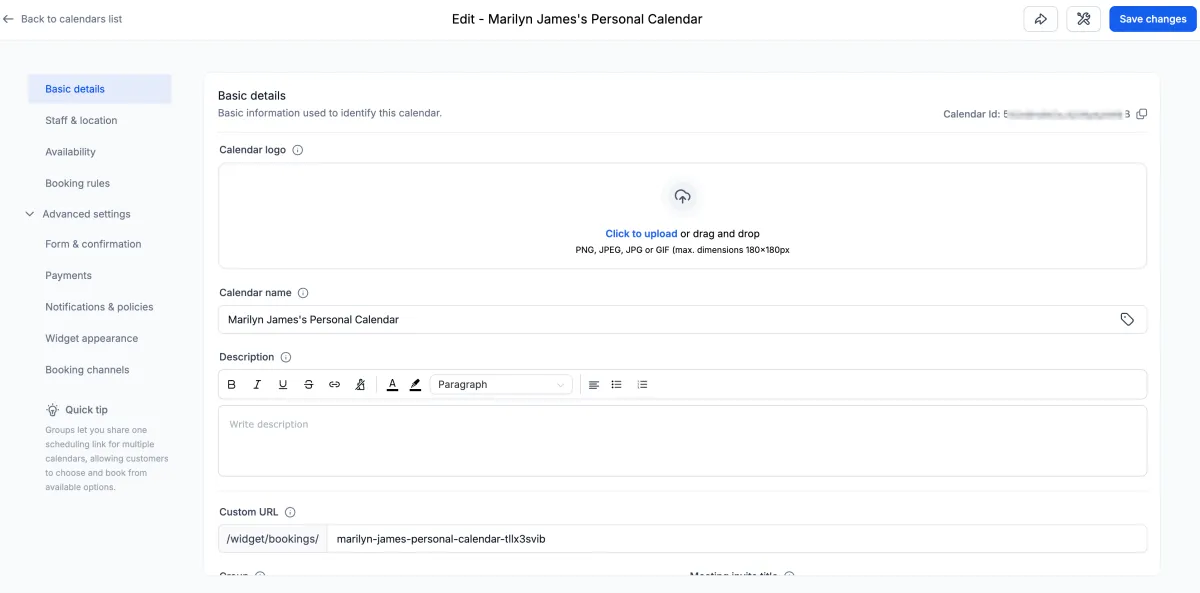
Calendar settings sit in five sections: Basic Details, Staff and Location, Availability, Booking Rules, and Advanced Settings, with the last broken down further into form and confirmation, payments, notifications and policies, widget appearance, external sync and booking channels. Helper text sits inline explaining what each setting does. Find it under Calendars, Calendar Settings, Meetings, Edit Calendar.

Saving a calendar with a required field missing used to fail silently. The save now scrolls to the validation error, or moves to the right tab and highlights the field. Custom values work inside calendar and service configuration fields as well, so location details flow through rather than being retyped.
Date-specific hours can be applied to several dates in one action. Pick the dates, enter the start and end time, and it applies across them, with consecutive dates grouped into ranges and each group editable afterwards.
Availability on a service can also carry an explicit start and end date rather than a rolling window, and once the end date passes the booking page closes itself. That suits a stager taking bookings for a spring selling season. Separately, business hours on listings carry multiple time blocks in a single day, covering split shifts, 24-hour operation, always open, single continuous hours and closed.
What the customer sees on the booking page
A long service list presented all at once is where bookings stall. The booking page can ask customers to pick a category first and only then show the services inside it, turning a wall of options into a guided path.
How far they can wander is your call. A toggle under Global Settings, then Booking Page Settings, called “Allow customers to explore other services”, controls whether someone can browse beyond the link they arrived on. Left on, a person who clicked a link for one service can book any of the others, which is how you cross-sell. Turned off, they stay scoped to the link you sent.
Service descriptions use a rich text editor rather than plain text: bold, italics, lists, links, headings, colours and alignment, all carrying through to the customer-facing page. Service images can be shown or hidden across the page with a toggle, where previously that took custom CSS, and the upfront payment amount displays clearly on mobile for bookings that take a deposit.
Calendar booking forms run conditional logic before the appointment exists. If a prospective booker meets your disqualification conditions, no appointment is scheduled and no payment taken, and they see the redirect or message you configured instead. Worth knowing: that extended logic sits on calendar booking forms, with support in the Services and Rentals flows listed as planned rather than shipped.
Taking payment at the moment of booking
Whether pricing shows during booking, and whether a coupon field appears at checkout, is set once and applied across every service booking page rather than service by service. With a long service list, that is the difference between one setting and thirty.
Where a deposit is configured, the customer can choose between the deposit and the full amount rather than being forced down one path, and because the full amount is selectable, buy now pay later providers can finance the whole booking. Percentage deposits calculate on the final payable amount after discounts, recalculating when coupons change. It sits under Services, Global Settings, Payment Settings, with the mode set to Online Payment.
Klarna and Affirm are available on booking pages for accounts using Stripe. The customer splits the cost into instalments, you receive the full amount, and the provider carries the arrangement. On a full-house stage, that gives a hesitant customer a way through without discounting.
Paid bookings are no longer frozen. Both paid and unpaid service appointments can be edited in place: add or remove services, change add-ons, reassign staff, apply coupons. Totals recalculate and payment reconciles, showing whether more is owed or a refund is due, and refunds process from the appointment modal.

Editing is disabled while a refund processes, though rescheduling still works. If your money side runs on invoices too, that thread continues in our deep dive on invoicing and Xero sync.
Where the booking lands, and who sees it
Booking from inside an opportunity opens the full booking modal: calendar selection, time slots, pre-filled contact details, service selection. If the opportunity already carries an appointment, the modal opens for editing. Scheduling happens where the deal lives.
Appointments can carry guests, where the person booking adds other attendees by name and email, and workflow triggers account for them rather than firing only for the primary contact. For a couple booking a joint inspection, reminders reach everyone.
Confirmation pages name the right person. Custom values referencing the assigned user populate on the calendar confirmation page and the next funnel step, which matters most on round robin calendars. The confirmation carries their name, photo and contact details instead of trailing off after “Your meeting is booked with”.
On mobile, booking sits on one screen rather than several: contact, service or calendar, date and time, notes. Desktop permission restrictions are now enforced in the mobile app too, and permissions are standardised across Meetings, Services and Rentals into six types, so front-line staff can manage bookings without changing pricing or global settings.
Eleven service booking widgets cover revenue, revenue by staff member, coupon redemptions, staff rankings and appointment counts by service and category, inside a single Appointments module of 37 widgets. That replaces the spreadsheet you have been exporting bookings into.
Protecting the day
Pre-buffer and post-buffer time used to block availability invisibly, which made the calendar look wrong. Buffers now show as highlighted blocks around appointments in day and week views. Switch on Show buffer time after selecting day or week view; it holds across the staff, service and category filters.

For anyone scheduling back-to-back jobs with travel between them, it is finally obvious why a slot is gone.
The Book Appointment workflow action takes a timezone, fixed or dynamic, including the contact’s own. The start time is interpreted in that timezone before the booking is made, and the same timezone checks slot availability. If an automated booking has ever landed three hours out for an interstate contact, that is the fix.
Marking an appointment Showed or No Show used to push update emails to attendees through connected Google, Outlook or iCloud calendars. Those statuses are internal tracking, so the emails no longer send.
Booking without anyone filling in a form
Conversation AI books directly into the Services calendar across SMS, live chat, Facebook, Instagram and WhatsApp. A customer describes what they need, the AI checks availability and confirms the booking with no manual step.
One bot can book across multiple calendars, routing each request on rules you set, with a fallback for anything that does not match. Cancellation, rescheduling and post-booking workflows keep working, and the booking record shows which calendar was used.
On Instagram, an inbound DM can be handled by a booking bot in autopilot mode: it offers to book, pulls live availability, confirms a time and creates the appointment, attributed to Conversation AI. The bot can pause after booking, allow rescheduling, or cap how many messages it sends. Define its goals and knowledge base carefully so it sounds like you.
Inside workflows, the AI Agent action takes a plain-language instruction such as “qualify this lead and book an appointment if they are a good fit”, with a log showing what it decided and why. For the phone side of the same problem, see our deep dive on the AI receptionist.
What an online booking system costs
Booking is included in the platform rather than sold separately. Clientflow is AUD $345 per month including GST, flat, with unlimited users, contacts and calendars, or $3,450 per year. Ex GST that is $313.64, the number to use against tools quoted ex GST.
A Calendly alternative that does more than book a time
Calendly Teams runs to roughly $143 per month for five users, ex GST, indicatively. It puts a time in two diaries and stops there, without touching the deal, the invoice or the follow-up, so those stay in whatever else you are paying for.
The comparison worth running is the whole stack. A five-user Australian services business paying separately for a CRM, an email tool, a scheduler, a payments layer and reporting is looking at roughly $2,300 to $2,600 a month on our estimate. There is a side-by-side comparison of the platforms, the pricing page covers what the flat rate includes, and our small business CRM page shows how the pieces fit.
If you would rather keep Calendly, it connects properly: five triggers and nine actions in workflows, covering invitee created, cancelled and no-show plus routing form submissions, though a reschedule reaches those native triggers as two separate events, a cancellation followed by a new booking. On the calendar sync side it behaves better: a reschedule made in Calendly is treated as a genuine reschedule of the existing appointment, flagged as Rescheduled, so workflows filtering on Rescheduled fire correctly instead of duplicating. Guest phone numbers sync back to the contact record.
Communities and the Client Portal also give you a permanent, reusable meeting room URL rather than a new link each session, alongside a Recordings Hub of past sessions.

What this looks like in practice
Rhys runs a four-van end-of-lease cleaning business across Perth’s northern suburbs. Bookings used to arrive as texts to his mobile and go on a whiteboard.
He sets up three service categories: end of lease, carpet steam clean, and window and track cleaning, so a customer picks the category before seeing the six services inside it. Each carries a formatted description of what is included, and the location type is Ask the Booker, so the customer types the property address while booking and it saves to the booking and the contact.
A 30 per cent deposit is configured, with the customer free to pay the full amount instead, and coupons are switched on across all services from the global setting. Buffers of 45 minutes cover travel, showing as blocks in the week view so his coordinator can see why 2pm in Joondalup is unavailable.
A tenant messages the Instagram account at 10.20pm about a Friday vacate clean. The booking bot pulls live availability, confirms 8am Friday and takes the deposit. On Thursday the tenant adds carpet steam cleaning, so the coordinator edits the paid booking in place, the total recalculates and the balance is collected without cancelling.
Frequently asked questions
What is an online booking system?
An online booking system lets a customer see your live availability, choose a service and confirm an appointment themselves, usually with payment taken at the same time. In Clientflow that covers the booking page, availability rules, deposits and coupons, confirmations, and the appointment record automations work from. It is included in the flat monthly fee.
Can customers pay when they book?
Yes. Services can take a deposit or the full amount, and where a deposit is configured the customer can choose which to pay. Percentage deposits calculate on the final payable amount after discounts, coupons and add-ons. Klarna and Affirm are available on Stripe accounts, and a paid booking can still be edited afterwards with totals and refunds reconciled.
Is Clientflow a good Calendly alternative?
It books a time the way Calendly does, then keeps going: services with pricing, deposits, coupons, the contact record, the pipeline and follow-up sit in the same place. Calendly Teams is indicatively around $143 per month for five users ex GST; Clientflow is $313.64 ex GST, flat, with unlimited users.
Can the booking page ask the customer for their address?
Yes. Set the location type on the service to Ask the Booker and the customer supplies their own service address while booking. It saves to both the appointment and the contact record, so nobody has to ring back for it. This is the option for trades, cleaners, stagers, inspectors and anyone who travels to the job.
Can AI take a booking without anyone on my team involved?
Conversation AI books directly into the Services calendar across SMS, live chat, Facebook, Instagram and WhatsApp. It checks live availability, confirms the time and creates the appointment. One bot can route bookings across several calendars, with a fallback for anything that does not match your rules. Conversation AI is billed at US$0.03 per message.
Already a Clientflow client? If you want any of this set up in your account, or want to know whether it suits how you work, get in touch with your usual contact on the Clientflow team.
Not yet a client? Book a call with the team, or see the full feature set on the platform capabilities page.
Clientflow is built on the HighLevel platform, delivered with Australian onboarding, support and expert implementation. Read how that works on our GoHighLevel Australia page.


