
How to Get More Google Reviews: Australian Business Guide
To get more Google reviews, ask every client within hours of finishing the job, from the number they already recognise, with one direct link to your profile and nothing in the way. Clientflow automates that request, finds every review profile you already have and replies with Reviews AI, inside its flat $345 per month.
A building inspector finishes a pre-purchase inspection on the Thursday morning, sends the report that afternoon, and the client replies with two words: thanks mate. That was the moment. By Monday the client is dealing with the conveyancer, the bank and the removalist, and the inspection has slid a long way down the list.
Most Australian property services businesses are not short of satisfied clients. What is missing is the habit of asking while the goodwill is warm, and something that asks without anyone having to remember.
Reviews sit inside Retention, the fifth of the Core 5 Marketing Automations, which holds that keeping a client costs a fraction of winning a new one. A review is the piece of retention work that also feeds the top of the funnel: a finished job turning into the next enquiry. What follows is how to ask properly, then what Clientflow does about it.
When to ask, and why hours beat days
The largest lever on your review count is how long you wait. A request that lands within a few hours of the job being signed off sits in front of someone who still has the outcome in mind and still feels the relief of the thing being done. A request that lands a fortnight later asks them to reconstruct all of that from memory.
Pick the moment the client experiences as completion, which is rarely the one your admin does. For a building inspector it is when the report arrives, not when the invoice clears. For an end-of-lease cleaner it is the walkthrough, not the bond release.
Then send once, on the same day. Batching a month of requests into a Friday afternoon is where review programmes go to die: the oldest names have forgotten you, the response rate drops, and the low return convinces everyone the idea does not work.
What a good request says, and what you must not do
Keep the request to one ask and one link. Name the specific job: “the inspection at 14 Harcourt Street” rather than “your recent service”. Say plainly that a Google review helps other people find you. Then give the link and stop. Every extra sentence, and every internal feedback form sitting in front of the link, costs you completions.
Send it from a number the client recognises. A message arriving from the same mobile that booked the job, sent the quote and chased the invoice gets opened considerably more often than one from an unfamiliar sender.
There are three things not to do. Do not offer anything in exchange: Google’s review policies prohibit payment, discounts, free work or prize draw entries, and reviews collected that way can be removed. Under the Australian Consumer Law, fake or incentivised reviews presented as genuine are misleading conduct, and the ACCC has acted on it. Do not ask only the clients you expect to be positive, which is against Google’s policies and produces a run of flawless reviews that reads as bought. And do not supply the wording. Five reviews with the same phrasing look exactly like what they are.
A negative review is survivable. An unanswered one costs you, because the next person reading it sees a complaint and silence.
Automating the ask so nobody has to remember
Clientflow sends review requests three ways: manually from a contact, as a campaign to a list, or from a workflow. The account-level sender settings apply to all three. Under Reputation then Settings, in the email and phone review request sections, you set the default phone number used for SMS and WhatsApp and the default email address, and every request goes out from those regardless of what triggered it. That is the recognisable-sender point turned into a setting rather than a policy nobody follows. WhatsApp works as a request channel, covered in the WhatsApp CRM deep dive.
For the automated route, the request should fire off the event that means the job is finished. If your field work runs through Housecall Pro, the native connection gives workflows a Job completed trigger, alongside triggers for jobs created, scheduled and cancelled and for estimates. Two limitations: most of those triggers poll every five to ten minutes rather than firing instantly, and they are premium actions billed per execution. If you sell through the store, Order Fulfilled does the same when an order is marked fulfilled.
From there the sequence is short. Send the request. Wait. Send one reminder. Stop. The rebuilt wait action handles the middle part: waiting until a specific date is a single step, and wait durations can be pulled from a custom field so the delay varies by contact.

What stops the sequence being a nuisance is the Review Request Clicked goal event. Set it as the workflow’s goal and the sequence ends the moment the contact clicks the link, so nobody gets a reminder about something they have already done. The same mechanism handles the payment side with the Invoice Paid goal, covered in the invoicing deep dive.
If you would rather not build it from scratch, the workflow templates library ships pre-built review request campaigns you install and then edit.
Finding every profile you are already being reviewed on
Most businesses are being reviewed in more places than they realise, and a review nobody has seen is a review nobody has replied to.
Reputation automatically detects review profiles for your business across more than 52 platforms, including Google Business Profile, Facebook, TripAdvisor, Yelp, Trustpilot and Booking.com. Each one shows the business name, an address preview and the review count before you connect it, and a top recommendation card points at the profile worth connecting first based on review volume. Confidence indicators mark each match High, Medium or Multiple, and in-app notifications flag high-confidence discoveries. Connect from Reputation then Overview, or Reputation then Settings then Integrations, and keep the results honest with View page, Integrate different profile or Not my business.

Each platform integration also takes unlimited connected pages, which matters for anyone with more than one listing, such as a property management group with an office in each suburb. All of them are managed from one dashboard in Reputation Settings showing connection status, review counts and last sync.

Google Business Profile reviews and messages arriving in the Conversations inbox show which page they came from, and contacts created from those interactions record the source page name.
The listing under the reviews
Reviews attach to a listing, so the listing needs to be right. Duplicate Suppression scans monthly for duplicate directory entries, which split your local search authority and show people conflicting phone numbers. It reports what it finds and lets you submit a suppression request to the publisher, reviewed in around 24 hours, with status indicators tracking each one from Possible Duplicate through to Suppressed. Where an update to Google, Bing or Apple Maps is stuck, Force Sync prioritises it from the Listings tab.
Google Business Profile special and holiday hours are set inside Listings without logging in to Google separately, which is the update everyone forgets until a client is standing outside a closed door on the Tuesday after Easter.
Replying to every review without it becoming somebody’s job
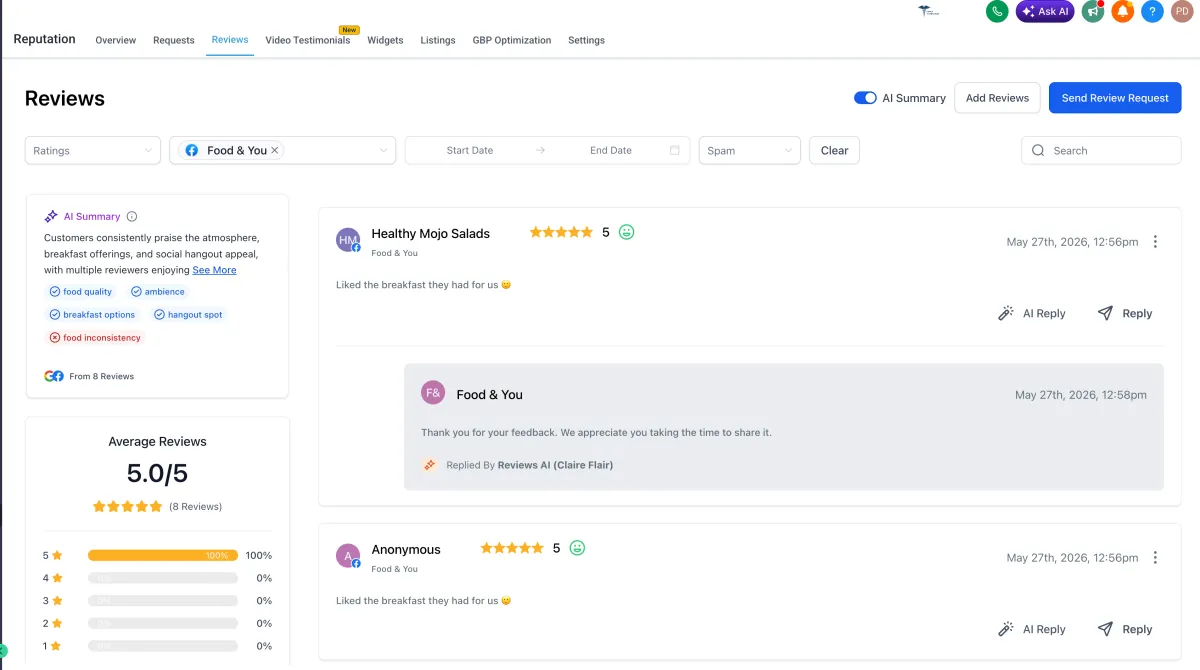
Reviews AI handles replies on Google and Facebook in two modes. Suggestive mode drafts a reply you read, edit and send yourself, from Reputation then Reviews, via AI Reply. Automatic mode lets an agent respond on its own according to rules you set, configured at Reputation then Settings then Reviews AI, via Create Agent. Agent settings cover the review source, rating conditions, tone, language and page-level control. Run automatic on four and five stars and suggestive on anything lower, and a complaint always reaches a human before a reply goes public.

For a backlog, Reviews AI drip campaigns work through old reviews a period at a time. A campaign can target an exact review date range as well as a fixed review age, and you can preview eligibility before launching, including the total number of matching reviews. Found under Reputation, Settings, Reviews AI, Drip Campaign.
Reading them is a separate problem once you have a few hundred. Reputation Management produces an AI summary across all your reviews, surfacing recurring themes, common praise and frequent complaints, and it updates as new reviews arrive. Knowing your star rating and knowing that eleven people have mentioned the same thing about scheduling are different pieces of information, and only one of them tells you what to fix.
The Reputation dashboard itself was rebuilt for monitoring and responding across connected platforms, with multilingual support now extending to Reputation Management. The Product Review Submitted trigger fires when a customer leaves a review on your store, and you can branch on rating to send a thank you, an offer or an internal escalation to whoever needs to ring that person today.
Reviews then earn their keep on the pages where people decide. Manual schema markup supports Review and Aggregate Rating among its 19 parent-level types, added through Add Schema Markup on any website or funnel page, which is how a star rating becomes machine-readable rather than decorative.
What review software costs on its own, and what it costs here
Dedicated review and reputation management software is normally its own subscription, sitting alongside the CRM, the SMS tool, the email platform and the listings service. For a five-user Australian services business the whole scattered stack runs to roughly $2,300 to $2,600 per month, an estimate rather than a quote, and the review tool is one of the smaller lines in it.
Clientflow is $345 per month including GST, flat, with unlimited users and contacts, or $3,450 per year, which is twelve months for the price of ten. Reputation, Listings, Reviews AI, workflows and Conversations all sit inside that figure. If you are comparing against a tool that quotes ex GST, Clientflow’s ex-GST equivalent is $313.64. Full detail is on the pricing page, and the case for one platform instead of six is on the all-in-one platform page.
The usage costs are worth being straight about. SMS and calls are paid directly to Twilio at carrier cost with no markup, so a review request by SMS costs you cents. Email includes 2,000 sends per month, then US$1.10 per 1,000. WhatsApp messages are US$0.111 each. Setup is covered by white-glove onboarding, and beyond that expert implementation is $25 per hour with no lock-in, against the $150 to $300 per hour Australian marketing and automation consultants typically charge.
What this looks like in practice
Nadia runs an end-of-lease cleaning business in Adelaide with five cleaners and about 90 jobs a month, scheduled and closed out in Housecall Pro. She had 34 Google reviews after four years, all from clients who volunteered.
The Job completed trigger starts a workflow within a few minutes of a cleaner marking the walkthrough done. The request goes by SMS from the office mobile, the number every tenant has already texted about key collection, and it names the property. Three days later a single email reminder follows, unless the Review Request Clicked goal has already ended the sequence. Nothing else is sent.
Profile detection found two listings she did not know about, one carrying eleven reviews and a phone number from two offices ago, and Duplicate Suppression cleared a second Google entry created by a previous bookkeeper.
Reviews AI now replies automatically to four and five stars in her own tone and drafts a suggestion for anything below, which she reads on her phone before it goes out. The AI summary told her something the star rating had not: seven reviews mentioned cleaners arriving before the tenant had finished moving out. Eleven months on she has 200-odd reviews and a scheduling rule that fixed the complaint, and nobody asks for a review by hand any more.
Frequently asked questions
How do I get more Google reviews for my business?
Ask every client, every time, within hours of the job finishing. Send one message from a number they recognise, name the specific job, include a direct link to your Google Business Profile and nothing else. Send one reminder if they do not act, then stop. Automating that off a job-completion event is what turns it from an intention into a number that climbs.
How soon after a job should I ask for a Google review?
The same day, ideally within a few hours of the moment the client experiences as completion. That is when the report arrives, the walkthrough happens or the bid is won, not when the invoice clears. Response rates fall away sharply once the job stops being front of mind, which is why batching requests into a monthly send performs so poorly.
Can I offer a discount or a prize draw for leaving a Google review?
No. Google’s review policies prohibit offering payment, discounts, free work or competition entries in exchange for reviews, and reviews collected that way can be removed. In Australia, presenting incentivised or fake reviews as genuine is misleading conduct under the Australian Consumer Law and the ACCC has acted on it. Ask everyone, incentivise no one.
Can Clientflow reply to Google reviews automatically?
Yes. Reviews AI covers Google and Facebook in two modes. Suggestive mode drafts a reply for you to edit and send from Reputation then Reviews. Automatic mode lets an agent reply on its own, with rules for review source, rating conditions, tone, language and which pages it covers. A common setup is automatic replies on four and five stars and drafts only on anything lower.
Do I need separate reputation management software?
Not if your CRM includes it. Clientflow has profile detection across more than 52 platforms, unlimited connected pages per platform, review requests by SMS, email and WhatsApp, Reviews AI replies, AI review summaries and listings management inside the flat $345 per month, with the messages themselves charged at usage rates on top. A standalone review tool would be another subscription holding a separate copy of your client list.
Already a Clientflow client? If you want any of this set up in your account, or want to know whether it suits how you work, get in touch with your usual contact on the Clientflow team.
Not yet a client? Book a call with the team, or see the full feature set on the platform capabilities page.
Clientflow is built on the HighLevel platform, delivered with Australian onboarding, support and expert implementation. Read how that works on our GoHighLevel Australia page.


