
WhatsApp Business API Without Code: Clientflow for Australia
The WhatsApp Business API is what lets a business send approved message templates, run campaigns and automate replies at scale. Clientflow includes it in a flat $345 per month platform, so you connect your numbers, build templates and run WhatsApp campaigns without writing code or hiring a developer. Messages cost US$0.111 each.
Search for the WhatsApp Business API and you land in Meta’s developer documentation: webhooks, access tokens, phone number identifiers, a cloud API reference written for somebody building an integration. Almost none of it addresses the person who wants the outcome rather than the plumbing, which is messaging customers on WhatsApp from the same place the rest of the business runs.
That gap matters in property services. A tenant or a buyer who will not answer an unknown mobile number will often reply to a WhatsApp message from a named business, and the thread stays as a record of what was agreed. Sixty-two per cent of enquiries go unanswered within five minutes, and a channel people actually open is one of the few direct levers on that.
The honest version is that you do not need to write code, but you do need to accept two things: messages cost US$0.111 each, and any template you use to open a conversation has to be approved by Meta first.
What the API gives you, and what it asks of you
WhatsApp used to allow one number per account, which was a problem for any business running more than one line. You can now connect and manage several numbers and route conversations and campaigns to the appropriate one, so a property management business with a leasing line and a maintenance line keeps those threads apart without workarounds.
Messaging can run through Meta’s Marketing Messages API, which prioritises delivery to more engaged recipients and delivers up to 9 per cent better rates on Meta’s own testing. It also unlocks conversion tracking, creative optimisation, GIFs, deep links and cost metrics per template, per click and per delivery.
Templates are where the approval process lives. WhatsApp does not let a business message someone out of the blue with free text, so anything that opens a conversation runs on a template Meta has reviewed. Clientflow gives you a builder for new templates, pulls your approved list into the places that need it, and ships some features with a pre-approved template so there is nothing to wait for. Templates pull images, video or documents from your media library rather than needing a fresh upload each time, and they carry service booking variables, appointment date, service name, location and staff member, without building a workflow first. That turns confirmations and reminders into a template-level job, which is the join between this and your online booking system. The phone numbers settings page shows your messaging limits and quality rating, so the two figures that govern what you may send are visible rather than buried.
Conversations rather than broadcasts
Most WhatsApp tooling treats the channel as a send mechanism, but in a services business it is mostly two-way, so the inbox has to hold up. The Conversations tab uses a four-panel layout with tag filtering on AND and OR operators, and filter combinations save as named views, so a queue like open WhatsApp threads sits one click away.
Voice notes sent from Conversations arrive as native WhatsApp voice messages that play inline rather than as downloadable audio files, and recipients with transcripts enabled can tap Transcribe on any note. For a tradesperson standing in a laundry describing a leak, that is faster than typing and clearer than a photo.
Media sticks around too. Photos, videos, PDFs and documents shared in WhatsApp conversations are stored in your account for up to 12 months, which fixes WhatsApp’s own limits of 7 days inbound and 30 days outbound quietly removing files from history. An Add to Documents option saves any attachment to the contact’s Documents folder, and a WhatsApp Media workflow action sends images, video, documents and audio automatically.
Messages can also be scheduled: template messages for any future time, free-form messages up to 24 hours from the last inbound message, within the open customer service window. That window is a WhatsApp rule rather than a platform limitation, and it is the reason templates exist at all.
Calling a customer inside the WhatsApp thread
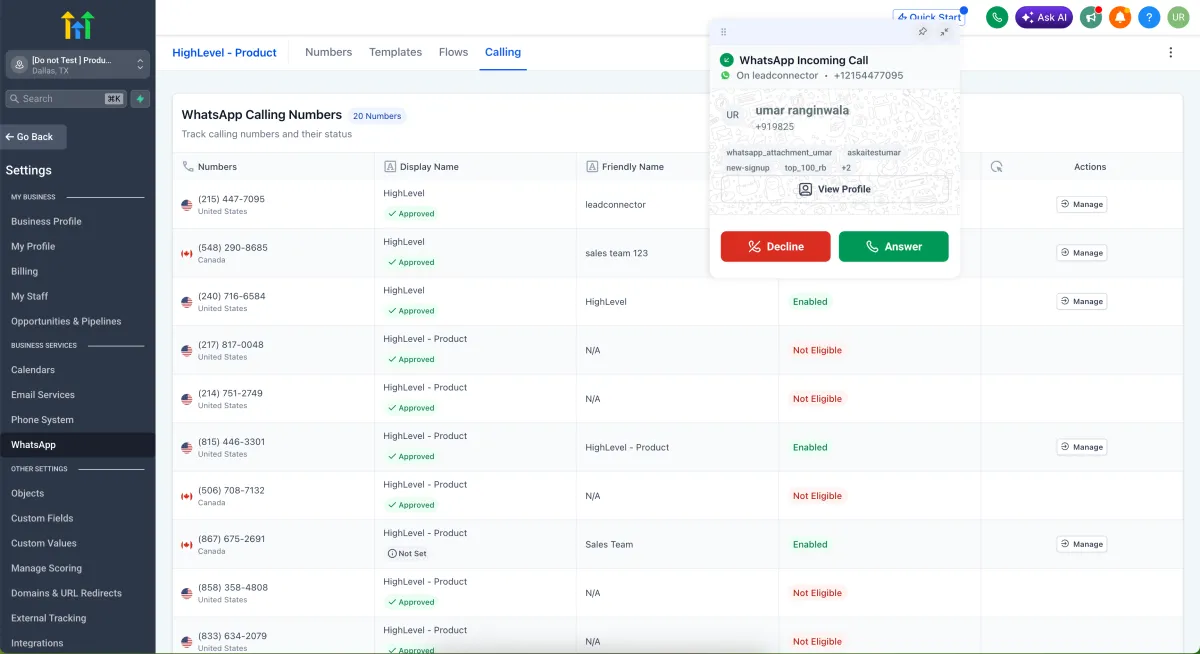
Voice calling works inside WhatsApp conversations on both web and mobile, out of beta and generally available. The call happens in the same thread with no external dialler and no number sharing, including one-click escalation from chat to voice. For a business whose customers screen unknown mobile numbers, that is the difference between a call answered and a call ignored.

Controls cover business calling hours, a temporarily unavailable mode for breaks and holidays, and call permission requests sent by template message. On mobile there is multi-account inbound calling, one-tap calling and full call logging. Up to ten call dispositions can be configured, with defaults including No Answer, Voicemail and Follow Up, and a disposition can trigger a workflow as well as feeding the call reporting dashboard.
Set it up on web under Settings, WhatsApp, Calling: pick a number, set a friendly name, configure up to six ring recipients and enable Allow Voice Calls. Mobile needs version 4.18 or later. The requirements are worth checking before you plan around it. You need a connected number at the 2,000-tier messaging limit or above, not on coexistence. Outbound calls need permission, cap at five connected calls per 24 hours, and are unavailable in the USA, Canada, Turkey, Egypt, Vietnam and Nigeria. Australia is not on that list.
The use that justifies it is the high-intent enquiry where one call settles what would take twenty messages.
Running a campaign on WhatsApp
Campaign sending here can be driven by instruction rather than by builder. Ask AI has full control of the channel, so a line like “create a template offering a spring staging discount and send it to everyone tagged past-client” builds the template, resolves the audience, personalises each message, dispatches the campaign and reports back on delivery and read status. It handles the channel-specific requirements unprompted, checking the 24-hour messaging window, do-not-disturb status and phone validity, and falling back to approved templates where required.
Where volume matters, the drip action paces the send. Its configuration shows a live schedule preview of when each of the next ten batches is due to go out, and an inline warning appears before you publish if your workflow time window would shift any of them, for example because you send weekdays 8am to 7pm only.

Automatic replies, with and without AI
The missed call that answers itself
When your business misses a phone call, Clientflow can send the caller a WhatsApp message automatically, with no workflow to build. Switch it on under Settings, then Phone System, then Voice, then Missed Call Text Back. It ships with a pre-approved template: “Hi, this is [business name], I saw that we just missed your call. How can I help?” Customise it with variables including agent name, booking link and business hours, and it runs alongside any missed-call workflows you have.
Rental bookings have their own set. Every rental event, unconfirmed, booked, cancelled, rescheduled, reminder and follow-up, can send a WhatsApp message, with recipients selectable per event so the contact and the business each get a different template. Templates come from your approved list, and a test message can go out before saving. Under Calendar Settings, Rentals, Global settings, Notifications.
A bot assigned to the WhatsApp channel
The requirement for a primary Conversation AI bot is gone. Any bot can be assigned directly to specific channels, covering SMS, email, Facebook, Instagram, WhatsApp, live chat and web chat, and respond independently on each. Routing works by channel, by account or number, and by contact tags, with more specific assignments taking priority. So the bot answering your website chat can behave differently from the one answering WhatsApp, rather than one bot covering everything with a compromise prompt. This is a Labs feature, with no public API support for channel assignment yet.
That bot does real work on the channel. It books directly into the Services calendar from a WhatsApp thread, checking availability and confirming without a manual step, in the same way the AI receptionist handles the phone. It detects the language of an inbound message and replies in kind, and it reads images customers send, several in one exchange, which is enabled through Labs. Autopilot also runs in the mobile app across WhatsApp, Facebook and Instagram DMs, with pause and resume from any conversation screen, in public beta on v3.96.5 and above.

An AI agent called partway through a workflow reads the contact’s whole history across SMS, email, WhatsApp, Instagram, Facebook Messenger and other channels, up to 50 messages per thread, with an AI summary of each. It references what was said days ago on another channel rather than asking again.

What WhatsApp costs on Clientflow
WhatsApp is part of the platform rather than an add-on with its own subscription. Clientflow is AUD $345 per month including GST, flat, with unlimited users and contacts, or $3,450 per year, twelve months for the price of ten. Everything above is included, and the pricing page covers the rest.
The usage cost is US$0.111 per message, billed in US dollars. Anyone who has looked at WhatsApp already knows a per-message cost exists, so here is what it means: a campaign to 500 past clients is roughly US$55, and a reminder sequence sending two messages to 80 bookings a month is about US$18. Email is 2,000 per month included then US$1.10 per 1,000, Conversation AI is US$0.03 per message, and SMS and calls go to Twilio at carrier cost with no markup.
The comparison worth making is with the scattered stack. A five-user Australian services business running a CRM plus an email tool plus a scheduler plus a separate WhatsApp platform is looking at roughly $2,300 to $2,600 a month on our estimate, so one platform is where the arithmetic changes. White-glove onboarding covers data migration, five hours of one-to-one setup and fortnightly live group training, and expert implementation runs at $25 per hour in blocks, against the $150 to $300 an hour Australian consultants typically charge.
What this looks like in practice
Priya runs a seven-person property staging business in Adelaide. She hires out furniture packages by the fortnight, and most enquiries come from agents between inspections who will not answer an unfamiliar number.
She connects two WhatsApp numbers, one for enquiries and one for logistics, so a delivery question never lands in a quoting thread. Her staging packages sit in Rentals, and the six booking events each send a WhatsApp notification from an approved template: one wording to the agent, another to her warehouse.
An agent messages the enquiries number at 4.50pm on a Thursday asking whether a three-bedroom package is free the following week. The Conversation AI bot assigned to the WhatsApp channel checks availability and offers two start dates. The agent sends three photos of the living room, the bot reads them, answers a question about sofa dimensions and books the walkthrough into the Services calendar.
Priya picks the thread up next morning with photos, dimensions and a booked time in it. She escalates to a voice call from inside the same thread, three minutes, and tags the disposition Follow Up, which starts the quote workflow.
Six weeks later she asks Ask AI to build a template offering returning agents a discount and send it to everyone tagged past-client. It writes the template, resolves the audience, checks do-not-disturb status and phone validity, and reports read rates. Two hundred and forty messages, about US$27.
Frequently asked questions
Do I need a developer to use the WhatsApp Business API?
No. Meta’s documentation is written for developers building an integration, but Clientflow provides the connection, the template builder, campaign sending and automation as part of the platform. You connect your number, get your templates approved by Meta, and work from the Conversations inbox and the workflow builder. No code, nothing to host.
How much does a WhatsApp message cost?
WhatsApp messages are billed at US$0.111 each, on top of the flat AUD $345 per month including GST that covers the platform. There is no per-contact pricing, so the cost scales with what you send rather than how many people you store. A campaign to 500 contacts is roughly US$55.
Do WhatsApp message templates need to be approved?
Yes. Any message that opens a conversation, rather than replying inside the 24-hour window after a customer messages you, has to run on a template Meta has reviewed. Clientflow includes a builder and pulls your approved list into workflows, rental notifications and campaigns. Some features, including the missed-call reply, ship with a pre-approved template.
Can I make phone calls through WhatsApp?
Yes. WhatsApp calling is generally available on web and mobile, and the call happens inside the same conversation thread with no external dialler and no number sharing. You can escalate from chat to voice in one click, set business calling hours and name up to six ring recipients. It requires a number at the 2,000-tier messaging limit or above, and outbound calls need permission and cap at five connected calls per 24 hours.
Can I use more than one WhatsApp number?
Yes. Several numbers can be connected in one account, with conversations and campaigns routed to the appropriate one. A business running a sales line and a service line keeps those threads separate, and automations can target the right contacts through the right number. Each number’s messaging limit and quality rating shows on the phone numbers settings page.
Can AI answer WhatsApp messages automatically?
Yes. A Conversation AI bot can be assigned to the WhatsApp channel specifically, so it answers differently there than on website chat. It replies in the language of the inbound message, reads images customers send, and books appointments into the Services calendar without a manual step. Autopilot also runs in the mobile app, in public beta. Conversation AI costs US$0.03 per message.
Already a Clientflow client? If you want any of this set up in your account, or want to know whether it suits how you work, get in touch with your usual contact on the Clientflow team.
Not yet a client? Book a call with the team, or see the full feature set on the platform capabilities page.
Clientflow is built on the HighLevel platform, delivered with Australian onboarding, support and expert implementation. Read how that works on our GoHighLevel Australia page.


