
Home → The event CRM for seminar and event businesses
The event CRM for seminar and event businesses
Sell the tickets, fill the room, check people in and follow up, all from one system.
You run events as a business: seminars, workshops, conferences, training days, and the webinars that fill them. Clientflow puts your ticketing, event pages, check-in, webinars, email, SMS and follow-up in one place, with every attendee already in your CRM.
Other CRMs send you to a separate ticketing platform. Here, tickets, attendees and follow-up live in one system.
No booking fees. Clientflow adds nothing to your ticket sales.
WebinarBoss included. A complete, converting live webinar funnel in about five minutes.
Set up for you by an Australian team, with your data migrated.
Built by the team behind Universal Stars: 1,208 live events in seven countries, 110 speakers and more than 500,000 attendees.
Who this is for
Clientflow's events & webinars features are built for businesses who rely on events, with a team running them:
Seminar and training companies running a calendar of events in multiple cities
Speaker promoters and event producers filling rooms for one or more presenters
Conference and workshop organisers who sell tickets, run sessions and sell from the stage
Education and coaching businesses that use live events and webinars to enrol clients
If you run one event a year, a free ticketing platform will do the job. Clientflow is for the business that runs an event or webinar most months and needs every registration, attendance and sale to feed the next one.
The problem with the usual events stack
Most event businesses run on five or six tools that don’t talk to each other. A ticketing platform holds the registrations. An email tool sends the reminders. Zoom runs the webinars. A page builder hosts the landing pages. A spreadsheet tracks who turned up. The CRM, if there is one, finds out about all of it last.
That costs you in three places:
Your attendee data lives on someone else’s platform. Every export, import and CSV is a chance to lose a name, duplicate a contact or miss a follow-up.
Follow-up starts late. By the time the attendee list reaches your email system, the energy from the event is gone.
You can’t see the whole journey. Which ad produced the registration, whether they turned up, whether they bought, and what they bought next, sit in different systems.
One system, from first click to repeat customer
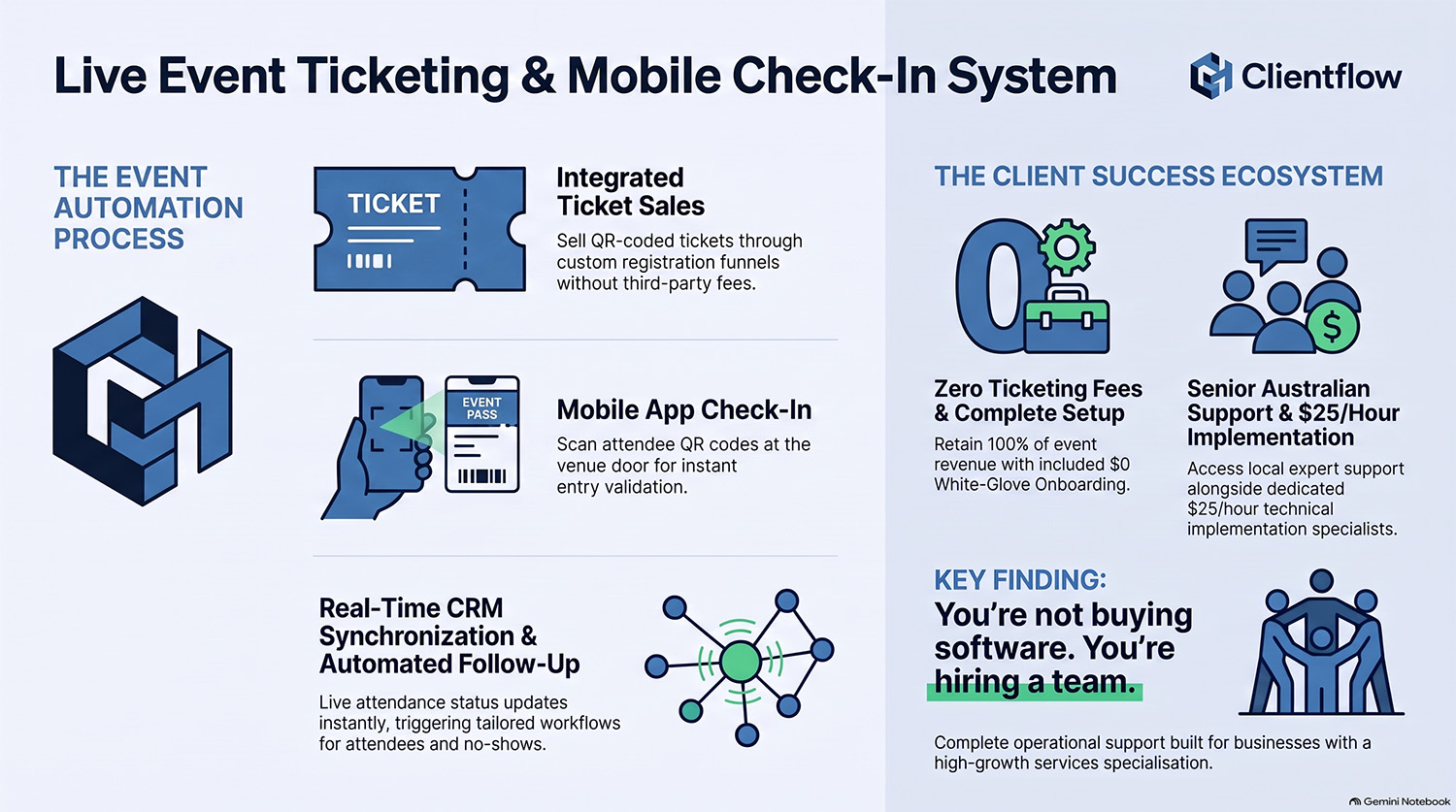
Events and ticketing
Free, paid and RSVP events, in person, online or hybrid
Multiple ticket types per event, each with its own price, quantity limit and sales window
No per-ticket booking fees. Clientflow adds no fees at all to your ticket sales. You pay standard card processing and keep the rest.
Coupon codes with usage limits for early-bird, partner and VIP offers
Branded event pages with your agenda, sessions and speaker profiles, styled to match your brand and embeddable on your website or funnels
Custom registration fields, so you collect what you need at checkout
Per-event time zones for events across states and countries
Registration and revenue reporting for every event
Check-in at the door
QR-code tickets issued automatically the moment someone registers
Mobile check-in: scan attendees in from your phone at the door
Attendance recorded against the contact, so you know exactly who turned up
Automation that runs itself
Registration triggers start your confirmation, reminder and pre-event sequences instantly
Check-in triggers start different follow-up for people who attended and people who didn’t
Branching by event, ticket type and attendance, so VIPs, general admission and no-shows each get the right message
Every attendee is already in your CRM
There is no export and no import. The moment someone registers, they are a contact in your CRM with their event, ticket type and attendance attached, ready for email, SMS, pipeline stages and offers.
WebinarBoss: your next webinar, live in five minutes
Most event businesses use webinars to sell events, and events to sell programs. WebinarBoss is the part of Clientflow that makes running those webinars fast, reliable and profitable. Nothing else on the market does it this way, and it is included in your subscription.
Why webinars take so long to set up by hand
Setting up a webinar by hand is detailed, fiddly work with a lot of room for error. The date, time, title and join link have to be entered in several places across several tools: the Zoom webinar, the registration page, the thank-you page, the confirmation email, every reminder email and SMS, the calendar invitation, the replay email and the follow-up sequence.
Miss one, and things go wrong:
Registrants get confused when the registration page, the confirmation email and the reminder show different dates or times, and some of them don’t turn up.
International registrants miss the start when they have to convert the time zone themselves.
The automation itself fails when one step still carries last month’s date: reminders fire on the wrong day, or not at all, and the join link points at the wrong session.
The mistake usually shows up after the webinar, as a disappointing attendance number.
Making live webinars easy
WebinarBoss was built with a single goal - make it super easy for Clientflow clients to set up and launch a live webinar:
Without needing a web designer to build registration & thank-you pages
Without needing a technical consultant to build automations
Without a lot of fiddly, detailed work
In minutes, not hours
Without any need to add conversion optimisations by hand
How WebinarBoss does it instead
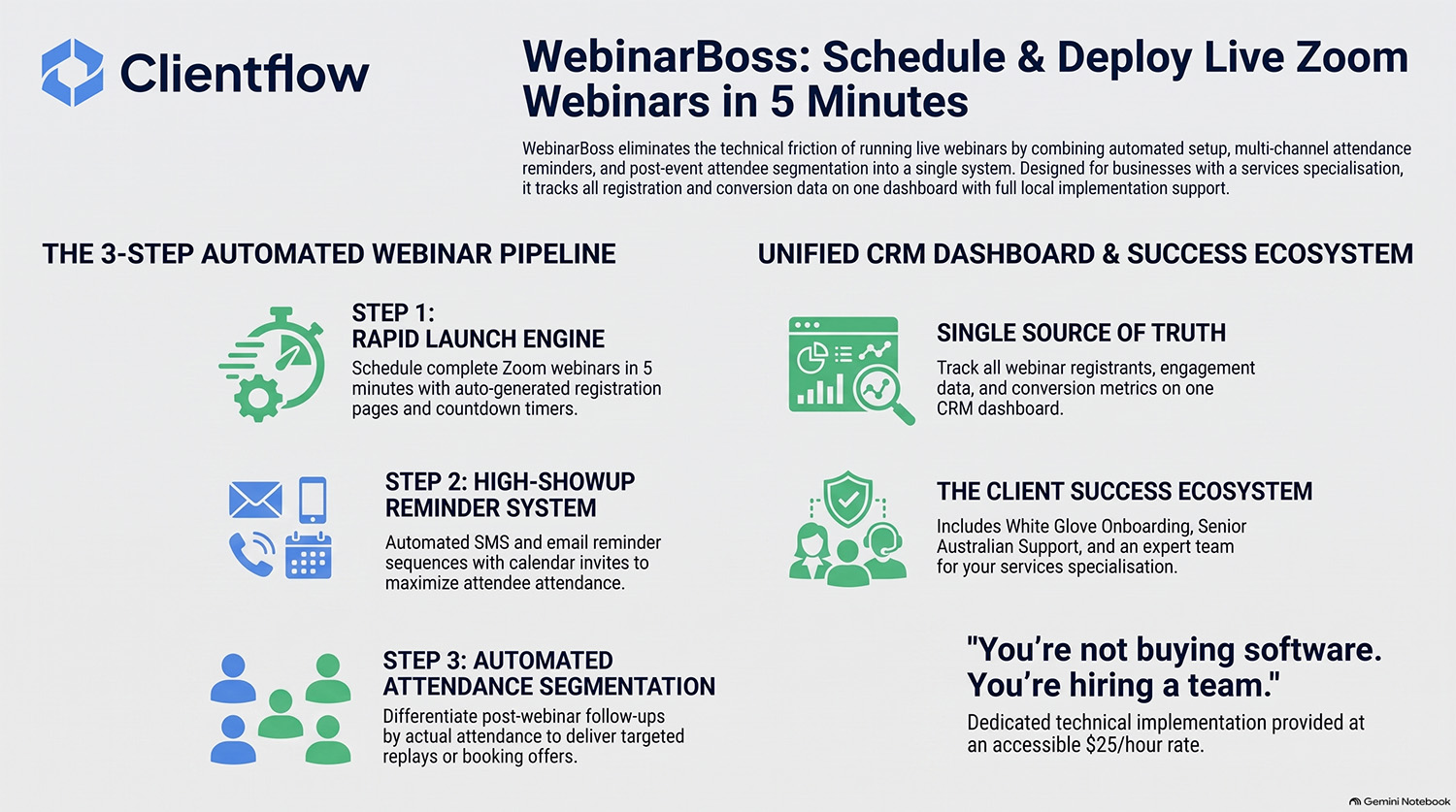
You fill in one simple form with your title, date, time, presenter details and sales copy. In about five minutes WebinarBoss builds the whole live Zoom webinar funnel from those details. Everything is entered once, so every page, message and reminder shows the same date, time and link.
A registration page built to convert
One or two presenters, each with a speaker bio
Optional testimonials with the person’s name, title, photo and quote
A countdown timer to build urgency
The start date and time shown in each visitor’s own time zone, on the registration page and the thank-you page, so international registrants see exactly when to join without doing the maths
Reminders that get people there
Confirmation and reminder messages by email and SMS: 5 days, 3 days, 24 hours, 1 hour, 30 minutes
Add-to-calendar links, so the webinar goes straight into their diary
A “we’re live” message at start time, with the link to join
Every message is pre-written, with the correct links, dates, times and other details already in place
Tech-free invitations for your list
Pre-written webinar invitation email & SMS templates with the correct links, dates & times for your webinar already in place; just add your promotional copy and send
Follow-up that matches what each person did
Separate follow-up for attendees and no-shows, based on attendance and action
The optimisations are built in
A custom-built webinar funnel usually leaves out many of the details above. They take time to build, they add to the consultant’s bill, and many builders don’t know which ones matter. WebinarBoss includes every one of them in every webinar, with no extra effort from you.
You don’t need a technical consultant to build the automations or a web designer to build the pages, and a non-technical team member can run the whole thing.
| Setting up a webinar | By hand | With WebinarBoss |
|---|---|---|
| Time to set up | Hours, often spread over days | About five minutes |
| Where the date and time are entered | Several places across several tools | Once |
| Chance of mismatched dates, times or links | High | None, one set of details drives everything |
| Visitor’s local time zone on the registration and thank-you pages | Rarely built | Included |
| Email and SMS confirmations and reminders | Built and scheduled one by one | Included |
| Add-to-calendar links and a “we’re live” message | Often skipped | Included |
| Follow-up by attendance | Custom build | Included |
| Who can run it | A technical consultant and a web designer | Anyone on your team |
Built by someone who learnt the hard way. Ken set up more than 150 webinars by hand before building WebinarBoss, and every mistake on that list is one he made or watched happen.
Run up to six webinars at once
WebinarBoss enables you to schedule three (3) Zoom webinars and three (3) Zoom meetings - six webinars in total, all taking registrations at the same time. As soon as one webinar ends, you can use the slot to schedule another one at a future date.
Note: meetings can be run with just a Zoom Pro or Zoom Business license. Running webinars requires a Zoom Webinar license as well, at an additional cost.
Fill the right room: automatic lead geolocation
Touring seminar businesses know this one. You promote the Brisbane event, and your Sydney and Melbourne subscribers get the invitation too. Some ignore it, some unsubscribe.
Clientflow detects a contact’s city, state and country automatically when they fill in a form, with no address field needed. Invite people to the event near them, and leave everyone else alone. Ken built this after doing exactly that to his own database.
Built by people who ran events for twenty years
Clientflow’s founder, Ken Wood, spent two decades with his wife Karen building Universal Stars, one of Australia’s leading seminar promotion companies:
1,208 live events across seven countries
110 speakers promoted
More than 500,000 attendees
Listed on the Business Review Weekly Fast 100 three years running
Ken is also co-founder of The Speakers Alchemy Network and co-author of the international best-seller Guest Speaker Success.
That history is why the events side of Clientflow works the way it does. Ticketing, check-in, WebinarBoss and geolocation all came from problems Ken and Karen hit running their own seminar business. When you book a demo, you talk to Ken directly: someone who has sold the tickets, filled the rooms and chased the follow-up himself.
Set up for you, supported in Australia
White-glove onboarding included. We migrate your contacts and attendee lists, rebuild your forms and email templates, and give you five hours of one-on-one training. Most clients are fully operational within two to four weeks. What’s included →
Australian support from the same team that set up your account.
Custom builds at $25 an hour + GST from our expert implementation team, for anything specific to your events. Meet the team →
One flat price: $345 a month including GST, with unlimited users. Add your whole events team, your speakers’ assistants and your contractors at no extra cost.
The same system also runs the rest of your business: email and SMS marketing, sales pipelines, funnels and websites, online courses and memberships, invoicing, reviews and reporting. See the full platform →
Frequently Asked Questions
What is an event CRM?
An event CRM combines event registration and ticketing with customer relationship management, so every registrant becomes a contact with their event history attached. Clientflow adds check-in, webinars, email, SMS and automation in the same system, so you can promote, run and follow up on events without moving data between tools.
Are there booking fees on tickets?
No. Clientflow adds no fees at all to your ticket sales. You pay your payment provider’s standard card processing, and the rest of the ticket price is yours.
Can I sell paid tickets and run free events?
Yes. You can run paid ticketed events, free ticketed events and RSVP events, each with multiple ticket types, quantity limits, sales windows and coupon codes.
How does check-in work?
Every registrant receives a QR-code ticket automatically. On the day, your team scans attendees in with a mobile phone, and attendance is recorded against each contact so your follow-up knows who was there.
How long does it take to set up a webinar with WebinarBoss?
About five minutes. You fill in one form with the title, date, time, presenter details and sales copy, and WebinarBoss builds the Zoom webinar, the registration and thank-you pages, the email and SMS confirmations and reminders, and the follow-up.
Do I need a Zoom Webinar license to use WebinarBoss?
WebinarBoss supports both Zoom Meetings and Zoom Webinars. If you're getting started with webinars, you can run them as Zoom meetings to avoid the extra cost of a Zoom Webinar license. All you need is a Zoom Pro license, for around $25 per month, to host meetings with up to 100 attendees.
As your attendee numbers increase, you will likely want the extra capacity and audience management features that a Zoom Webinar provides, and you can purchase the license then.
Do I need to be technical to run webinars?
No. WebinarBoss was built so a non-technical team member can set up and run a webinar without a technical consultant or a web designer.
Does WebinarBoss work for international audiences?
Yes. The registration and thank-you pages show the start date and time in each visitor’s own time zone, so registrants in other countries see exactly when to join.
Can you move our attendee lists across from our current platform?
Yes. White-glove onboarding includes migrating your contacts, including attendee lists exported from your current ticketing or email platforms, at no extra cost.
Is Clientflow right for a one-off event?
Probably not. If you run a single event, a free ticketing platform is the simpler choice. Clientflow is built for businesses that run events regularly and want every event to build the database, the pipeline and the next event.
What does it cost?
$345 a month including GST, with unlimited users, onboarding and WebinarBoss included, and no fees on your ticket sales.
Are event ticketing and WebinarBoss extra cost features?
Both WebinarBoss and live event ticketing are included with your regular Clientflow subscription of $345 per month. There is no additional cost.
Talk to someone who has run 1,208 live events
Book a demo with Ken. He’ll show you how an event runs end to end in Clientflow, from the first ad to the webinar to the post-event offer, and tell you plainly whether it suits your business.
Social


© Copyright 2026, Clientflow. All rights reserved.