

On this page
Missed call text back sends an automatic message to every caller you do not answer. Clientflow has it built in: switch it on under Settings, Phone System, Voice, Missed Call Text Back, and a pre-approved WhatsApp message goes out with no workflow to build. It runs alongside any missed-call automations you already have.
Work out what a missed call costs you. Take your average job value, say $450 for a pre-purchase inspection, and multiply it by the calls a week that ring out. Three a week is roughly $70,000 a year. Not every one of those callers would have booked, so halve it twice: it still beats your software bill.
Sixty-two per cent of enquiries go unanswered within five minutes. In property services the business that answers first usually gets the job, which is why Response sits second in the Core 5 Marketing Automations. A caller who hears nothing rings the next name on the list, and hardly anybody leaves a voicemail now.
Your phone rings while you are under a house or three suburbs away in traffic. Here is what the platform does about that.
The message that goes out when the call drops
When your business misses a phone call, Clientflow can send the caller a WhatsApp message automatically, with no workflow setup required. Switch it on under Settings, then Phone System, then Voice, then Missed Call Text Back. Because it is a platform setting rather than an automation you build, there is nothing to maintain.
It ships with a pre-approved template ready to use: “Hi, this is [business name], I saw that we just missed your call. How can I help?” You can customise it with variables including agent name, booking link and business hours.
The booking link is the variable worth adding first. A caller who gets a message carrying a live link can book themselves in while the phone is still in their hand, which removes the return call you would otherwise squeeze in between jobs. Business hours tells someone ringing at 7pm when a human will be available.
It runs alongside any missed-call workflows you already have, so an SMS follow-up you built earlier keeps running.
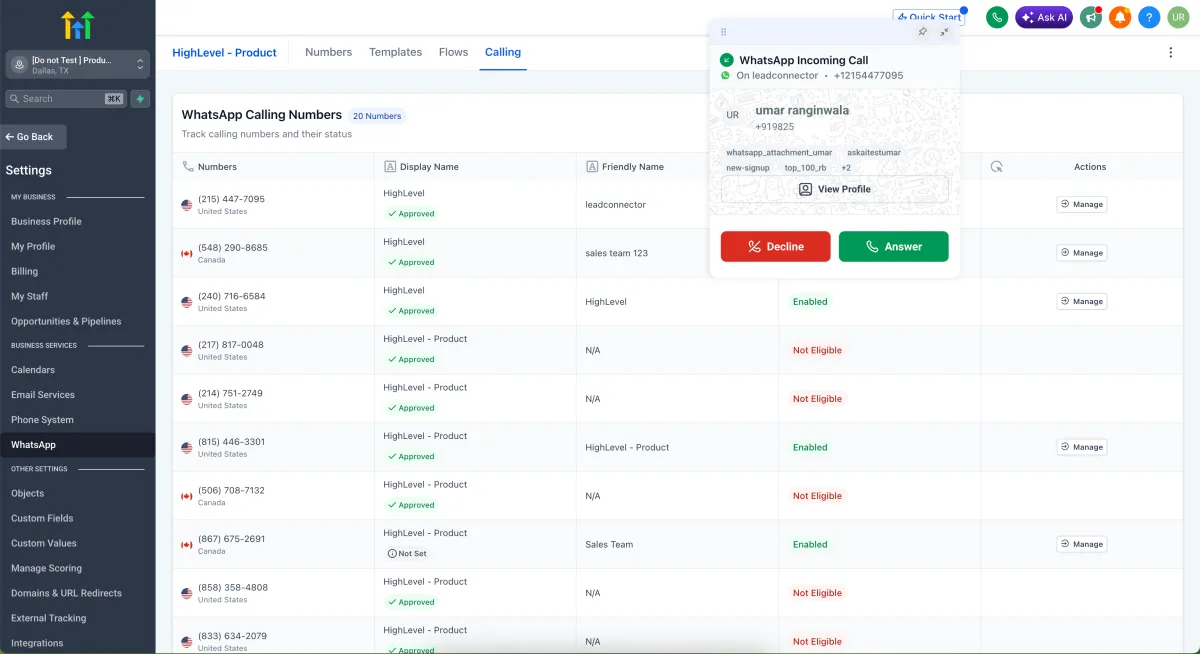
Because the reply lands in WhatsApp, it opens a thread you can call from. WhatsApp calling is generally available on web and mobile, so a chat becomes a voice call in the same conversation with no external dialler and no number shared either way. Set it up on web under Settings, WhatsApp, Calling, which needs a connected number at the 2,000-tier messaging limit or above and not on coexistence. Two limits matter before you lean on it for callbacks: an outbound call needs the caller’s permission, and outbound calling caps at five connected calls per 24 hours. There is more on the channel in the WhatsApp business CRM deep dive.
Stopping the call from being missed in the first place
An automatic reply is the safety net. Better still is the call reaching someone who can answer it.
A user can receive inbound calls only during their working hours, with calls outside those hours routing to the number’s backup destination. Switch on “Only ring during working hours” in your profile and pick a schedule; holidays take date-specific overrides. It sits under Settings, My Profile, in the inbound call routing card, and admins manage it for staff.
Behaviour differs by call type: direct calls skip users outside their hours, ring-all skips only the teammates who are off, and call menu and IVR skip off-hours users while everyone else keeps ringing. It is off by default, and two limits are worth knowing: transferred calls are not yet supported, and there are no per-user backup options.
When a call reaches the wrong person it can be moved. A live call can be transferred to a team member with no personal phone number configured, by routing it to whatever devices they do have, so the web app, a mobile and a SIP desk phone all ring at once. Warm and blind transfers both work, and nobody hands out a personal mobile number.
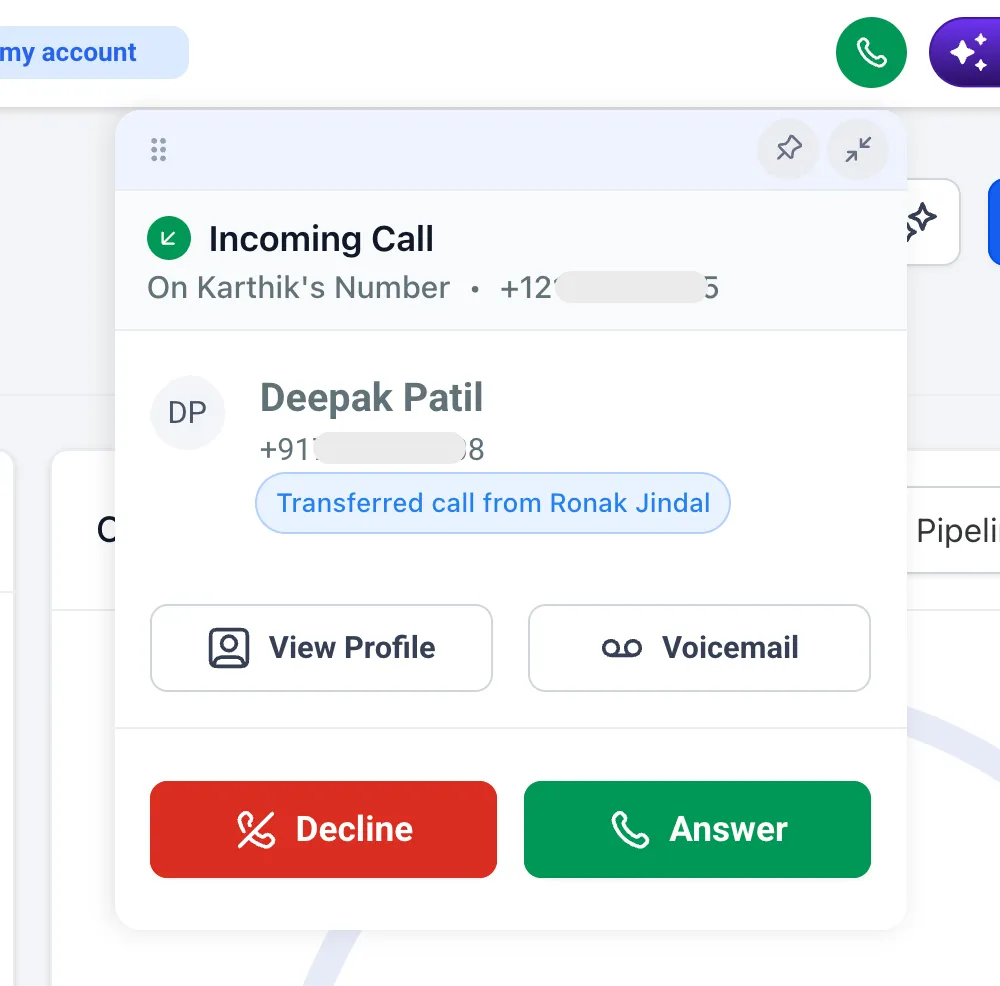
This one runs through Labs. Mobile app support is coming, re-transferring an already-transferred call is not supported, and staff without configured devices do not appear in the transfer list. On deskphones, a call that arrived through an IVR can be handed on by dialling a teammate’s extension mid-call, so dialling 3001 rings whoever holds that extension.
Then there are the calls you would never otherwise see. Incoming calls from withheld numbers are captured once you turn on Allow Private Calls, under Phone System, Voice, Other Settings, Inbound Calls. The contact saves as “Private caller from [country code] at [timestamp]” and is tagged “private phone number”, so the enquiry lands in the CRM.
When nobody can answer at all
Missed call text back deals with the caller after the fact. A Voice AI agent deals with the call itself.
The agent is built in a full-screen workspace holding the prompt editor, call settings, voice settings, knowledge bases, actions and a live test console. Custom Actions let it make POST webhook calls mid-conversation, passing details it picked up from the caller, so it can look something up mid-call.
What it gathers comes back to you. Summaries, transcripts and extracted data are passed downstream, and the Voice AI dashboard tracks calls completed, trends, duration, actions triggered and sentiment analysis, arriving as a weekly email digest. Recorded calls are transcribed automatically once you enable Call Transcription under Settings, Phone Numbers, Advanced Settings, Voice Calls, so nobody relistens to a long call to find one detail.
Voice AI is billed at US$0.032 per minute on top of the flat platform fee, plus the call itself at Twilio carrier cost. The AI receptionist deep dive covers how the agent is built.
Knowing the moment a human takes over
Automated follow-up that keeps messaging someone you have already spoken to undoes the good the first message did. Two triggers close that gap.
The User Replied trigger fires when a team member replies to a contact conversation. It works across channels, takes filters, and automates the internal steps that follow a reply: moving an opportunity stage, applying a tag, creating a task.

The Goal action accepts User Replied as a goal event, so a contact jumps straight to that step the moment your team engages, skipping messages still queued behind it. The Wait action takes the same condition with an optional timeout, pausing a workflow until someone responds and escalating if nobody does: alert a supervisor after 30 minutes, or raise an urgent task after 15.
From the caller’s side, the Customer Replied trigger handles the other half. Its message body filter covers contains, does not contain, exact match, empty and not empty in one place, and a Has Attachments filter checks whether a message carries a file.
Finding out whether the response was actually fast
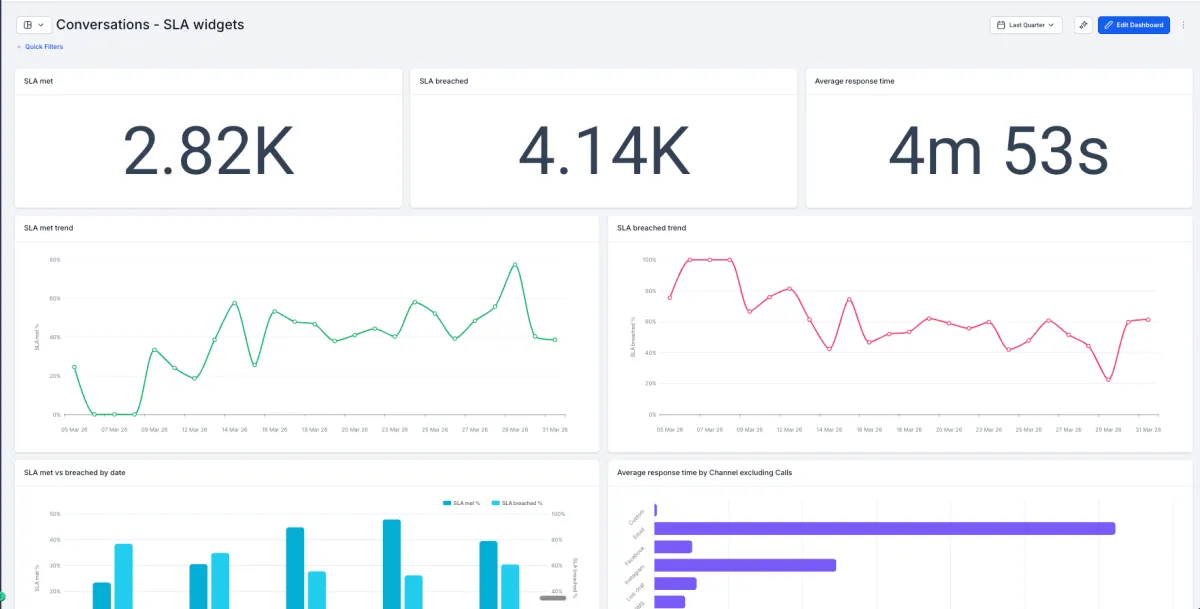
A workflow can run when a conversation SLA becomes due soon, becomes overdue or is manually dismissed, so a slow reply escalates itself rather than being noticed by chance. Four SLA widgets then sit in the dashboard widget panel: SLA met trend, SLA breached trend, average response time trend, and SLA performance across users and channels, each filtered by assigned user and by channel.
What it costs to run
Clientflow is AUD $345 per month including GST, flat, with unlimited users and contacts, or $3,450 for the year, twelve months for the price of ten. Missed call text back, working-hours routing, private call capture, the SLA triggers and the dashboards are all included at that price.
What you pay on top is usage. WhatsApp messages are US$0.111 each, so a hundred missed-call replies in a month costs a little over eleven US dollars. Voice AI is US$0.032 per minute. SMS and calls go directly to Twilio at carrier cost with no markup, which for an inbound call on an Australian local number is about a cent a minute.
Set that against the stack it replaces. A phone system, a missed-call texting tool, a CRM, a booking tool and a reporting layer for a five-user Australian services business runs to roughly $2,300 to $2,600 per month on our estimate. The pricing page has the breakdown, and the consolidation argument is set out separately. Against competitor prices quoted ex GST, use $313.64 rather than $345.
What this looks like in practice
Nadia runs a building inspection business on the Central Coast with two inspectors and a part-time office manager. Inspections take two hours and phones stay in the car, so the middle of every weekday is a blackout for the phones.
She turns on Missed Call Text Back and adds two variables: the booking link and business hours. A vendor rings at 10:40 on a Tuesday while she is in a roof space. The call rings out, and he gets a WhatsApp message naming the business and carrying a link to Wednesday’s remaining slots. He books the 2pm himself and never rings anyone else.
Working-hours routing goes on for the office manager, who finishes at 1pm, so afternoon calls stop ringing a phone nobody is holding. Private call capture goes on too, because roughly one enquiry a fortnight comes from a withheld number. Then one workflow: a missed call starts a two-step SMS follow-up with a Goal action set on User Replied, so those messages stop the moment anyone answers the thread.
Frequently asked questions
What is missed call text back?
Missed call text back is an automatic message sent to a caller whose call your business did not answer. In Clientflow it is a built-in setting rather than an automation you build. Turn it on under Settings, Phone System, Voice, Missed Call Text Back, and every unanswered call gets a pre-approved WhatsApp message.
Can I change what the missed call message says?
Yes. The template that ships with it reads “Hi, this is [business name], I saw that we just missed your call. How can I help?” You can customise the wording and add variables including agent name, booking link and business hours. Add the booking link first, because it lets the caller book themselves in.
Does it send an SMS as well as a WhatsApp message?
The built-in Missed Call Text Back setting sends a WhatsApp message using a pre-approved template. It runs alongside any missed-call workflows you already have, so an SMS follow-up built as a workflow keeps working and the two operate together. Ask your Clientflow contact which suits your callers.
What does missed call text back cost?
The feature is included in the flat AUD $345 per month including GST, with unlimited users and contacts. You pay only for the messages: WhatsApp costs US$0.111 each, so a hundred missed-call replies in a month is a little over eleven US dollars.
Will the automation keep texting someone after I have called them back?
Not if you build it with the User Replied trigger. Adding User Replied as a Goal event makes a contact jump straight to that step the moment a team member engages, skipping any queued messages. The Wait action takes the same condition with a timeout, so a workflow pauses until someone replies.
Already a Clientflow client? If you want any of this set up in your account, or want to know whether it suits how you work, get in touch with your usual contact on the Clientflow team.
Not yet a client? Book a call with the team, or see the full feature set on the platform capabilities page.
Clientflow is built on the HighLevel platform, delivered with Australian onboarding, support and expert implementation. Read how that works on our GoHighLevel Australia page.


