
Clientflow Platform Updates: 27 April - 10 May 2026
Twenty-eight features across the fortnight, with the AI builders getting most of the attention. The workflow AI builder has been rebuilt from scratch and now shows you what it is doing while it does it, AI Studio gains direct visual editing that costs no tokens at all, and blog posts can finally be recovered after an accidental delete. Here is everything from 27 April to 10 May 2026.
AI
Workflow AI Builder Rebuilt
The workflow AI builder has been replaced rather than patched. The visible change is a live streaming interface: every build, edit or query shows a step-by-step progress card as it happens, covering clarifying questions, the search for actions and triggers, building the schema, placing nodes on the canvas and validating the result. You watch the workflow being assembled instead of waiting for something to appear.

Compound requests now work in a single turn, so “rename this, add a 24-hour wait and disable re-entry” gets executed as one instruction rather than three. The builder holds full session context, which means a follow-up like “make that 48 hours instead” lands correctly without you restating what you meant. The sidebar adapts its suggestions to whether the canvas is empty or already has a workflow on it, sessions survive closing and reopening the sidebar, and Learn Mode now streams its answers with follow-up suggestions. More detail
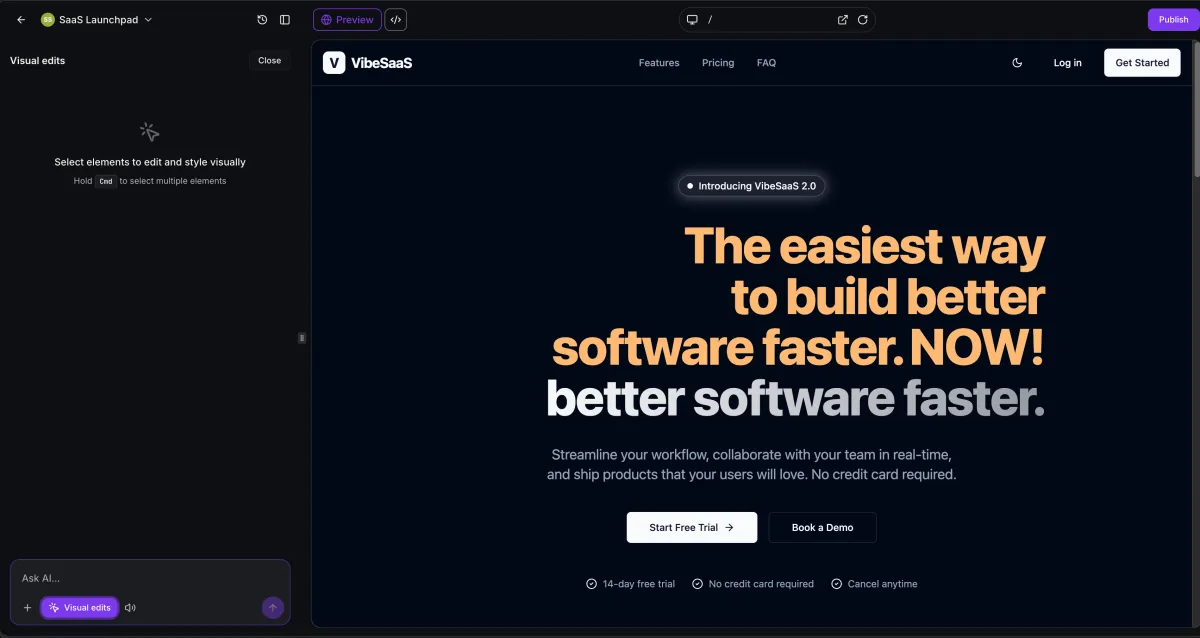
Visual Edits in AI Studio
Refining an AI-generated site used to mean describing the change in words and waiting for the AI to regenerate a section. You can now click any element in the live preview and edit it directly through a context-sensitive panel: typography, spacing, colours, borders, shadows, corner radius and opacity for most elements, inline text editing for text, URL and target for links, source and alt text for images, and a searchable library of more than 1,600 icons.

The part that matters most is that none of this consumes AI tokens. Colour swaps, spacing adjustments, text edits and icon changes apply instantly with no model call. The AI is invoked only when you deliberately send it a prompt. Multi-select is supported too, so you can pick several elements and apply one instruction across all of them. Changes preview live and can be saved or discarded. More detail
AI Agent: Call Transcript Access
The AI Agent workflow action can now read a contact’s call transcripts, with no configuration required. Reference them in the agent prompt, along the lines of “review this contact’s call transcripts and summarise their main concerns”, and the agent retrieves the relevant call data itself. Combined with the conversation history access added in April, an agent now draws on both written conversations and phone calls when it decides what to say. For any business where the phone is the main channel, this opens up follow-up messages that actually reference what was discussed on the call. The same release adds a structured feedback flow in execution logs, so you can flag what an agent got wrong or right directly from the log. More detail

Mistral AI: Workflow Actions
Three new premium workflow actions running on Mistral models, connected with your own API key from Settings then Integrations. Create Chat Completion sends a prompt and returns generated text as a workflow variable, ready to populate an email body, update a custom field or feed a conditional. Create Embeddings turns text into a vector, which enables semantic search and FAQ matching inside an automation rather than keyword matching. Analyse Image sends an image URL and a prompt to a vision model and returns a structured answer, which covers reading receipts, identity documents, business cards or damage photos without a separate OCR tool. Mistral’s multilingual coverage runs to more than 40 languages. Currently in beta. More detail
Conversation AI: Separate Sleep Controls for Manual and Workflow Messages
One setting used to govern whether the AI bot goes to sleep, and it applied to every outgoing message. It has been split in two: one control for manual messages and one for workflow messages. So an automated follow-up SMS can leave the bot awake while a personal reply from you puts it to sleep, or the reverse if that suits how you work. Existing configurations are unchanged unless you go and update them. More detail
Ask AI: Memory, Voice Input and a Refreshed Interface
Three changes to Ask AI landed together. Memory means the assistant now carries context between conversations rather than starting fresh each time, so it holds details about your account, past interactions and how you prefer things done. Voice mode lets you speak a query instead of typing it, which suits working through tasks with your hands busy. And the interface itself has been reworked with clearer input areas and better visual hierarchy. More detail
Automation
Email Verification Action in Workflows
A workflow step that checks an email address and returns valid, risky or invalid, exposed as a workflow variable so you can branch on it. Place it immediately before any sending action and invalid addresses never receive mail. This matters more than it sounds: hard bounces from invalid addresses damage sender reputation, and that damage affects delivery for everything else sent from your domain. List hygiene that previously meant a third-party cleaning service now sits inside the automation. The action must be enabled on the account before it appears, and verification charges may apply depending on your plan. More detail
Add Notes Action: Titles and Colours
Notes created by a workflow were plain text, which made them indistinguishable from each other in a contact’s notes list. The Add to Notes action now takes an optional title and colour, matching what has been available when adding a note by hand. Colour coding lets you separate sales activity from support interactions from automated qualification notes at a glance. Both fields are optional and existing workflows keep working untouched. More detail
Add Notes Action for Custom Objects
The Add Note action now works in custom object workflows, not only contact workflows, so a note can be written directly onto a custom object record as part of an automated sequence. If you have built custom objects for properties, jobs, vehicles or projects, a workflow can now record a milestone against the record itself rather than against a contact loosely related to it. Note titles and colours are coming to this action in a later release. More detail
Marketing Audit Reports: Report Link as a Custom Value
The Generate Marketing Audit Report workflow action now exposes two custom values after it runs: the prospect’s web report link and their business name. Both can be referenced in later steps, so the follow-up email or SMS can carry a direct link to the report without anyone retrieving and pasting the URL by hand. More detail
CRM and calendars
Calendar Settings Redesign
Calendar settings have been reorganised into five sections: Basic Details, Staff and Location, Availability, Booking Rules, and Advanced Settings, with Advanced Settings broken down further into form and confirmation, payments, notifications and policies, widget appearance, external sync and booking channels. Each section holds only related settings, which cuts down the scrolling and hunting that calendar setup used to involve. Helper text now sits inline explaining what each setting does, and the panel spans a wider portion of the screen so less stacks vertically. Found under Calendars, Calendar Settings, Meetings, Edit Calendar, and applied to every calendar type. More detail

Assigned User Details on Booking Confirmations
Custom values referencing the assigned user now populate correctly in two places they previously did not: the next funnel step after a calendar booking, and the Thank You message on the calendar confirmation page. That fixes the confirmation page reading “Your meeting is booked with” followed by nothing. It matters most on round robin calendars, where the booking could be with any one of your team, and the confirmation can now name the person, show their photo and give their contact details. More detail
Marketing
Delete and Restore Blog Posts
Deleting a blog post used to be permanent and immediate. Deleted posts now move to a Deleted state, hidden from the main list but fully recoverable for 30 days. A Deleted filter shows them, one click restores a post with its original content and status intact, and bulk restore handles a batch deleted by mistake. Permanent deletion is still available when you actually want it. An accidental deletion that used to mean a support ticket and often permanent loss is now a ten-second fix. More detail

Bluesky Comment Management in Social Planner
Bluesky comments now appear in Social Planner’s Comments tab alongside your other platforms, so you can read and reply without opening the Bluesky app. Replies support emoji and threaded conversations up to three levels deep, and comments sync every six hours for your recent posts. The limits are worth knowing: replies are text and emoji only with no media, profile tagging is not supported, and the sync covers your last 15 posts. Found under Marketing, Social Planner, Comments. More detail
Social Planner: Custom Video Thumbnails in Bulk Uploads
Bulk CSV and XLSX uploads now accept a thumbnailUrl column, which applies the specified image as the thumbnail for the first video in each post during upload. That moves thumbnail selection into the scheduling step instead of leaving it as a post-by-post job afterwards. The sample templates already include the column. The thumbnail applies to the first video in a post only, and behaviour varies a little between platforms. More detail
Social Planner: Approvals on Mobile
The content approval flow now works in the mobile app. A team member can submit a post for review and an approver can accept or reject it from their phone, with the same structured review process as on desktop. If posts sit waiting because the person who signs them off is rarely at a desk, this is the fix. More detail
Sales Pages for Communities and Courses
Communities and courses in the creator marketplace now get their own standalone sales page, with descriptions, outcomes and a one-click join or enrol action. The discovery flow runs from browsing through to the sales page and enrolment without losing your place. Top, Popular and Featured sections surface high-performing products using engagement metrics, creators get a profile page showing their full portfolio, and browsing by category covers themes such as Marketing, Wellness and Technology. A new Kollab Studio dashboard puts control of every product in one place, where you can preview sales pages, publish or unpublish a community, and manage course visibility. More detail
Communication
Meeting Room Mode: Host Controls and Rejoin
Following the Live Rooms we covered in the 6-12 April roundup, community events now offer a dedicated Meeting Room mode. Where broadcast mode runs one speaker to many, Meeting Room is many-to-many: every participant can share audio, video and their screen, which suits team calls, client workshops and collaborative sessions. Hosts can mute and unmute attendees, grant or revoke microphone, video and screen-sharing permissions, remove participants and switch layouts. Anyone who drops out or closes the tab by accident can rejoin without disrupting the session. More detail
Chat Widget Registration: Compliance Check Before Submission
A missing chat widget on the website has been one of the most common causes of chat widget messaging campaign rejections, and a rejection means investigating, fixing and resubmitting. The compliance review now scans the website you enter during registration to confirm the widget script is present and live. If it is not detected, the submission is blocked and you get a step-by-step prompt inside the compliance review: copy the script, paste it into your site, run the check again. Submission only opens once the check passes. More detail
Conversations: Message Source for Marketplace Apps
Messages arriving through a third-party conversation provider now show which app delivered them in the message detail view. If some of your conversations come through a connected app rather than a native channel, you can now see which at a glance. More detail
Reporting
Dashboards on the Mobile App
The mobile Insights module has been replaced with the full Dashboards experience. Every dashboard you have built on the web is now on your phone, not a cut-down version: pipeline, deals, conversions, campaigns and team activity. You can switch between dashboards, apply date filters, expand a widget for detail and scrub a line chart with your finger to read exact values. Each widget carries an AI Insights button that summarises what the data is showing in plain English. Data is real-time, with no drift between mobile and web. This first phase is view-only, so dashboards still need to be built and edited on the web, and campaign data has moved to its own Campaigns module on mobile. More detail

Websites and funnels
Schema Markup: Seven New Types
Manual schema creation now supports 19 parent-level types, up from 12. The additions are Offer, Review, Aggregate Rating, Recipe, ImageObject, Service and Course. Between them they cover a much wider range of businesses: Service for service-based businesses, Review and Aggregate Rating for anyone whose reputation does the selling, Offer for product pages, Course for training providers. Add them through Add Schema Markup on a website or funnel page, using either the guided form or the raw JSON-LD editor, then validate and save. Existing schema is unaffected, and the AI-assisted flow still covers every Schema.org type. More detail

Custom Product Detail Pages Inherit the Default Design
Creating a custom product detail page used to hand you a blank page and leave you to rebuild the layout. It now opens with the default product page’s design already applied: section structure, store elements, styling, fonts, colours and desktop and mobile visibility rules. The inheritance is a one-time copy, so later changes to the default page do not propagate into custom pages already created. One custom page can be assigned to several products. More detail
Store Elements Move Up the Builder Panel
Store elements such as Featured Products, Cart and Collection now appear at the top of the Add Elements panel when the account has a store set up, and between the Blog and Media sections when it does not. Nothing about the elements has changed, they are just where you would look for them. More detail
Certificates, badges and media
Badges in the Certificate Builder
Badges are a new format inside the Certificate Builder, built from scratch or from a template, with control over backgrounds, icons, borders, text effects and the rest, plus an element library of shapes, icons and graphics. Finished badges export as PNG or share straight to social media. The same release adds undo and redo with keyboard shortcuts to the certificate editor, which makes experimenting with a design considerably less risky, along with location-level and user-level permissions on the certificates module. More detail
Badges in the Client Portal
Badges now have their own tab in the Client Portal, alongside certificates, where members can see everything they have earned, download them as image files and share them. Previously they were difficult to find. Together with the badge builder above, that completes the path from creating a badge through to a member showing it off. More detail
Media Storage: A Canva Connection per User
The Canva integration in Media Storage, covered in the 2-15 March roundup, supported one connection per account, which meant the whole team worked through one person’s Canva. Each user can now authenticate with their own Canva credentials and reach their own designs and assets from inside Media Storage. More detail
Knowledge Base Tables: Export to CSV or Google Sheets
Tables inside Knowledge Base articles can now be downloaded as a CSV or sent straight to Google Sheets, which saves copying data out by hand when you want to review it offline, share it with someone outside the platform or run some analysis on it.
That is the fortnight. Missed the last one? Catch up on the 18-26 April updates.
Already a Clientflow client? If you want to know more about any of these features, or would like them deployed in your account, get in touch with your usual contact on the Clientflow team.
Not yet a client? Book a call with the team, or see the full feature set on the platform capabilities page.
Clientflow is built on the HighLevel platform, delivered with Australian onboarding, support and expert implementation. Read how that works on our GoHighLevel Australia page.


