
Clientflow Platform Updates: 6-12 April 2026
Nineteen new features in the second week of April, and the headline is a change in kind rather than degree. Workflows can now call an AI agent that reasons its way through a task instead of following branches you mapped by hand. The drip action has been rebuilt with a schedule preview and proper pause behaviour, and contact records can now be laid out differently for different people on your team. Here is everything from 6 to 12 April 2026.
AI
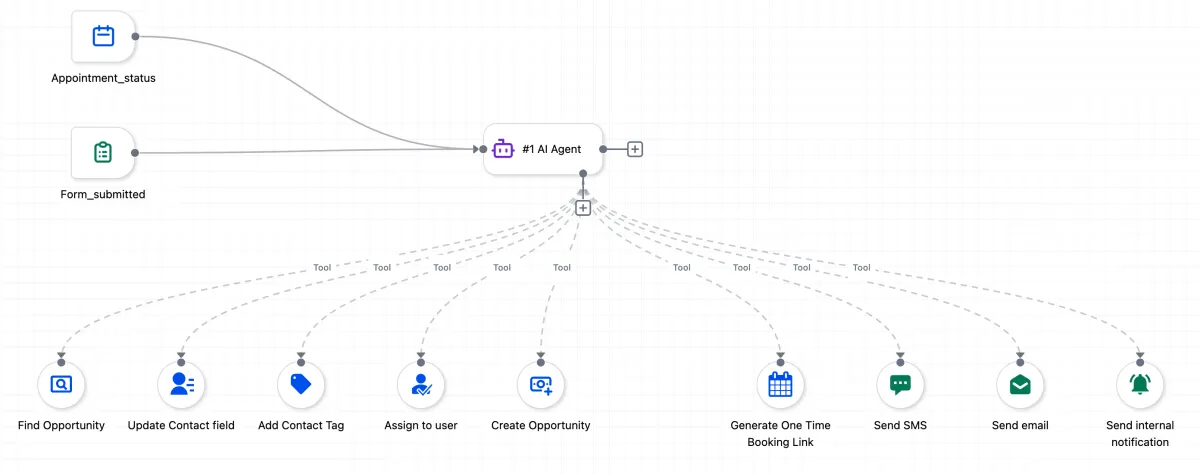
AI Agent Action in Workflows
This is a departure from how automation has worked until now. Instead of defining every branch and condition yourself, you write a plain-language instruction describing the outcome you want, for example “qualify this lead and book an appointment if they are a good fit”, and the agent handles the reasoning, the data lookups and the execution. It has full awareness of your CRM data, including contacts, pipelines, calendars and custom fields, so it can make contextual decisions without you mapping every variable. Templates cover lead follow-up, no-show recovery, Facebook lead nurturing and deal re-engagement. Every run produces a detailed execution log showing what the agent decided and why, which matters when you are deciding how much to trust it. More detail

Voice AI: Full-Screen Agent Builder
The Voice AI agent builder has been rebuilt as a full-screen, three-panel workspace in the same style as the workflow and email builders. Prompt editor, call settings, voice settings, knowledge bases, actions and a live test console all sit on one screen, so you can edit a prompt, change a setting and place a real test call without moving between tabs and losing your place. The 50-plus configuration options are grouped into collapsible sections. If you have been building an AI receptionist, the setup work now happens in one place. More detail
AI Review Summaries
Reputation Management now produces an AI summary across all your reviews, surfacing recurring themes, common praise and frequent complaints instead of leaving you to read every review to work out the pattern. The summary updates as new reviews arrive. If you are sitting on hundreds of Google reviews, this is the difference between knowing your star rating and knowing what people actually keep saying about you. More detail
Ask AI on Mobile
Ask AI is now in the mobile app. From your phone you can add leads to sequences, book appointments, pull transaction records and update pipeline stages through a conversational interface rather than navigating menus. It also handles content and image generation, so you can draft a post and produce the visual for it on the go. It can answer platform questions directly as well. Currently available to admin users. More detail
AI Studio: Clone Projects
AI Studio projects can now be cloned rather than rebuilt. You can clone within your own account or across accounts, and place the copy at the root level or inside any existing folder. It is on by default for anyone with AI Studio access. Once you have a project configured the way you want it, that configuration becomes reusable. More detail
AI Studio: Code Editor
For the technically inclined, AI Studio now includes a proper code editor built on CodeMirror. It handles TypeScript, JSX, CSS and JSON, with tabbed files, keyboard shortcuts, search with case-sensitive and whole-word options, project-wide search with highlighted matches and line numbers, and AI-assisted error fixing where you click “Try to fix” and the AI resolves the error. Changes save and go live in seconds with no separate deployment step, and every edit is kept so you can preview or roll back. More detail
Automation
Drip Action: Major Upgrades
Anyone who has set up a drip sequence and then wondered exactly when each batch would actually send will find something here. The drip action now shows a live schedule preview inside its configuration, listing when each of the next ten batches is due to go out. If your workflow time window would shift any of those batches, for example because you send weekdays 8am to 7pm only, an inline warning tells you before you publish rather than after.

The statistics view has been rebuilt as a dashboard showing contacts currently in the drip, the next batch, and the full schedule. If you change batch size on a published workflow that already has contacts queued, a note explains that queued contacts keep the old batch size while new arrivals use the new one.
The most important change is a reliability fix. Moving a workflow from Published to Draft with contacts waiting in the drip used to mean those contacts burst out all at once on republishing. They are now paused and resume from where they left off, which preserves your pacing and protects your sender reputation. More detail
Add Task Action: Flexible Due Dates and Rich Text
The Add Task action now sets due dates in days, weeks, months or years, with a specific time of day, and shows a live preview of the date the workflow will actually calculate. An Exclude Weekends option skips Saturday and Sunday when counting forward, so a three-day follow-up on a Thursday lands on Tuesday rather than Sunday. Task descriptions now keep rich text formatting, so bullet points and bold text survive into the task list. More detail
Smarter Field Pickers in Workflows
The field picker in the Custom Value Picker and If/Else actions now returns fields stored inside folders and subfolders when you search. Previously you had to open each folder to find them, which penalised anyone who had bothered to organise their fields properly. Navigation through nested folders is smoother, long field names show a tooltip with the full name, and both actions now use the same dropdown pattern. More detail

Workflow AI Builder: Twice as Fast
Workflow generation times have dropped from around 60 seconds to under 28. Straightforward prompts can finish in 15 seconds, and template-based prompts that took up to 90 seconds now return in under 7. The gain comes from how workflows are assembled internally, so the output quality is unchanged. It arrives sooner, which makes trying a second and third version of an idea worth doing. More detail
CRM
Contact Page Customisation
Now in Labs, this lets you redesign the contact record for different people on your team. You can build up to five layout views per account and assign each to specific users or groups, so the sales side sees what matters for closing and the admin side sees what matters for billing. Layouts can run two or three panels, modules can be arranged as tabs or dropdowns and dragged into any order, and individual custom fields and folders can be shown or hidden per view. The single shared layout that everyone had to work around is no longer the only option. More detail

Custom Fields: UI Overhaul
The custom fields and folders management area has been rebuilt for readability, with cleaner grouping and hierarchy. Nothing about how existing fields or folders behave has changed. This is purely about navigating the structure, which matters most on accounts carrying a large number of fields across contacts, opportunities and companies. More detail
Marketing
Nested Folders for Campaigns, Templates and Sequences
Campaigns, templates and sequences now support subfolders within folders, so you can build a real hierarchy instead of a single flat level. A folder per campaign type with subfolders for message stages or content variations is now possible. The value of this compounds: a library of twenty templates does not need it, a library of two hundred does. More detail
Facebook Integration Enhancements
Two changes. You can now search and filter when selecting Facebook Pages and Ad Accounts, rather than scrolling a long list. And for Click-to-Messenger campaigns, the ad image now appears in the conversation thread, so you can see which ad started the conversation before you reply to it. More detail
Social Planner: Instagram Post Sync
Social Planner can now pull in your existing Instagram posts, not just the ones scheduled through the platform. The sync brings in the last 30 days automatically and refreshes post insights every 24 hours. If some of your Instagram activity happens directly on Instagram, your performance data no longer sits in two places. Currently in beta. More detail
Communication
Communities Events: Live Rooms
Community events can now host live video sessions natively, without a third-party tool. Zoom, Google Meet and custom links still work if you prefer them, but the built-in live room means attendees do not leave the platform or install anything. For group coaching calls, member Q&As and training sessions, the event and the discussion around it now live in the same space. More detail
Conversations: Notifications for Followers
Following a conversation you do not own used to mean checking it manually to find out whether the customer had replied. A new setting, “Notify for new messages on conversations where I am a follower”, closes that gap. In-app notifications are on by default, and each user can turn on email and SMS notifications to suit how they work. More detail
Ecommerce and courses
Packing Slip Enhancements
Packing slips now print order notes and SKU codes. Order notes mean special instructions or customer comments are visible to whoever packs the order, without cross-referencing the order record. SKUs are pulled automatically from each product’s setup and shown beside the product name, which speeds up picking when product names are similar. More detail
Import Content from Another Course
The Courses builder can now import content directly from a course you have already built, rather than recreating lessons and modules by hand. Useful when a core module belongs in both a beginner and an advanced course, when you are building a new course on the bones of an existing one, or when you are consolidating several courses into one. More detail
That is the week. Missed the last one? Catch up on the 30 March - 5 April updates.
Already a Clientflow client? If you want to know more about any of these features, or would like them deployed in your account, get in touch with your usual contact on the Clientflow team.
Not yet a client? Book a call with the team, or see the full feature set on the platform capabilities page.
Clientflow is built on the HighLevel platform, delivered with Australian onboarding, support and expert implementation. Read how that works on our GoHighLevel Australia page.


