
Clientflow Platform Updates: 18-26 April 2026
Thirty-nine features to close out April, and the AI agent work is where the attention should go. Agents inside workflows can now read a contact’s entire conversation history across every channel before they respond, and reach outside services through MCP. Voice AI can hand a live call from one agent to another. WhatsApp gains voice calling in the same thread as the chat, and stores can finally deliver digital products without making the customer log in. Here is everything from 18 to 26 April 2026.
AI
AI Agent: Full Conversation Context
An agent called partway through a workflow used to know only about the conversation it was handed. It can now read a contact’s complete history across SMS, email, WhatsApp, Instagram, Facebook Messenger, TikTok and other channels, up to 50 messages per thread, with an AI summary of each thread so long histories stay manageable. The practical effect is that the agent responds the way a colleague would after reading the file: it can reference something the contact said days ago on a different channel, and it stops asking people to repeat what they have already told you. On any sales or service cycle that runs across several touchpoints, this is the difference between an agent that sounds automated and one that does not. More detail

AI Agent: MCP Integrations
The AI Agent workflow action now supports Model Context Protocol, which lets an agent reach external servers and services in real time rather than working only from what is already in your CRM. You add a connection by supplying the server URL, choosing the transport type and authenticating with a bearer token, API key, OAuth2 or a custom header. Available tools on that server are discovered automatically and can be switched on or off per agent, so each agent gets only the capabilities you intend. Compatible servers include Exa for web search, Tavily for live page extraction and Browserbase for browser automation, along with custom and open-source servers. More detail
AI Agent: Lower Token Cost per Run
A set of optimisations has cut what it costs to run an AI agent, with no change to output quality. Duplicate and internal data is no longer sent to the model on every turn, tool responses are trimmed to the fields that matter rather than dozens of permission and metadata columns, long-running agents summarise older messages instead of resending the full history, and the final extraction step no longer duplicates context. Testing showed a 36 per cent reduction on the first model call and 20 per cent across a full execution. If you run agents at any volume, that comes straight off your running cost. More detail
Ask AI: WhatsApp Campaign Execution
Ask AI now has full control of the WhatsApp channel. A single instruction along the lines of “create a 20 per cent off template and send it to everyone tagged new-enquiry” will build the template, resolve the audience, personalise each message, dispatch the campaign and report back on delivery and read status. It handles the WhatsApp-specific requirements on its own, checking the 24-hour messaging window, do-not-disturb status and phone validity before sending, and falling back to approved templates where required. More detail
Voice AI: Agent Transfer
A live call can now be handed from one voice agent to another without the caller being disconnected or asked to ring a different number. It works on a root-and-destination model: the primary agent listens for natural-language conditions, a caller asking about pricing or switching language, and routes the conversation to the right specialist agent mid-call. Each root agent can connect to three destination agents, and you can configure a spoken handoff message so the caller knows what is happening. Summaries, transcripts and extracted data are merged across every agent involved, so whatever runs downstream still receives the whole conversation. Setup guide
Voice AI: Custom Action 2.0
Voice agents can now call external systems during a call rather than only after it. Custom Actions make POST webhook calls mid-conversation, passing parameters the agent has picked up from what the caller said, such as a name, an email address, an order number or a phone number. That covers live record lookups, checking the status of an order or an appointment, updating something in another system, or triggering an external automation, all while the caller is still on the line. Previously data could only be extracted once the call ended. More detail
Voice AI: 22 New Languages and a Voice Model Picker
Voice AI now covers more than 27 languages with regional accent variations, up by 22 in this release. A new voice model picker lets you choose which model powers an agent, so you can weigh voice quality against response latency and per-minute cost yourself. Leave it on Auto and the system picks the best compatible model for the agent’s language. More detail
Multilingual Support Across the AI Tools
Conversation AI can now detect the language of an inbound message and reply in that language, without separate bot configurations or manual routing. This sits inside a wider push that has extended multilingual support to the Location Dashboard, Memberships, Reputation Management and Voice AI. Relevant to any business serving customers who would rather not conduct their enquiry in English. More detail
Agent Studio: Required Field Validation
The Invoke Agent Studio Agent workflow action now validates that every required input variable the agent expects has actually been mapped. If something is missing, the action halts and surfaces an error in the workflow log rather than running on incomplete data. Misconfigured agent steps now announce themselves instead of failing quietly in production. Setup guide
Automation
Inbound Email Trigger for Workflows
Workflows can now fire the moment an email arrives in a connected mailbox, rather than waiting on the Customer Replied trigger. Filter by mailbox, sender, CC recipients, subject line, body content and whether attachments are present, which is enough to route incoming mail with real precision. It covers cold email from senders not yet in your CRM as well as replies from existing contacts, so it suits enquiry capture, support intake and document-triggered automations alike. Custom value fields make the sender name, subject, plain text body and full reply thread available downstream, so an AI reply or a notification can use the actual content of the email. Full cold inbound capture needs a dedicated email domain. It runs alongside the existing Customer Replied trigger without conflict. More detail
Apify Integration for Workflows
Web scraping now connects to workflows natively, with no webhooks or third-party connectors in between. Workflows can be triggered when an Apify actor or task run completes, and workflows can run Apify jobs directly through dedicated actions: Run An Actor, Run A Task, Scrape Single URL and Fetch Dataset Items. The obvious uses are scraping business listings and enrolling them into an outreach campaign, watching competitor sites for changes, and enriching a contact record from the lead’s own website. Connect it by authenticating with an API key in Settings, after which your actors and tasks appear in the builder. More detail

Workflow Builder: Drag-and-Drop Nodes
The standard builder now lets you drag nodes around the canvas. Hover over a node, grab the six-dot handle, and drop it where you want it, with a drop indicator showing valid positions. Repositioning a step previously meant right-clicking through menus, or deleting and re-adding it. When a workflow has grown past the point where its layout matches its logic, this is how you fix it. More detail
Custom Date Reminders for Opportunities, Custom Objects and Companies
The custom date reminder trigger used to work only on date fields on contact records, which forced workarounds for the cases people most often wanted: a renewal date, a contract end date, an expected close date. It now fires from opportunity date fields inside contact-based workflows, custom object date fields inside custom object workflows, and company date fields inside company-based workflows. A reminder a set number of days before an opportunity’s close date is now a two-minute build rather than a workaround. More detail
Email Attachments from the Media Library
The Send Email workflow action can now attach a file straight from the Media Library instead of requiring a fresh upload each time, with the option to upload from your device if the file is not there yet. For assets that go out repeatedly, a capability statement, a price list, an onboarding pack, this means one copy of the file feeding every workflow that sends it. More detail
CRM
Opportunity Smart Lists
Save a customised opportunity view, combining filters, sort order and visible fields, as a named list you can return to. Rather than reapplying the same filters every time you open Opportunities, you build the list once and switch to it in a click. Smart lists can be set as the default view for a specific pipeline, shared with team members at various permission levels, exported to CSV and duplicated to create variations. Works in both board and list views. Available through Labs. More detail

Custom Objects: Pre-Built Industry Templates
Custom objects now come with a template library, so a structured CRM for a particular kind of business can be applied in one flow rather than built object by object. Seven industries are covered, including Real Estate, Insurance, Automotive, Events and Home Services, and each template can be previewed before you apply it, showing exactly which objects, fields, associations and prerequisites will be created. For anyone who has looked at custom objects and put the job in the too-hard basket, this is a working starting point. Setup guide
Contacts: Activity Stream Redesign
The Activity section on a contact record has been rebuilt as a continuous stream, on both desktop and mobile. Each activity type carries its own icon, entries are grouped under date headings such as Today and Yesterday, and every card shows a title, timestamp, campaign or source label and a link through to the related record. Load times and scrolling have been improved on the back end. What was a flat list is now something you can scan before picking up the phone. Available through Labs. More detail
Contacts: Smart List Management Redesign
The Manage Smart List page has been moved onto the current design system, which was the last page in the Contacts module still running the old one. The module is now visually consistent throughout. Cleaner layout, clearer hierarchy and a more accessible share icon. Available through Labs ahead of a wider rollout. More detail
Smarter Contact Merge
Merging duplicate contacts used to risk losing documents attached to the record being merged away. Files now carry across to the primary contact automatically. If your contact records hold signed agreements, quotes or uploaded forms, cleaning up duplicates is no longer a job that needs checking afterwards. More detail
Communication
WhatsApp Calling
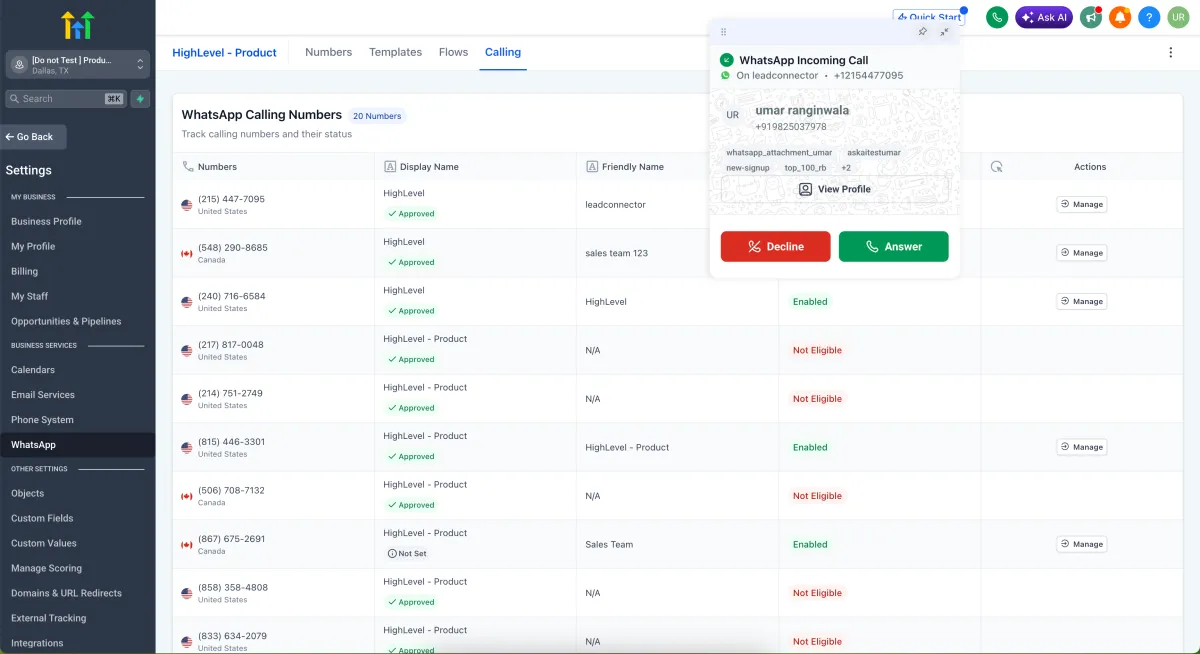
Voice calling now works inside WhatsApp conversations, so a chat can become a call in the same thread without an external dialler, a separate number or switching apps. Inbound and outbound calling are both supported, along with one-click escalation from chat to voice, callback requests for missed calls, and configurable available hours. Currently in closed beta, web only for now, and it requires a WhatsApp number at the 2,000-tier messaging limit or above. The obvious use is the high-intent enquiry where one short call settles what would otherwise take twenty messages. More detail

Communities: Newsletter Send Time Configuration
Community newsletters no longer all go out at one fixed default time. Daily newsletters can be set to a specific time and timezone, weekly and fortnightly ones to a particular day and time, and monthly ones to a specific date such as the first or last of the month. Timezone support means communities with members in different regions can be timed for local audiences. More detail
Conversations: Google Business Profile Page Names
Google Business Profile reviews and messages arriving in the Conversations inbox now show which profile page they came from. This is part of the wider multi-profile support that lets several Google Business Profile locations connect to one account and be managed from a single view. Contacts created from those interactions also record the source page name. Relevant to any business running more than one location listing. More detail
Marketing
Social Planner: Community Comment Management
Comments on your community posts now appear in Social Planner’s comment management section alongside comments from Facebook, Instagram, LinkedIn and TikTok. You can reply from there, mention community members in a reply, and everything syncs back in real time. One place to work through the day’s comments rather than several. More detail

Forms, Surveys and Quizzes: New Default Theme
The default theme for all three has been refreshed, with updated typography, spacing and rounded corners, and better styling on checkboxes, radio buttons, monetary fields, date pickers, signature fields and file uploads. File upload fields now state the supported file types and size limits up front, and payment components have improved styling and a clearer empty state. New forms look presentable without anyone styling them first, which matters because a scrappy form on a landing page costs you enquiries. More detail
Ad Manager: Public APIs
Ad Manager now has public APIs covering the full campaign lifecycle across Facebook, Google and LinkedIn: connecting ad accounts, setting targeting and budgets, publishing ads, and pulling cross-platform performance metrics including impressions, clicks, spend and conversions. This one is for developers rather than day-to-day users, but it means Ad Manager can feed a custom reporting dashboard or an automated campaign pipeline instead of being a destination you log into. More detail
Payments and ecommerce
Digital Product Delivery
Customers buying a digital product had to log in to the Customer Access Centre to collect it. Files under 20MB can now be delivered as an email attachment, larger files through a secure download button in the email, and either way the customer can also collect the file straight from the Thank You page after checkout with no login. External URLs can be sold as digital products with a configurable expiry. One toggle in Store Settings controls instant delivery. This removes the most common point at which a digital sale turns into a support email. More detail

Courses: Tax at Checkout
Course offers now calculate tax at checkout based on the learner’s billing address, showing a transparent breakdown before purchase rather than a surprise at the final step. Tax-inclusive and tax-exclusive pricing are both supported, and coupon codes still work, with tax applied after the discount. Setup involves adding nexus addresses and configuring tax rules and categories in Payments settings. More detail
Terms and Conditions Consent at Checkout
Store checkout pages can now carry a mandatory terms and conditions and privacy policy consent checkbox. It sits just before the payment button, is unchecked by default, and blocks checkout with an inline error if a customer tries to move past it. The label text and the links to your own documents are configurable, and it applies on desktop and mobile. Enabled from the checkout element settings. More detail
Locale-Based Currency Formatting
Prices can now display in the number format a visitor expects for their location and language, so $1,000.00 for one visitor and €1.000,00 for another, with the right separators and decimal conventions. It uses the page language setting alongside the visitor’s detected location, and applies across product listings, product detail pages, cart and checkout. Worth being clear about what it does not do: this is display formatting only and does not convert currencies at exchange rates. Enabled by a toggle in Store Settings. More detail
Printful: Automatic Shipping Profile and Live Rates
Connecting Printful to a store now creates a dedicated shipping profile automatically and assigns products to it, which is what makes live Printful shipping rates appear at checkout. That configuration step previously had to be done by hand before rates would show at all. The profile is system-generated, so it is best left alone. More detail
Affiliate Manager: Pay Per Sale
Pay Per Sale commissions previously tracked only when the purchase happened through a funnel or website. Forms, surveys and calendars now count as attribution sources, so if someone arrives on an affiliate link, submits a form, completes a survey or books an appointment, and then buys within the tracking window, the referring affiliate earns the commission. Commissions can be a flat amount or a percentage. It is mutually exclusive with Pay Per Lead to prevent double counting, and on calendars it applies only where payment is enabled. More detail
Websites and funnels
Schema Markup: Deletion Controls
Schema markup added to a page could not be cleanly removed, which was a problem if the wrong type went on or you wanted to start again. There are now three ways to delete it: a three-dot menu beside each entry in the form view, clearing the code in the JSON view, or asking the AI to remove it conversationally. Individual schemas or all schemas on a page can go at once, a confirmation prompt guards against accidents, and version history will recover a mistake. More detail

Safer Store Deletion
Deleting a store could take the whole website with it. Deletion is now scoped: it removes the store-specific pages, being Products List, Product Details, Cart, Checkout and Thank You, and leaves everything else, including your homepage, About page and blog, untouched. A confirmation step has been added, and the behaviour is the same whether you delete from the Stores list or from Store Settings. Deleting a website from the Websites section still removes everything, which keeps the two actions clearly separate. More detail
Courses and booking
Courses: Live Sessions
Courses can now host live classes natively, available through Labs. Schedule one-off sessions or recurring series on daily, weekly or custom patterns, with full timezone support so attendees see their own local time. The Go Live button appears 15 minutes before the session, learners get reminder and go-live notifications, and the recording is available afterwards to download or add back into the course as a standard lesson. Courses moves from a library of recorded content to a place where live and on-demand teaching sit together. More detail

Courses: Funnel Pages as Lessons
Funnel pages can now be embedded as lessons inside a course, which opens up gated resources behind an opt-in step, mid-course offers, and interactive pages as part of the learning path. This arrives alongside the rebuilt Courses builder in Labs, which brings a full-screen editing experience, drag-and-drop layout management, a three-step creation wizard and considerably faster load times. More detail
Courses: Video Player and Lesson Progression
The course video player now auto-plays when a lesson opens, shows an Up Next overlay with the next lesson’s thumbnail and a countdown before advancing, and offers a Play Now button to skip the wait. Lessons complete automatically once enough progress has been made, rather than waiting on the learner to mark them, and text lessons complete when the learner navigates away. Creators get settings to control auto-start, auto-play and auto-completion, and can apply them across every course at once. More detail
Rentals: Smarter End Date Selection
On the Rentals booking page, choosing a start date in a future month used to open the end date calendar back on the current month, forcing the customer to navigate forward again. The end date picker now opens on the same month as the start date. A small fix at a point in the flow where customers are deciding whether to commit. More detail
Reporting and admin
Audit Logs: Notification Preference Changes
Audit logs now capture changes to notification preferences, including who turned an email or SMS alert on or off for a team member and when. Notification settings were previously outside the audit trail, which made questions about who changed what difficult to answer.
Marketplace: Installed Apps Filtering
The installed apps page now lets you filter by status, so apps with updates available, connection issues or payment failures can be found directly rather than by checking each one. Fixes can be actioned from the same screen. If an integration has quietly stopped working, this is where you will now notice. More detail
That is the fortnight. Missed the last one? Catch up on the 13-17 April updates.
Already a Clientflow client? If you want to know more about any of these features, or would like them deployed in your account, get in touch with your usual contact on the Clientflow team.
Not yet a client? Book a call with the team, or see the full feature set on the platform capabilities page.
Clientflow is built on the HighLevel platform, delivered with Australian onboarding, support and expert implementation. Read how that works on our GoHighLevel Australia page.


