
Clientflow Platform Updates: 2-15 March 2026
A quieter fortnight than February, but with one standout for anyone who cares about search: a schema markup builder is now built into the page builder, no code required. Meta campaigns also gained proper ad set structure, and Conversation AI arrived on mobile. Here is everything from 2 to 15 March.
Websites and SEO
Build schema markup without touching code

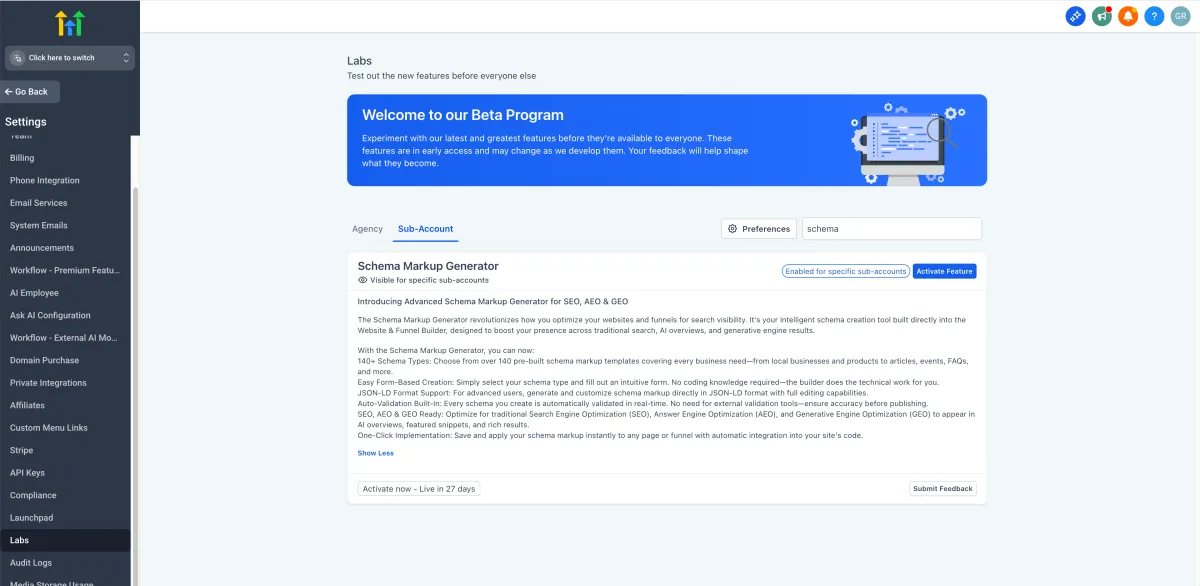
Structured data tells search engines what a page actually is, and it is now built into the website and funnel builder. More than 140 schema types are supported, including Local Business, Product, FAQ, Article and Event. Build it through a no-code form, or write JSON-LD directly in the code view, with validation against Schema.org and Google’s rich results guidelines when you save. Multiple schemas can sit on one page, and they go live when the page publishes. Enabled through Labs; ask us to switch it on. Note the SEO section has been renamed to “SEO & AI search optimisation”. More detail
A better blog importer

Migrating a blog in from another platform now follows a clearer Scan, Review, Map, Import sequence. You can add missing categories, authors and tags during the import rather than cancelling and starting again. Mapped posts import as published, unmapped ones as drafts, and both can run in the same pass. More detail
Audit logs for deleted builder assets
Deleting a saved section or element template now writes an audit log entry, covering section templates, global sections, universal sections and element templates across funnels, websites, stores and webinars. Each entry records the asset name and ID, who deleted it and when, and is filterable under Settings, then Audit Logs. Useful when a builder asset goes missing and nobody remembers why. More detail
Advertising
Multiple ad sets and ads per Meta campaign

Meta campaigns in Ad Manager now support up to 10 ad sets, each holding up to 10 ads, following the proper Campaign, Ad Set, Ad hierarchy. A default ad set and ad are created with each new campaign, and both can be added, duplicated or deleted from contextual menus. The review screen shows everything before you publish, and statistics now report at campaign, ad set and individual ad level. That makes audience and creative testing practical without leaving the platform. More detail
AI
Conversation AI on your phone

Conversation AI now runs in the mobile app, in both Autopilot and Suggestive modes. Autopilot replies automatically after a preset delay across WhatsApp, Facebook and Instagram DMs. Suggestive offers AI-drafted replies when you tap into the message box. You can pause, resume or schedule the bot’s reactivation from any conversation screen, which is handy for managing usage while away from a desk. In public beta, mobile app v3.96.5 and above. More detail
Control how long your AI replies are
Conversation AI bots now have a response style setting with three options: Concise (around 30 words), Balanced (around 80) and Detailed (up to 200). It applies at bot level in Autopilot mode. Treat it as a strong steer rather than a hard cap, and note that conflicting length instructions in a custom prompt will override it. More detail
The AI Agent action got cheaper to run
The AI Agent workflow action now uses noticeably fewer tokens per run with no drop in output quality: duplicate and internal data is stripped from each model call, tool responses return only relevant fields, and long-running agents summarise older steps to keep context small. Testing showed a 36 per cent reduction on the first model call and 20 per cent across a full execution. If you are billed per token, that is the same automation for less. More detail
Automation
Manus AI connects natively
Workflows now have native triggers and actions for Manus, the task-based AI system, with no third-party connector needed. Triggers fire when a Manus task is created or stopped; actions create, get, update, fetch, delete or continue a task with a follow-up prompt. Store the Task ID from a Create Task action in a custom field, since later operations need it. Manus actions bill as premium workflow steps, with AI usage billed separately by Manus. More detail
Trigger on All-in-One Chat replies specifically
The Customer Replied trigger now has a dedicated All-in-One Chat option in its reply channel dropdown, with further filters for chat type and the specific widget. Previously these replies could not be cleanly separated from other chat channels, which forced broader trigger conditions than you wanted. Existing chat widget triggers keep working unchanged. More detail
Calendars and bookings
Calendar settings, reorganised

Calendar settings have been restructured into clear sections: Basic Details, Staff and Location, Availability, Booking Rules and Advanced Settings. Each carries short helper text explaining what the option does, and the panel is wider so there is less scrolling. Find it under Calendars, then Calendar Settings, then Meetings, then Edit Calendar. More detail
Set availability for many dates at once
Date-specific hours for meetings and rentals can now be applied to several dates in one action. Pick all the dates, enter the start and end time, and it applies across them. Consecutive dates group into ranges for cleaner display while separate dates stay as their own blocks, and each group can be edited or removed afterwards. Anyone setting up holiday hours or a run of special availability will notice this immediately. More detail
Formatted service descriptions on booking pages
Service descriptions on Services v2 booking pages now use a rich text editor rather than plain text: bold, italics, lists, links, headings, colours and alignment. The formatting carries through to the customer-facing booking page, which makes a real difference when a service needs explaining rather than just naming. More detail
No more confusing calendar emails on Showed and No Show
Marking an appointment as Showed or No Show used to push update emails to attendees through connected Google, Outlook or iCloud calendars. Those statuses are internal tracking and mean nothing to the customer, so the emails were pure confusion. They no longer send, while internal reporting and automation continue as before. More detail
CRM
Export companies in bulk
Company records can now be exported to CSV from Contacts, then Companies, either as a selection via checkboxes or all at once from the three-dot menu. A progress modal shows record count and completion as it runs. More detail
Sort custom objects by any field
Custom object list views can now sort on custom fields rather than just created and updated dates. Click a column header to toggle direction, or use the Sort dropdown to sort by a field that is not currently shown as a column. Useful for prioritising by price, renewal date, status or whatever your object tracks. Dropdown (multiple), checkbox and textbox list fields cannot be sorted. More detail
Assign contract signatures to a specific staff member
Document and contract templates can now assign a signature field to any staff member, not just the sender or contact. The “to be signed by” property lists your full staff, so the right person signs on the business side without the old workaround of using the generic Sender role. More detail
Payments
Edit invoices in a new tab
Invoices and estimates can now be opened in their own browser tab from the three-dot menu on the list. Your filters, search and scroll position survive, which matters when you are working through a batch. More detail
Courses
Pull course media from your library
Course lessons can now import audio and video directly from Media Storage rather than re-uploading files you already have. Look for Import via Media Library in the lesson creator. Available through Labs; ask us to enable it. More detail
That is the fortnight. Missed the last one? Catch up on the 16 February - 1 March updates.
Already a Clientflow client? If you want to know more about any of these features, or would like them deployed in your account, get in touch with your usual contact on the Clientflow team.
Not yet a client? Book a call with the team, or see the full feature set on the platform capabilities page.
Clientflow is built on the HighLevel platform, delivered with Australian onboarding, support and expert implementation. Read how that works on our GoHighLevel Australia page.


