

On this page
The first week of this fortnight belonged to LevelUp 2026, and everything announced at the conference has its own post: Features Announced at LevelUp 2026. This roundup covers the twelve releases that followed. Ask AI is now one tap away on your phone, with a home screen widget, iPhone Action button shortcuts and a summary card on every contact. Quizzes can send people to different pages based on their score, AI chat agents move to a newer and more accurate model, and Field Services, the new module for businesses that work on site, has published its full feature list. Here is the rest of the fortnight, from 26 October to 8 November.
Ask AI on your phone
Ask AI is the assistant built into your account. These five releases bring it closer to hand in the mobile app. All of them need version 4.27.0 or later, and they appear only for users who have Ask AI access.
A new Ask AI chat from your home screen
New Ask AI Chat is now a shortcut in three places: long-press the mobile app's icon on your home screen, tap it on the Quick Actions card, or search for it. Each one opens a new, empty chat rather than dropping you back into your last conversation, so earlier topics do not mix into new answers. If Ask AI is already open, the shortcut switches to a fresh chat instead of stacking another screen on top. For a property services business owner standing on a job site, it removes the steps between a question, such as how to word a follow-up, and an answer. More detail
An Ask AI widget for your home screen
A new Ask AI widget puts a chat bar, a Voice button and a Camera button on your phone's home screen, on iPhone (iOS 16.6 or later) and Android. The chat bar opens a new chat with the keyboard ready, Voice opens a new chat in hands-free voice mode, and Camera takes a photo, attaches it to a new chat and waits for your question. The widget follows the app's language and brand colours in light and dark mode. To add it, long-press an empty spot on your home screen, tap + on iPhone or Widgets on Android, and search for the app. The widget is off by default and has to be switched on by the Clientflow team, so ask your usual contact if you would like it. For a tradie or property manager, a photo of a damaged fitting, a receipt or a supplier quote can go straight to Ask AI with a question about it. More detail
Ask AI on the iPhone Action button, Siri and Spotlight
Ask AI now has three iPhone shortcuts: New Chat, Dictation and Voice Mode. Put one on the Action button (iPhone 15 Pro or later) and a single press opens the app, even if it was closed, starts a fresh chat and, for Dictation and Voice Mode, turns on the microphone. To set it up, open iPhone Settings, then Action Button, swipe to Shortcut, tap Choose a Shortcut, then pick the app and the shortcut you want. Without an Action button, the same shortcuts work from Siri and Spotlight on iOS 16.6 or later, for example by asking Siri to start voice mode in the app. A voice or dictation session that is already running is never interrupted. For anyone driving between jobs, a note or a question can be spoken the moment it comes to mind. More detail
A summary card on every contact
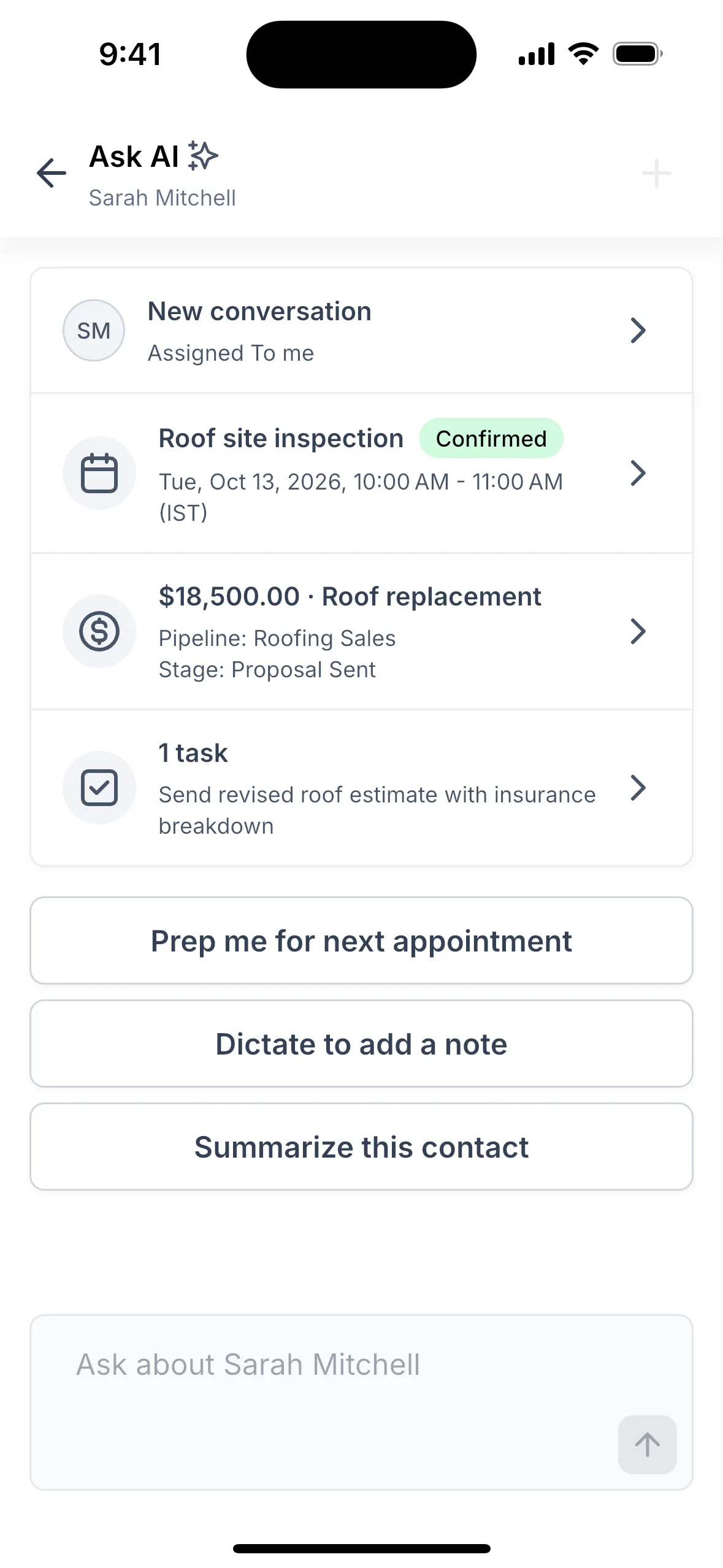
Tap the new Ask AI icon at the top of any contact in the mobile app and you get a summary card for that contact, built from your records rather than written by AI. It shows the last message and how long ago it was sent, the next appointment and its status, the biggest open deal with its pipeline stage and how many days since it last moved, and open tasks, with overdue ones flagged. Tap any row to open that record. Underneath are three buttons: one prepares you for the next appointment (shown when there is one in the next seven days), one summarises the contact and one lets you dictate a note. A dictated note comes back as a proposed note, plus a task if needed, and nothing is saved until you approve it. The card only shows what each user already has permission to see. For a property services business, the briefing before a site visit is one tap away, and notes from the visit can be spoken on the walk back to the car. More detail
Connect other apps to Ask AI from your phone
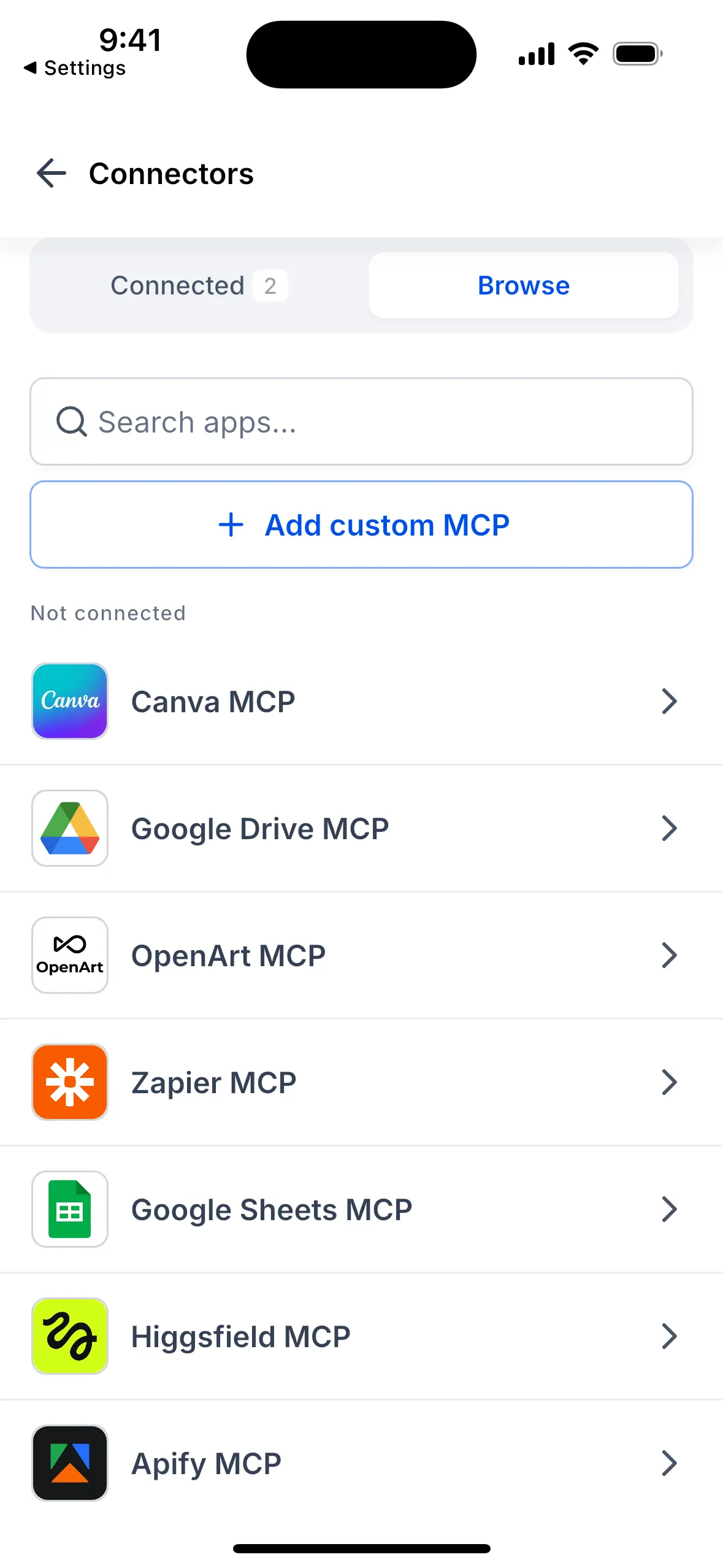
Connectors, which link Ask AI to the other apps your team uses, can now be set up in the mobile app as well as on the web. A Connected tab lists each connected app with its number of accounts and how many tools are switched on, and a Browse tab lets you search the catalogue and connect a new app, usually by signing in on that app's own page in a secure in-app browser. You choose exactly which tools Ask AI may use for each app, and you can add a custom MCP server by name and web address (MCP, or Model Context Protocol, is the standard way AI assistants talk to other apps). Apps connected on the web appear on mobile and the other way round, and the accounts you connect stay private to you. To find it, open Ask AI, tap the chat history icon at the top right, then open Connectors from the menu at the top right. Leaving the screen without tapping Save discards your changes, with no warning. For an owner who finds an expired connection while out of the office, it can now be fixed from the phone. More detail
Conversations and AI agents
GPT-6 Sol is now the recommended model for AI chat agents
GPT-6 Sol is now the recommended model for prompt-based Conversation AI agents, the AI agents that reply to leads by SMS, website chat and social messages. It sits first in the Model menu, tagged Recommended, and new prompt-based agents start on it by default, while existing agents keep the model you chose. In the platform's own testing it passed 98.4% of evaluation checks, against 96.3% for GPT-4.1, at about the same cost per reply, with a typical reply generated in 1.68 seconds. Agents that were on GPT-5 or GPT-5 Mini have already been moved across, since those models are deprecated, and now reply up to 4.5 times faster. GPT-4.1 is being retired, so any agent still using it should be switched: open the agent under AI Agents, then Conversation AI, choose GPT 6 Sol in the Model menu on the Build tab and save. Each model writes a little differently, so test the agent before relying on it. For a business using an AI agent to answer quote enquiries after hours, this is an accuracy upgrade at about the same running cost. More detail
Connect more than one Facebook account
The Facebook integration now accepts more than one Facebook account, each with several Pages, so you no longer have to disconnect one login to use another. Messages, lead sync and supported automations work across all the connected Pages, including Pages that belong to different Facebook accounts. The integration has also been rebuilt on the platform's app marketplace framework, which stores login tokens in a secure keychain, and existing Facebook connections are being moved across automatically, with no need to reconnect. It is a Labs feature for now: switch on "Facebook marketplace migration & multiple account support" in Labs, then go to Settings, Integrations, choose Facebook and connect the extra account. Facebook shops and ad accounts still support only one Facebook account. For a property services business running separate Pages for different brands or service areas, messages and leads from all of them now land in one place. More detail
Quizzes and communities
Quizzes can send people to different pages based on their score
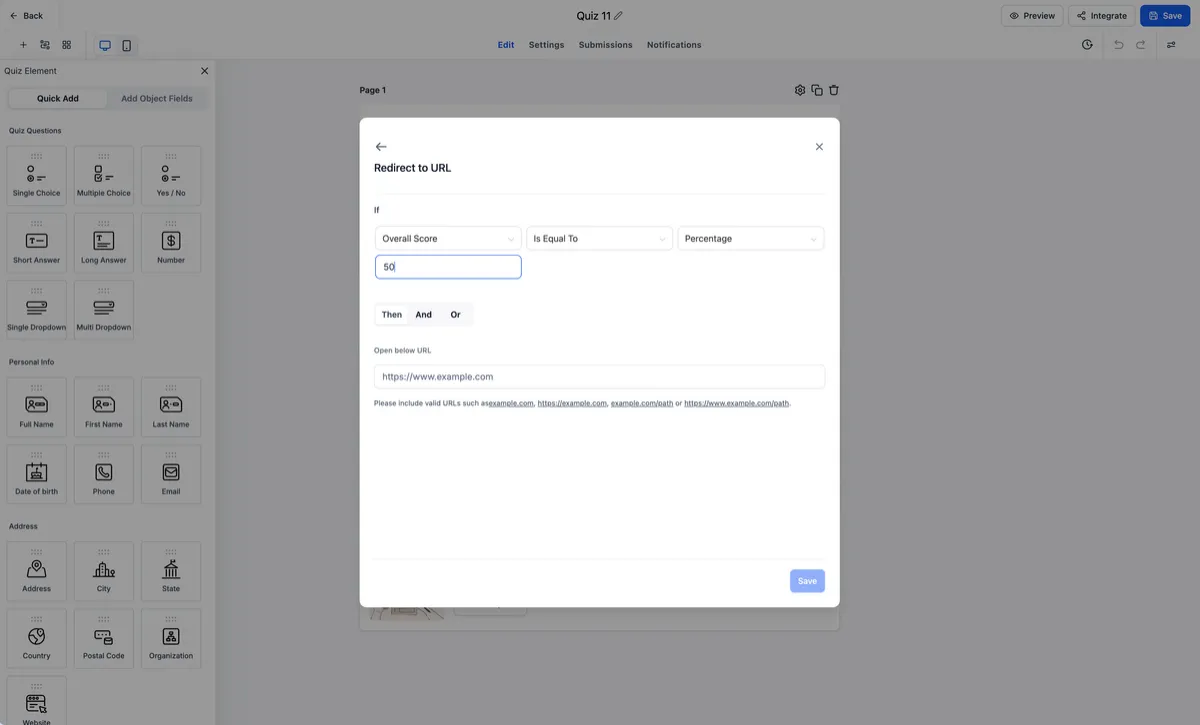
Quizzes now support conditional logic, starting with Redirect to URL. Instead of every respondent landing on the same results page, you can send them to different web addresses based on their answers, with the same conditions forms and surveys already offer, or on four new quiz score fields: overall score, the score within one category, the category they scored highest in and the category they scored lowest in. A high scorer can go to an advanced page and a low scorer to extra resources, or a respondent can be sent to the product or service page that matches their strongest category. Open the quiz builder, go to Conditional Logic, choose Redirect to URL, then set the conditions and the destination. Showing a custom message, disqualifying a lead and showing or hiding fields are planned to follow. For a property services business, a quiz such as "Which cleaning plan suits you?" or "Is your property ready to sell?" can now hand each visitor the page or offer that fits their result. More detail
An analytics dashboard for communities
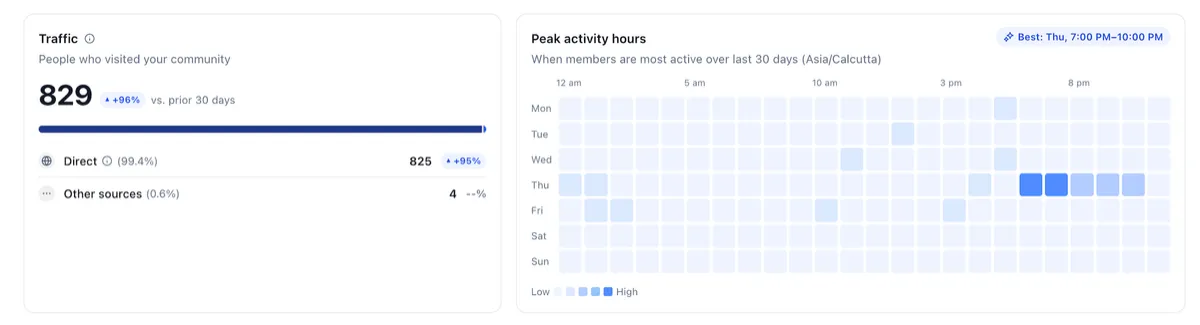
Communities now have their own analytics dashboard, under Settings, then Analytics. Four headline cards show total earnings (community revenue after refunds and chargebacks), total members with new joins, inactive members, and email invitations still pending, each compared with the previous period. Inactive members can be exported as a CSV file for follow-up. Below the cards are traffic sources, showing whether visitors arrive directly or from Instagram, YouTube, Facebook or LinkedIn, a heatmap of the hours when members are most active, and engagement broken down into posts, comments and reactions, with a trend line. The whole dashboard can be filtered from today out to 12 months, or a custom range. Traffic counts start from now, with no history filled in. For a business running a client or member community, it shows the best times to post and which members have gone quiet. More detail
Field Services
Field Services: the full feature list for the private beta
Field Services, listed as a private beta in our LevelUp 2026 post with no detail at the time, now has a full description. It is a new module for businesses that do their work at the customer's location, such as plumbing, electrical, air conditioning, cleaning and landscaping, built around requests, jobs and visits rather than appointments. A request can come from your booking page or be entered by staff, then be quoted, turned into a job and scheduled across as many visits as the work needs. Scheduling suggests times from staff hours, service areas, existing bookings and drive time, and route optimisation proposes a better order for each technician's day, showing the drive time saved before anything changes. Jobs carry checklists, notes, timesheets and invoices, so you can bill after any visit and see what is still outstanding. Customers can book and pay on a branded booking page that checks their address against your service areas, and customers and staff get email, SMS and WhatsApp updates at key moments, such as when a technician is on the way. Crews run their visits from the mobile app. It is still a closed beta, so talk to the Clientflow team if you would like to register interest. For trades and property services businesses, this is the module built most closely around the way they already work. More detail
AI Studio
AI Studio builds websites and web apps from a description. If it is not yet switched on for your team, ask your usual contact on the Clientflow team.
Sell more than 100 products from an AI Studio site
The Payments panel for AI Studio sites, covered in the 28 September to 11 October roundup, used to stop at 100 products. That limit is gone, so you can add as many products from your store as you need, select a whole page of products at once in the product picker, and search across everything you have added. Two limits remain. When checkout is set to "All products", buyers are offered your first 100, so to sell beyond that, choose the products to offer or link to individual product pages. A storefront product list shows up to 500 products. Existing products, sites and checkouts carry on working, with nothing to change. For a business selling maintenance packages, parts or add-on services through an AI Studio site, a large catalogue is no longer capped. More detail
Put an AI agent on an AI Studio site's live chat
The live chat for AI Studio sites, covered in the 12 to 25 October roundup, can now be answered by a Conversation AI agent without leaving AI Studio. A new AI agent section in the site's chat widget settings (More, then Chat Widgets, then AI agent) lets you pick an agent from a dropdown and save, and it starts replying to visitors in that live chat widget. The section shows which agent is connected and the tag conditions it follows, such as only answering contacts tagged as new leads, and the menu beside it lets you edit the agent in Conversation AI or remove the connection after a confirmation. It works with live chat widgets only, one agent can be connected from AI Studio, and agents are still created, trained and given their tag rules in Conversation AI. For a property services business with a site built in AI Studio, visitors asking about prices or availability out of hours can get an answer straight away. More detail
That is the fortnight. Missed the last one? Catch up on the 12 to 25 October updates.
Already a Clientflow client? If you want to know more about any of these features, or would like them deployed in your account, get in touch with your usual contact on the Clientflow team.
Not yet a client? Book a call with the team, or see the full feature set on the platform capabilities page.
Clientflow is built on the HighLevel platform, delivered with Australian onboarding, support and expert implementation. Read how that works on our GoHighLevel Australia page.


