
Clientflow Platform Updates: 12-25 October 2026
Fifteen features landed across this fortnight. For businesses running paid ads, call tracking now names the ad platform behind far more phone enquiries, and a tracking number can ring up to six team members at once. Websites and funnels gain a schema dashboard that shows which pages are missing structured data and can write it for you. And if you send marketing messages over WhatsApp, Meta has set an October 2027 deadline to move them across to its Marketing Messages API. Here is everything from 12 to 25 October.
Calls and call tracking
Call tracking now names the ad platform behind more calls
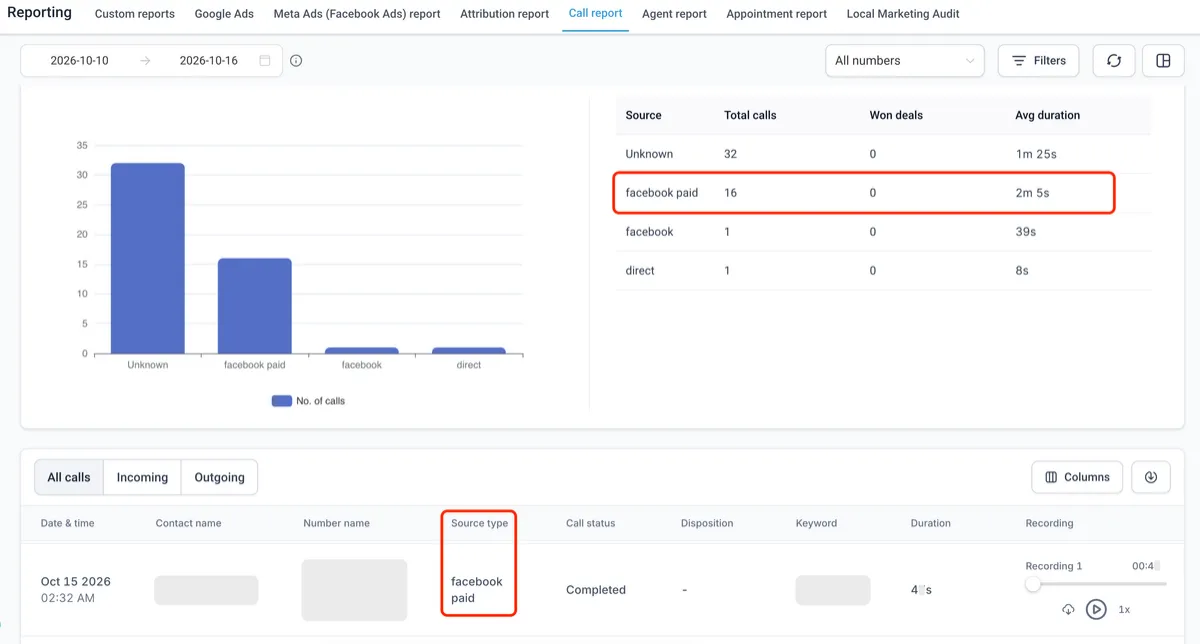
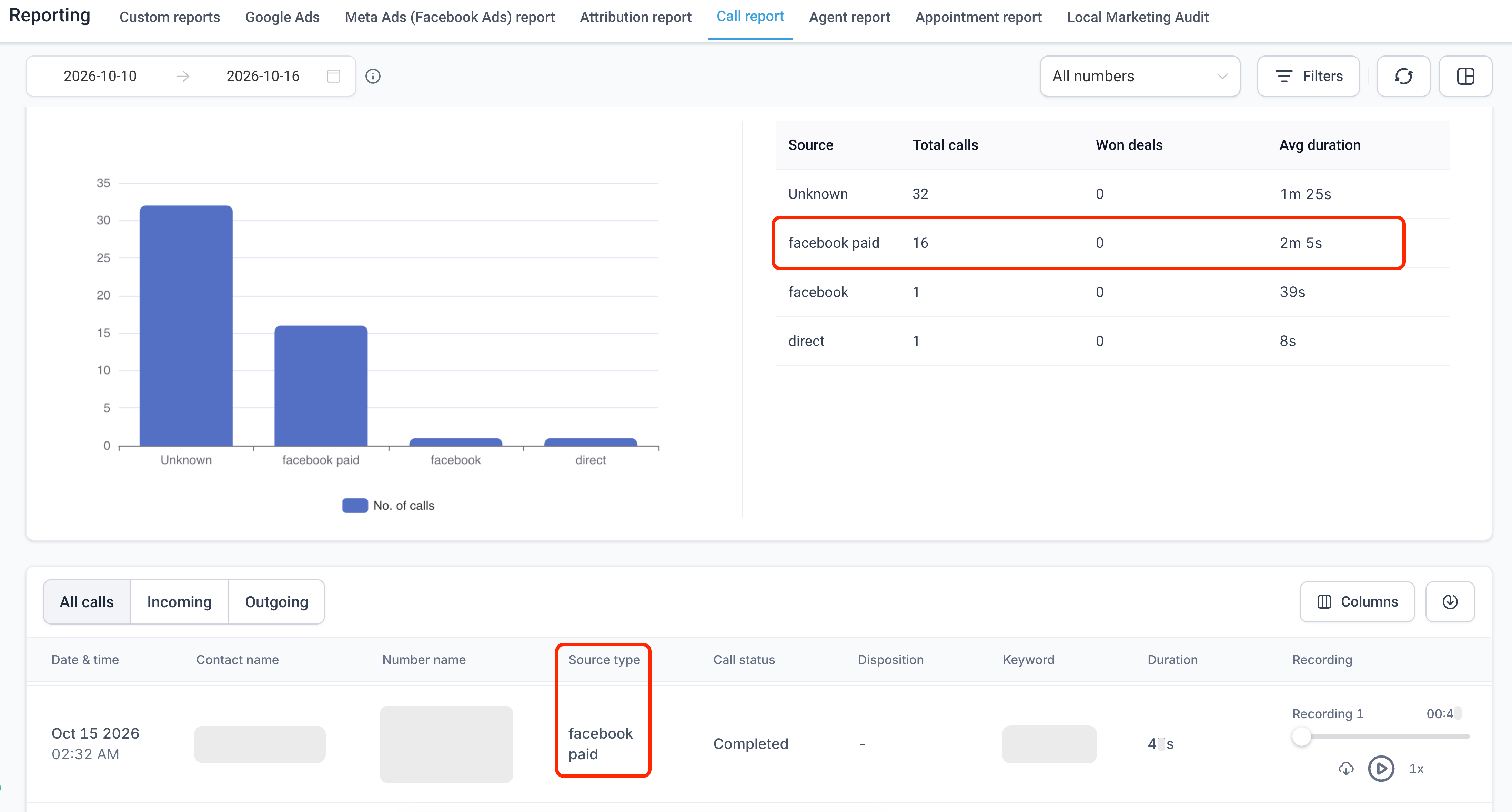
Number pool call tracking now labels the ad platform behind a call more precisely. Calls driven by Facebook ads used to show up as Facebook or plain Direct, with no way to tell which ads were actually making the phone ring. They now show as Facebook Paid, and the same labelling covers TikTok, LinkedIn and Microsoft (Bing) ads, plus Google ads clicked from inside apps. Links tagged with utm_medium=cpc show the platform plus Paid, and visits arriving through ChatGPT and similar tools get their own source label. Nothing needs configuring: it applies automatically to number pool tracking from now on, while past calls keep the source they already had. Some calls will still show as Direct, where a visitor’s browser hides where they came from and the link carries no ad tracking code. You will see it in call reports and call details. For a property services business running paid ads on several platforms, this shows which channel is actually producing phone enquiries, not only web leads. More detail
A tracking number can ring up to six team members
A number pool can now ring up to six team members at once when a call comes in, where previously pool calls could not be sent to specific team members’ devices. Turn on Ring Incoming Call to selected Users in the pool’s settings and choose who should be alerted. Each person answers on whichever device suits them, whether the web app, the mobile app, a desk phone or their own mobile number, based on the default ring channel set in their user settings under Call & voicemail. The selection is saved for next time. For a property services business sharing enquiry calls across a small office or field team, a call to a tracking number reaches whoever is free, on whatever device they are carrying, instead of ringing out on one line. More detail Setup guide
Websites and tracking
A schema dashboard for every website and funnel
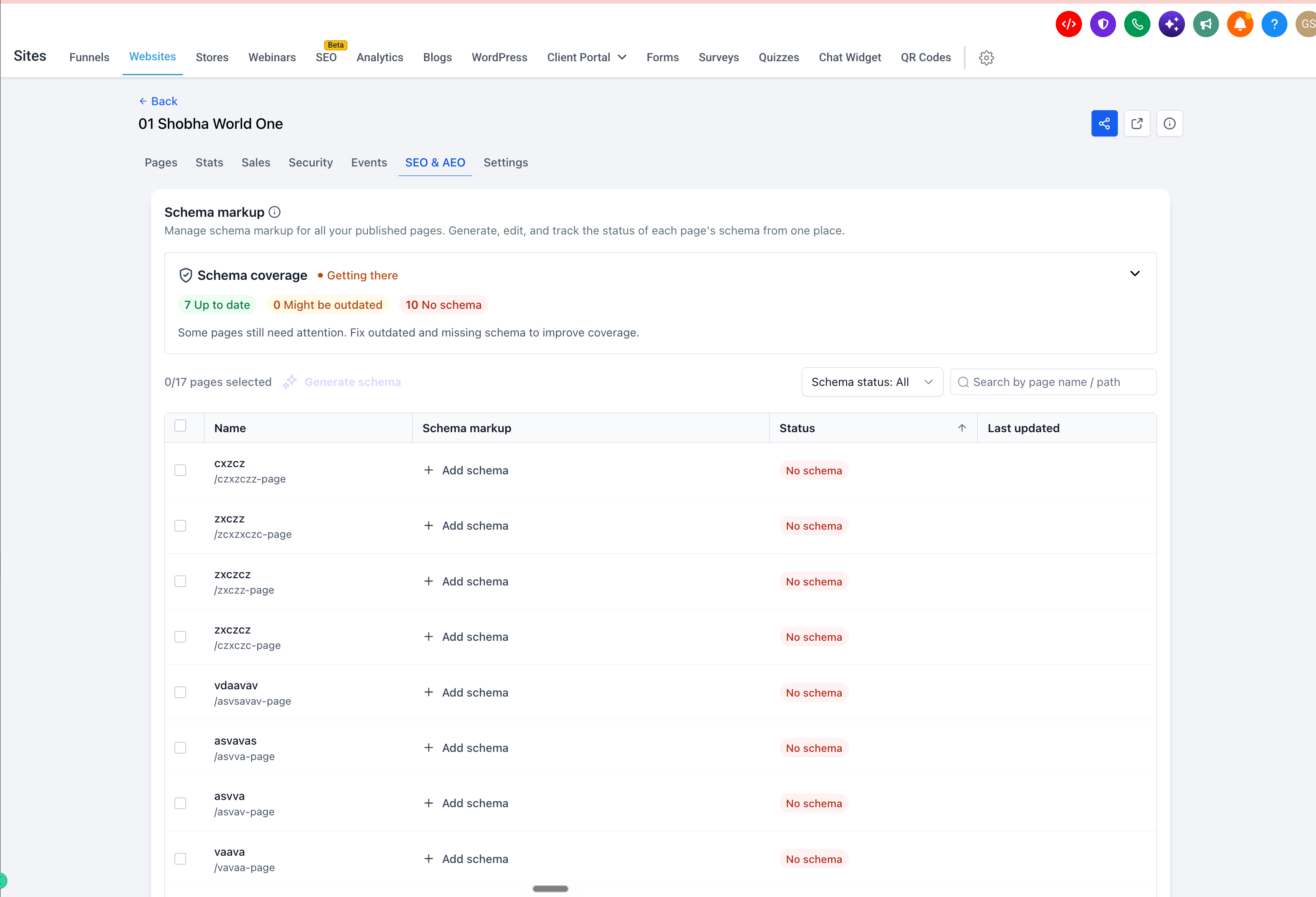
A new Schema markup dashboard sits in the SEO & AEO tab of every website and funnel. Instead of opening each page in the builder to check its structured data, you get one screen showing overall schema health, rated Needs work, Getting there, Good or Excellent, with a page-by-page breakdown of schema type and status. Schema can be generated with AI for one page or many at once, replacing any schema a page already has, and anything generated or edited stays unsaved until you review and publish it. Pages edited and republished two or more times since their schema was created are flagged as possibly outdated. Open Sites, then Websites or Funnels, choose a site, then SEO & AEO. For a property services business with a page for every service and suburb, keeping structured data current across the whole site becomes realistic, which supports Google’s rich results and visibility in AI answer engines. More detail
Meta Pixel now records checkout drop-off
The Meta Pixel InitiateCheckout event now fires when a buyer reaches the checkout page or begins an order form, rather than when they submit payment, on any funnel, website or store with the pixel and InitiateCheckout enabled. That makes the gap between starting checkout and completing a purchase visible for the first time. AddPaymentInfo now also carries order value, currency, product IDs and hashed customer details where available, which improves Meta’s event match quality. Nothing needs reconfiguring, though InitiateCheckout counts will rise now that drop-off is captured. For a business running Meta ads to book quotes or jobs, this gives a clearer read on where people fall away before paying a deposit, and better signals for Meta to optimise campaigns towards buyers who show real intent. More detail
Move WhatsApp marketing messages to MM Lite before October 2027
Meta is retiring marketing sends through the WhatsApp Cloud API from 13 October 2027, so the platform is now prompting a move to MM Lite, its Marketing Messages API integration. Activation takes a few minutes per account under Settings, WhatsApp, and existing templates and numbers carry across untouched. MM Lite adds delivery optimisation based on engagement signals, animated GIF headers, Android app deep links, conversion tracking from message through to purchase, and cost-per-click and cost-per-delivery metrics. Service and utility messages are unaffected, since only marketing sends are in scope. If you send WhatsApp promotions or reminders to past clients, moving early means better delivery data and no rush when the deadline arrives, and your usual contact on the Clientflow team can help you switch. More detail Setup guide
A rebuilt WhatsApp template builder, with media for each contact
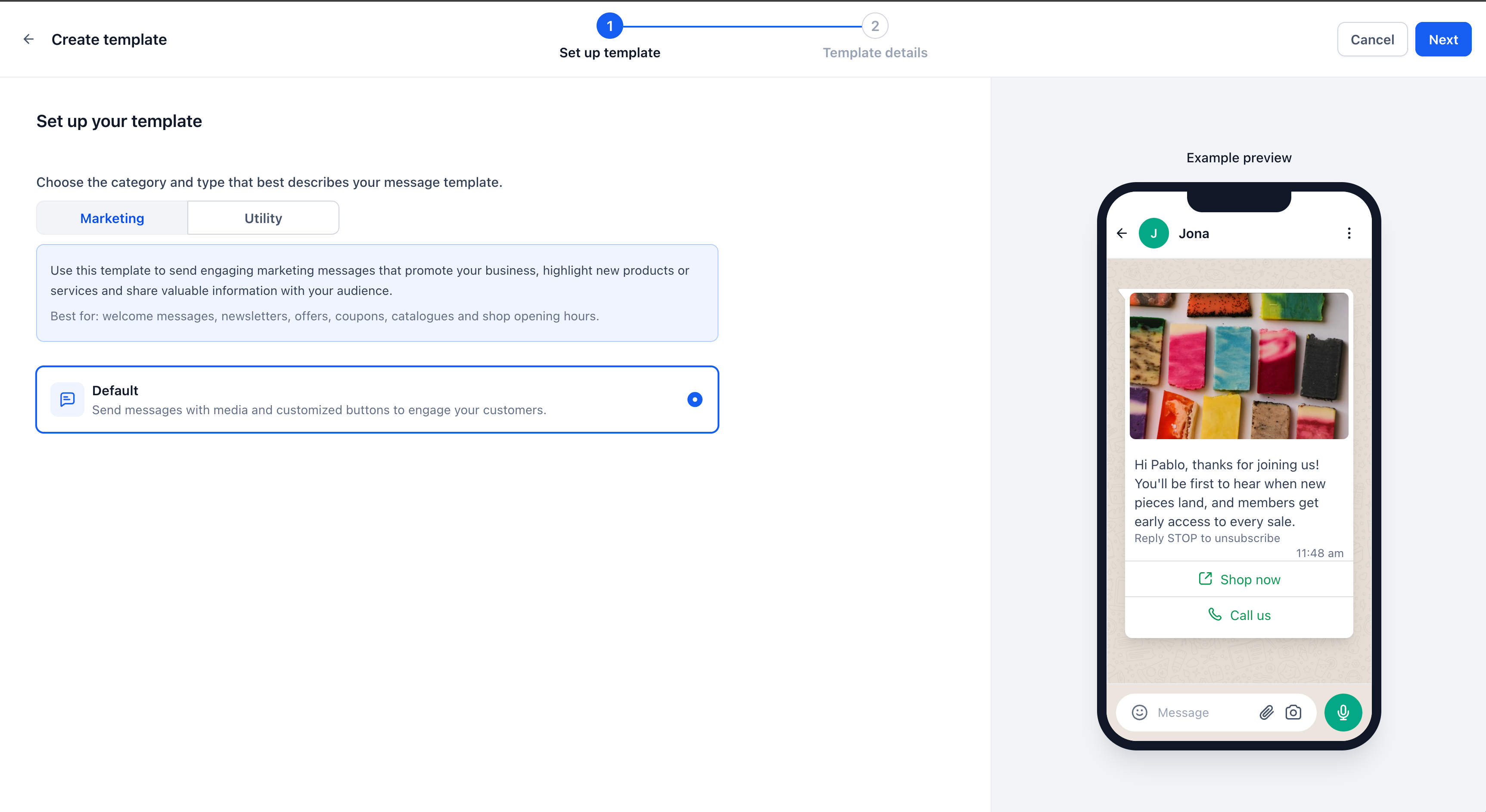
Creating and editing WhatsApp templates now happens in a rebuilt builder with a live phone preview, so what you see while building matches what the contact receives. The bigger change is that a media header, whether an image, video or document, can now point to a dynamic value instead of one fixed file, so the actual file is chosen for each contact at send time. That works from workflows, conversations, bulk actions, calendar appointments, review requests and missed call text back. One approved template can now send each contact their own invoice, ticket or personalised image, instead of needing a new template and a new Meta approval for every variation. The file has to sit at a publicly reachable URL, so private drive links or anything behind a login will fail. For a property services business, that means sending every customer their own quote, invoice or booking confirmation through WhatsApp from a single workflow. More detail
Limited time offers with a live countdown in WhatsApp
A new WhatsApp template type is built for time-limited offers. It shows a live countdown inside WhatsApp itself, running down to an expiry you choose at send time, with a discount code and a link button underneath. Build it under Settings, WhatsApp, Templates, Create template, choosing the Marketing category and the Limited time offer type, then submit it for Meta approval as usual. Once approved, the same template can be reused across campaigns, because only the expiry changes with each send. It can go out from conversations, bulk actions, workflows and calendar sends, and the AI template writer can draft one on request. It suits short-notice promotions such as a seasonal booking discount or the last few slots of the week, since a visible deadline tends to prompt a quicker response. More detail
Bookings, payments and imports
Attach a booking form to service and rental bookings made in-app
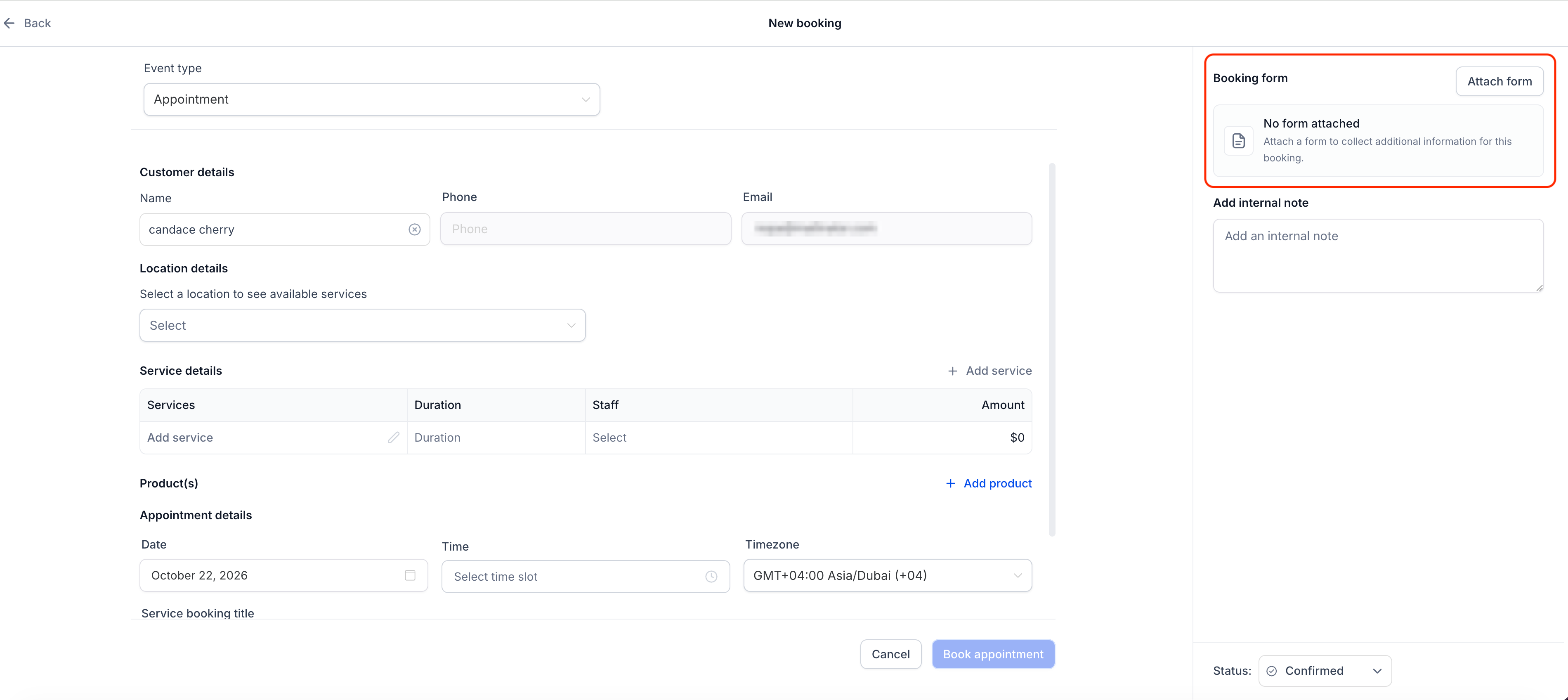
Service and rental bookings created by staff in the appointment window can now have a booking form attached, matching what happens when a customer books through the public booking page. While creating the booking, a new Booking form section lets staff click Attach form and fill it in on the customer’s behalf. The configured form is preselected, though any available form can be chosen, and contact details such as name, email and phone prefill from the selected contact. CAPTCHA, product selling and payment elements are left out when a form is completed this way. One limitation: the form can only be attached while the booking is first created, not added or edited afterwards. For a property services business taking bookings over the phone, staff can now capture the same intake details a customer would provide online, so every job has consistent records however it was booked. More detail
Gift card messages can now be sent in other languages
Gift card messages, including purchase confirmations, recipient emails and SMS notifications, are now translated automatically into the selected locale, rather than always sending in one fixed language. The preview in the gift card send flow updates to the chosen locale too, across every delivery method, so what you preview matches what the recipient receives. Nothing needs setting up, since the translation follows the locale already selected. For a business whose customers prefer a language other than English, gift card promotions and confirmations can now arrive in their own language without extra template work. More detail
Filter HubSpot records before you import them
The HubSpot importer, covered in the 3-16 August roundup, now lets you filter which Contacts, Deals, Companies and Tasks come across before the import runs. Each record type can be filtered separately by HubSpot Created Date or Last Modified Date, using relative ranges such as the last six months or this quarter, or exact dates with on, before, after or between. Conditions can be combined with AND or OR, the same filters can be applied to every selected object in one click, and record counts update straight away so you can see how many records match before confirming. Open Contacts, Companies or Opportunities, choose Import from HubSpot, then use the edit icon on the Preview step. Filters are optional and limited to created and modified dates for now. For a business moving off HubSpot, this means bringing across active client records only, rather than years of stale contacts that need cleaning up afterwards. More detail
Workflows
Workflows can add internal comments to a conversation
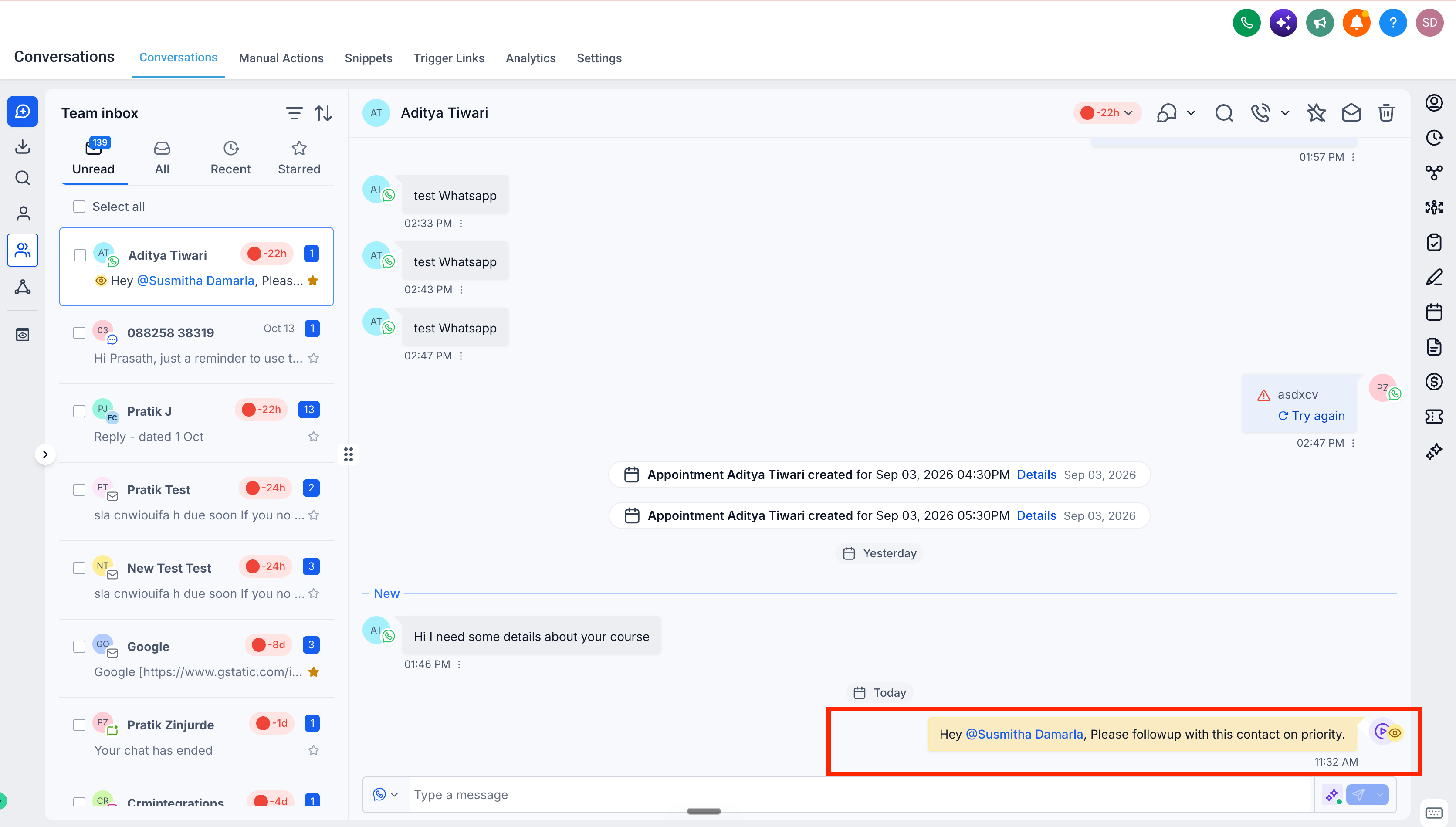
Workflows can now post an internal comment to a conversation automatically, instead of relying on a team member to add one by hand. The new Add Internal Comment action can @mention team members as part of the note, and the comment lands in the conversation history, visible only to your team and never to the customer. It is useful for passing on context or next steps the moment a workflow condition fires, such as a lead reaching a particular stage. For a property services business juggling quote requests, bookings and follow-ups across several people, handover notes and urgent flags now attach themselves to the right conversation. More detail
A workflow trigger for Social Planner posts
A new Social Planner Posts trigger lets workflows react to what happens to a scheduled post. It can fire on six post statuses: approval requested, approved, rejected, scheduled, published or failed. You can narrow it by content category, platform, post type, specific connected social accounts and tags. For now it only covers accounts connected directly through Social Planner, and accounts connected through Integrations are not supported yet. For a business posting for several trades or locations, a failed post can now send an instant alert to the person who needs to fix it, rather than someone noticing days later. More detail
AI Studio
AI Studio builds websites and web apps from a description. If it is not yet switched on for your team, ask your usual contact on the Clientflow team.
Live chat built into AI Studio apps
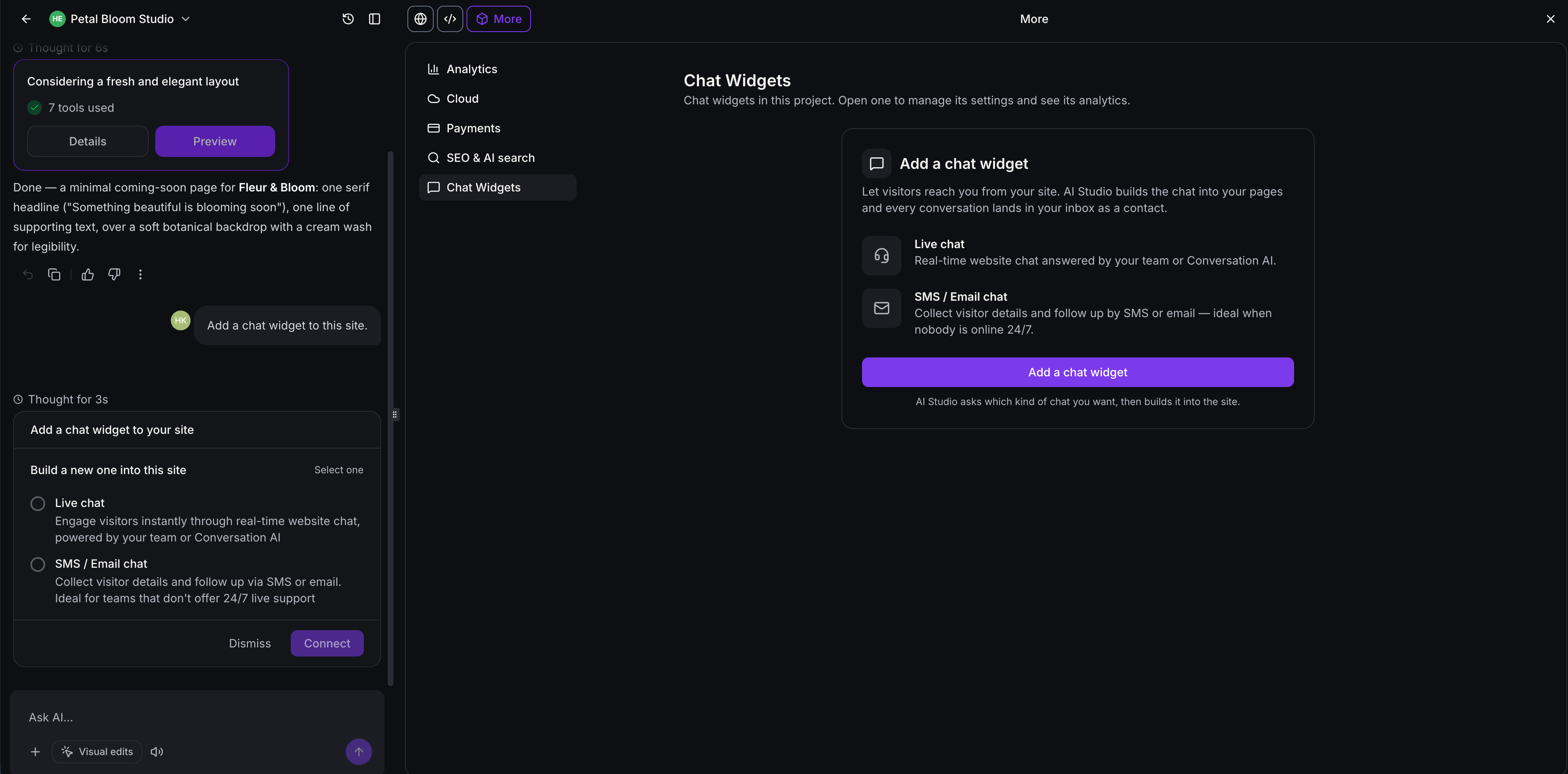
AI Studio apps can now carry a native live chat widget instead of a generic chat bubble. Ask AI Studio to add a live chat and it builds a widget styled to match the app’s own colours and fonts, connected to your account’s existing chat, contacts and conversation settings. There are two types: Live Chat for real-time conversations, and Email Chat, shown in AI Studio as SMS / Email chat, for visitors who leave their details and get a reply by email. Both come with secure visitor sessions, spam protection, conversation history and delivery status, and live chat also lets visitors share files. There is also a Chat Widgets analytics view and a settings panel inside AI Studio. It works only on TanStack Start and React projects, and voice, WhatsApp, Facebook Messenger and Instagram chat are not supported yet. For a booking or quoting app built in AI Studio, enquiries are now captured live and on brand without adding a separate chat tool. More detail
More checkout options for AI Studio payments
The checkout that came with AI Studio payments, covered in the 28 September to 11 October roundup, gains three new options. You can choose which fields buyers must fill in, showing, hiding or requiring the phone number and each billing address field, while name and email stay compulsory. A two-step checkout can now capture the buyer as a contact before payment, so anyone who drops off before paying is still a lead to follow up. That step fires a Contact Created trigger rather than Order Form Submission, so check your workflows are listening for the right one. After payment, buyers see a full order summary with order ID, items, tax and total, or can be sent to a custom thank-you page instead. Any AI Studio project already using payments gets the new options on its next prompt, with no need to reconnect. More detail
Sync AI Studio projects with GitHub
AI Studio projects can now connect to a GitHub account and sync code both ways. Connecting creates a private repository for the project and pushes every version you save there, whether from AI prompts, code edits, visual edits or restores, and commits made outside AI Studio are pulled back in, with a fresh preview built each time. You can choose which branch to sync, see a full sync history, and resolve diverged branches with a force push or a new branch. Access sits behind a new Manage Git & download code permission, switched on by default for every role, which the Clientflow team can turn off for individual users. It works only with React (Vite) and TanStack Start projects, and only the connected branch syncs. This is a feature for developers, so it mainly matters if someone on your team, or a contractor, is working on an AI Studio app in code alongside the builder. More detail
That is the fortnight. Missed the last one? Catch up on the 28 September to 11 October updates.
Already a Clientflow client? If you want to know more about any of these features, or would like them deployed in your account, get in touch with your usual contact on the Clientflow team.
Not yet a client? Book a call with the team, or see the full feature set on the platform capabilities page.
Clientflow is built on the HighLevel platform, delivered with Australian onboarding, support and expert implementation. Read how that works on our GoHighLevel Australia page.


