
Clientflow Platform Updates: 14-27 September 2026
Thirty features landed across this fortnight, and two need attention this week. Local presence dialling now covers Australia, so an outbound call can show a caller ID local to the person you are ringing. From 1 October, Meta starts charging for some WhatsApp replies that have been free until now. Ask AI also picked up two new ways in, by WhatsApp message and by voice on the mobile app, and two new OpenAI models run the AI Agent action at roughly half the previous cost. Here is everything from 14 to 27 September.
Calls and messaging
Local presence dialling now covers Australia
The local presence dialling engine has been rebuilt, and its coverage now includes Australia alongside the US, Canada and the UK. It picks the best local caller ID for each outbound call using real postcode distance rather than static lookup tables, so the person you ring sees the closest match to their area from the numbers you hold. Contacts see the same number from your business on every repeat call, which builds familiarity and protects your standing with carriers. Matching now works consistently for calls made from the web app and from desk phones, with mobile app support coming soon. Up to 50 numbers per account can be reserved to keep main office lines out of the automatic selection. It is under Settings, Phone System, Voice, Other Settings, Outbound calls. For a property services business calling homeowners back about quotes, a local number in place of an unfamiliar one should lift pickup rates on follow-up calls. More detail
Meta changes how WhatsApp messages are billed from 1 October
From 1 October 2026, Meta starts charging for two kinds of WhatsApp message that have been free. Service messages, meaning any free-form reply sent inside an open 24 hour customer service window, become billable, and so do utility messages sent in reply to a customer inside that window. The first 1,000 service messages per phone number each month stay free, and the allowance resets at the start of each month. Marketing messages are still charged per message, and Meta is also raising its marketing rate from 1 October for its Rest of Asia Pacific pricing region, which covers Australian numbers. When a customer messages you from a Click to WhatsApp ad or a Facebook Page call-to-action button in the WhatsApp phone app, and you reply within 24 hours, your reply opens a free entry point window lasting 72 hours in which every message type is free, though the usual 24 hour rule for free-form replies still applies inside it. If you handle a steady volume of customer questions over WhatsApp, it is worth reviewing those conversations now, and sending more new enquiries through Click to WhatsApp ads keeps more of each conversation inside the free window. Your usual contact on the Clientflow team can explain how the change applies to your account.
WhatsApp permissions can now be set action by action
Seven new permissions give admins fine-grained control over who can change WhatsApp settings: creating or editing templates, deleting templates, creating or editing flows, deleting or deprecating flows, updating the business profile, managing phone numbers, and disconnecting WhatsApp entirely. They sit under Settings, Users, Edit, Roles and permissions. All seven are granted by default to existing roles, so nothing changes until you restrict them. Restrictions are enforced behind the scenes as well as in the settings screen, and permission changes appear in the audit logs. A new office hire can create quote-response templates without also being able to delete the approved ones or disconnect the number the whole team relies on. More detail
Spam protection for the chat widget
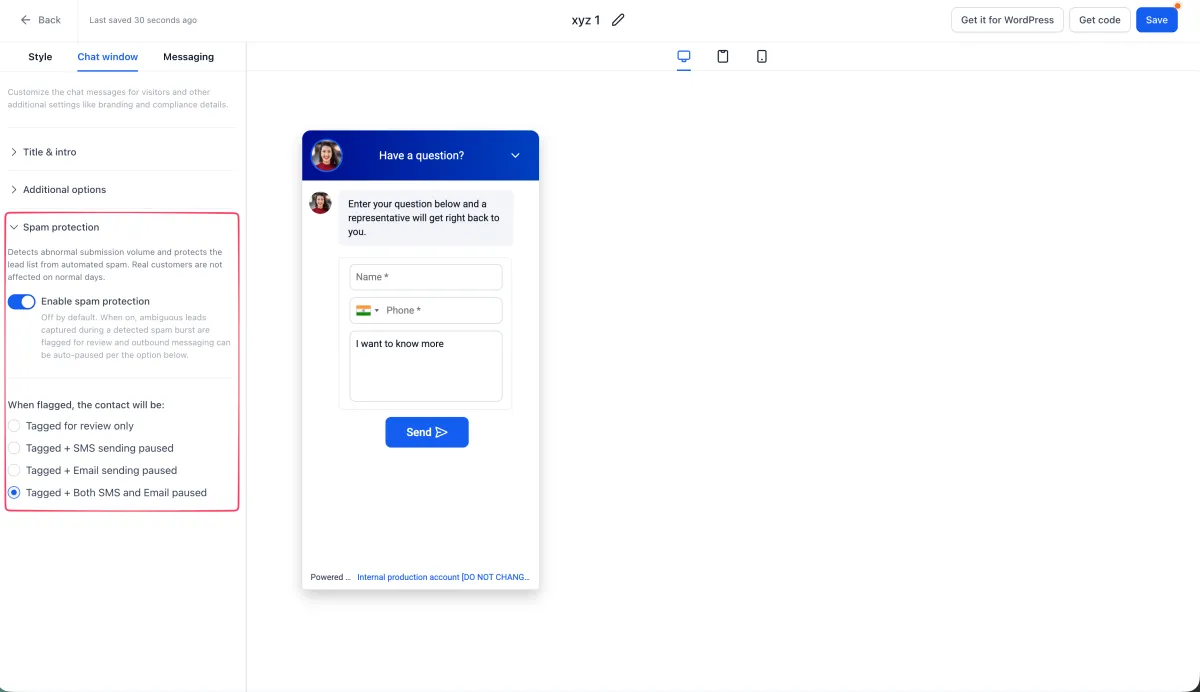
The chat widget can now detect bot and high-volume suspicious submissions without adding a CAPTCHA or extra fields, so genuine visitors see no change. Flagged contacts are kept rather than deleted, tagged with chat_widget_high_volume_flag, and left for review. You choose for each widget what happens to a flagged contact: tag only, pause SMS, pause email, or pause both. It is under Sites, Chat Widget, Spam Protection in the builder sidebar. Existing widgets have it switched off, so nothing changes unexpectedly, while new widgets have it switched on with both SMS and email paused. A chat widget left running overnight stops spending SMS credits and sender reputation on bot spam, and genuine after-hours enquiries are still waiting for review in the morning. More detail
Diagnose missed notifications from the mobile app
The mobile app now has a one-tap check for missed notifications, under Settings, Diagnose Notifications. It tests the network connection, notification permission, sound and delivery, sends a real test notification to the phone, and reports which checks passed and which need attention. A failed check names what to fix, whether that is Wi-Fi, notification permission, or ringer and Focus mode settings, and the results can be copied in one tap to paste into a support request. It needs app version 4.25.0 or later. When staff rely on mobile alerts for new bookings and messages, this quickly shows whether a missed alert comes down to a phone setting or needs looking into. More detail
Email attachments are moving to authenticated access, now in Labs
Access to email conversation attachments is moving to a permission-based model, with authenticated access replacing directly accessible links. Most users will see no change at all. It matters if you use a third-party app that reads or displays attachments from your inbox, because those apps will need an added file-access permission and will need reauthorising. The new controls are available in Labs now, existing attachment links keep working until 30 November 2026, and the change becomes permanent from that date. It covers email attachments only for now, with other conversation channels to follow in later phases. More detail
AI across the platform
Ask AI now works from WhatsApp
The full Ask AI assistant can now be reached from WhatsApp. Connect a WhatsApp number once from the Dispatch tab, and from then on you can look up contacts, add notes, update fields, move opportunities along a pipeline, check the calendar, draft content, generate images, or set up recurring tasks and follow-up reminders, all by text message. Custom skills work the same way over WhatsApp as they do on the web. Each connected number is private to the person who linked it, and every exchange is logged in the Dispatch tab for later review. For a tradie or property manager who lives on their phone between jobs, logging a client note or checking today’s bookings from the van no longer has to wait until they are back at a desk. More detail
Build a workflow by describing it to Ask AI
The Workflow AI agent that already builds automations inside the workflow builder can now be reached from Ask AI. Describe the workflow you want in a new Ask AI chat and the agent drafts it, with a live preview you can click into to check any trigger or action. Ask for changes and it updates the workflow in place. Because Ask AI now runs on WhatsApp, a workflow can be started from a WhatsApp message too. A button in the preview opens the draft in the workflow builder, which is still where testing and publishing happen, and manual editing is not available inside Ask AI itself. A quick automation change can now be started from a phone rather than waiting until someone is at a desk. More detail
Talk to Ask AI on the mobile app
Ask AI on the mobile app now supports full two-way voice, matching the web experience. Tap the microphone, speak your question, and the assistant streams its answer back as audio while highlighting the text in time with the voice. You can interrupt mid-sentence to redirect it, and it pauses automatically when a question or approval card needs a tap rather than a word. A dropped connection shows a reconnecting message and picks the same conversation back up rather than starting over, and it works hands-free over Bluetooth headsets with echo cancellation. Voice and typed messages sit in the same thread, so you can switch between them at any point. A tradie can put a question to the assistant between appointments without stopping to type it out. More detail
GPT-6 Sol and GPT-6 Luna in the AI Agent and GPT actions
OpenAI’s GPT-6 Sol and GPT-6 Luna have replaced GPT-5.6 in the AI Agent and GPT workflow actions. Sol handles complex, multi-step automations that span several apps, while Luna is built for high-volume tasks such as classification, tagging and quick replies. Both make fewer factual errors than their predecessors and cost roughly half as much to run. Choose either from the Model dropdown inside an AI Agent or GPT action, then save and publish the workflow. For a property services business running automated follow-ups or lead qualification, that means more accurate AI replies at a lower running cost. More detail

AI Studio is out of Labs
AI Studio has moved out of Labs and is now available on every account. Access for users inside each account is switched off by default, and is granted to specific users or to everyone at once. Anyone who already had AI Studio switched on through Labs keeps that access. If you would like it turned on for your team, ask your usual contact on the Clientflow team. More detail
Older AI Studio projects can move to server rendering
The 31 August to 13 September roundup covered AI Studio’s move to server-side rendering for new projects, with a migration path for older projects promised later. That path has now arrived. A React project built in AI Studio can be upgraded from Project Settings, under Migrate to SSR. Running it creates a second, separate project in the same account and carries the existing pages across as a draft, while the published site and its domain stay on the original project until someone chooses to publish the new one. Workflow triggers keep listening to the original project until they are pointed elsewhere. The option only appears for React or Vite projects that can be edited, and projects already built on the newer stack do not need it. A business with a site built in AI Studio that later needs server functions or stored secrets can get there without rebuilding from scratch or putting the live site at risk. More detail
Bookings and calendars
Calendar AI can now explain why a slot is not bookable
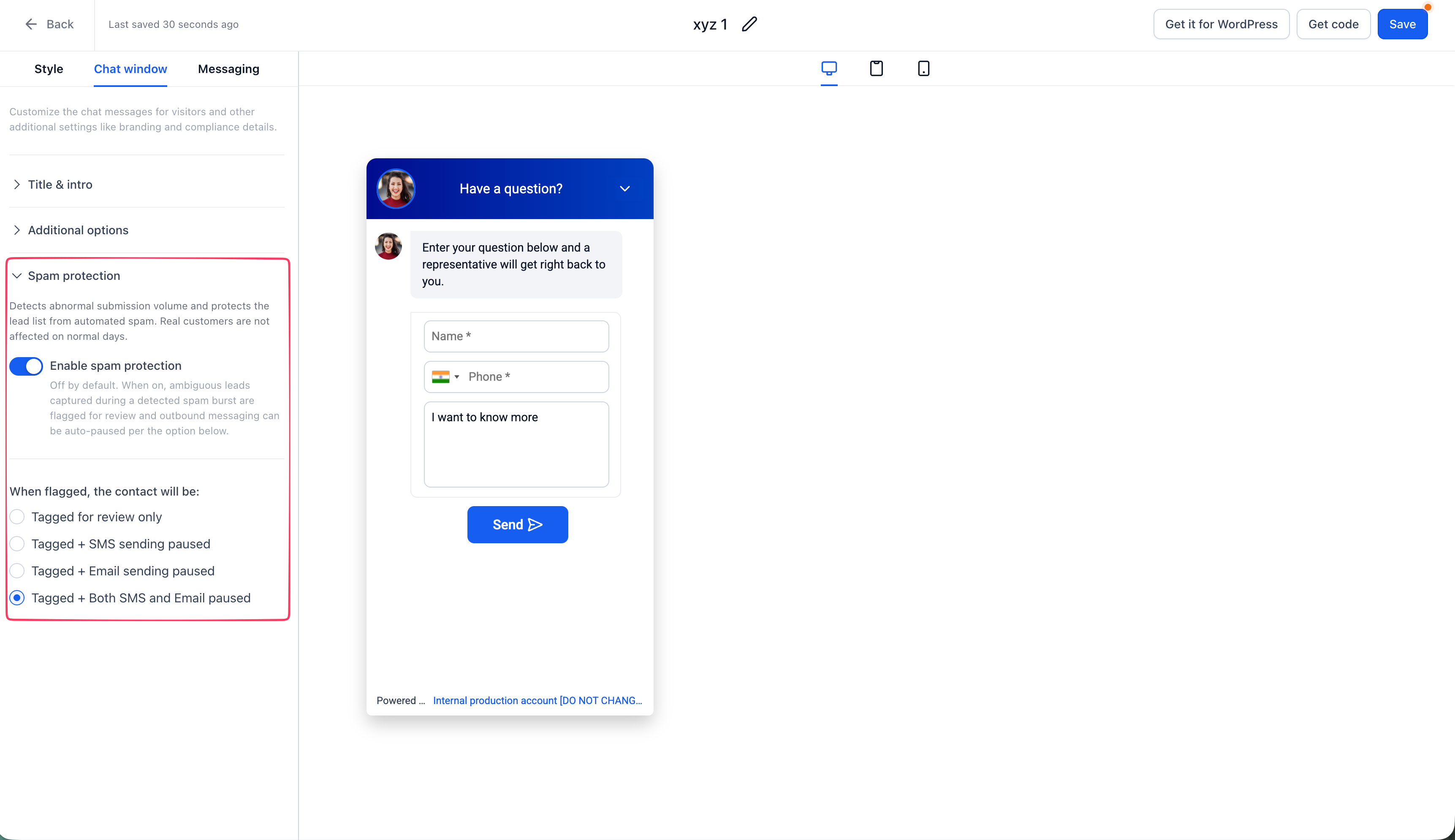
The troubleshooting mode flagged as coming next in the 17-30 August roundup has arrived. Calendar AI, the assistant that builds calendars from a plain-language description, can now answer questions about why a slot or a calendar is not bookable. Ask why a particular time is unavailable, or why a named team member is not showing as free, and it names the actual blocker. A question about a whole day returns one summarised answer per segment, with slot-level detail on request, and Calendar AI only asks a clarifying question when a name could mean more than one calendar or person. If it cannot produce a clean answer, it says so and links through to the full Troubleshooting View rather than guessing. When a customer says they cannot book a time, staff can get a straight answer on the spot instead of escalating it. More detail
Set a custom price on a single service appointment
Service prices can now be edited on an individual appointment while it is being created, edited or duplicated, without touching the service’s standard price. The change applies to that one booking only, and every other appointment keeps the standard rate. Zero is accepted for complimentary work, negative values are blocked, and a Custom tag appears beside the amount so it is clear the booking is not on the standard rate. An appointment-level price overrides any staff-specific pricing that would otherwise apply, and the option works in the mobile app too. When a one-off rate is agreed with a customer, staff can record the real price charged without a workaround. More detail
Role badges for staff in Services
Staff profiles in Services can now carry a short, colour-coded role badge, such as Senior Technician or Lead Inspector, which appears on their card when customers choose who to book with. Badges are created once and reused across staff, each staff member gets one badge of up to 30 characters, and staff without one show no badge. The badge takes a lighter shade of the booking widget’s primary colour and appears consistently on desktop and mobile. Set it under Services, Staff, Basic details, Staff badge. For a team of technicians at different experience levels, customers get a quick visual cue for who they are booking without reading full staff bios. More detail
Booking notifications now follow your business language
Notification templates across Calendars, Services and Rentals now localise automatically to match the Platform Language set in your Business Profile, across email, SMS and WhatsApp wherever each product supports them. Templates you have already customised are left exactly as saved, and only untouched defaults pick up the new language. New calendars, services and rentals get localised defaults from the start, while existing ones keep their current English templates until someone clicks Reset to Default on the relevant notification. The settings sit under Calendar Settings, Notifications for calendars, and Global Settings, Notifications for services and rentals. For a business serving customers in a language other than English, this removes a chunk of manual translation from every booking notification. More detail
CRM and workflows
New custom field types
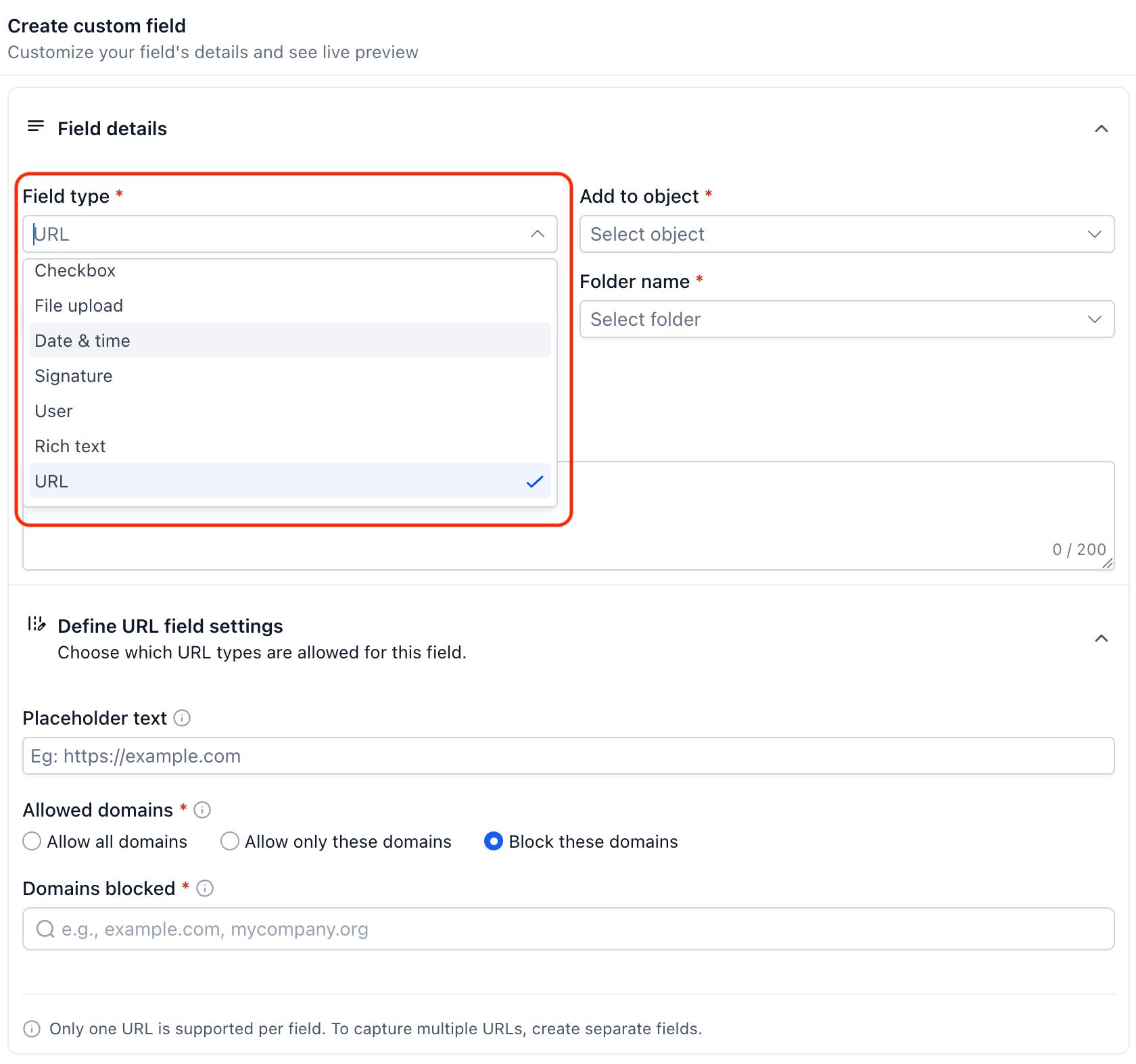
Custom fields have gained a set of new field types. URL fields can be limited to particular domains, or set to block them. Date-only, time-only and date-and-time fields can be restricted to past dates, future dates or a range. A Users field assigns team members to a record and gives them follower-level access. Radio buttons and checkboxes can now show an image or icon on each option, and rich text fields support bold, headings and lists. All are available now alongside the existing types. For booking forms, maintenance requests and customer intake, that means cleaner, more structured data, such as a service request date field that will not accept a date in the past. More detail
Email everyone linked to a set of company or custom object records
Bulk email can now be sent straight from a Company or Custom Object list to the contacts associated with the selected records, instead of rebuilding the same segment in Contacts. For Custom Objects you choose which association label to use, and whether the email goes to the most recently associated contact, the earliest, or everyone associated. Company and Custom Object fields work as merge fields, and the email can be written with Quick Compose, Smart Builder or a saved template, then sent immediately, scheduled, or sent in batches. Open Companies or a Custom Object list, select records, and click Send email. For a business tracking properties, jobs or service contracts as custom objects, you can filter by suburb or status and email everyone attached to those records in one step. More detail Setup guide
Companies can be created and matched by email domain, in Labs
When a contact is created or their email address changes, the platform can now match them to an existing Company by email domain, or create a new Company record and enrich it with a name and logo where one is available. A new Company Domain Name field is added, unique by default, so duplicate companies sharing a domain are prevented. Free email providers such as Gmail are excluded from matching, and you can add your own exclusions. Switch it on under Settings, Labs, then configure it under Settings, Objects, Companies. Enrichment is best effort and never blocks a Company being created. When you deal with several people at the same builder, real estate office or supplier, their records stay grouped under one company without manual tidying. More detail
Recolour tags in bulk and create categories as you go
Building on the tag categories and colours released in Labs in August, tag management now supports bulk actions. Up to 100 tags can be selected at once on the Tags page and given a new colour in one step, and a new category can be created directly from the category selector while you assign tags, with no need to leave the flow to set it up first. For a business with a large tag library sorted by suburb, service type or lead source, that turns a repetitive admin job into a few clicks and keeps colour coding consistent as the library grows. More detail
Jotform triggers and actions in workflows
The workflow builder now connects directly to Jotform, with two triggers and one action. New Submission starts a workflow the moment a form is filled in, and New Signed Document fires once a signed document comes back, checked every five minutes. The Create Submission action writes a new entry into any Jotform form, which is useful for logging phone or walk-in enquiries so form reporting stays complete. Connect an account by searching for Jotform inside the workflow builder, or under Settings, Integrations. File uploads, signatures, payment and appointment fields do not map yet, so they are left blank on created submissions, and those submissions should be treated as unpaid unless payment came through another channel. A lead taken over the phone can now appear in the same form report as an online enquiry, and a signed agreement can start onboarding automatically. More detail Setup guide
Marketing and reviews
Video testimonials can now trigger workflows
A video testimonial can now start a workflow the moment it is submitted, with filters for marketing consent and the collector used, so different campaigns or services can run their own automation. The reviewer’s name, email, phone and video link are available as custom values in notifications, notes, emails, SMS and webhook actions. On the display side, the reviews widget can publish new testimonials automatically or hold them for approval first, and the Video Testimonials Responses page now shows which submissions are live on the widget, with a quick show or hide toggle. A strong video review from a happy customer can send an automatic thank-you and go straight onto your website, or wait in a queue until the team has checked it. More detail
One QR code for both app stores
A new App QR Code type detects the scanning device and sends iPhone and iPad users to the App Store, Android users to Google Play, and everyone else to a fallback URL, all from one code. That replaces printing a separate code for each platform, or sending people to a landing page with several download links. Set it up from QR Codes, Create QR Code, App, then enter the App Store, Play Store and fallback URLs. Existing QR code design options are unchanged. If you promote a booking or loyalty app on van signage, invoices or flyers, one code now covers every customer’s phone. More detail
Communities and courses
Hold community posts for review with keyword moderation
Community admins can now set flagged keywords and phrases, so posts and comments that match are held for review before they appear in the feed rather than caught after publishing. A starter pack of common spam and scam phrases can be added in one click, and a test tool lets admins check sample text against the rules before anything goes live. Held content sits in a review queue, member-reported posts get their own tab, and authors see their own pending post marked as in review. Posts from admins and owners are never held. Community search has also improved, handling typos and ranking results by relevance. For a growing client community, moderation now scales without an admin reading every post. More detail
Filter courses by topic, difficulty and language
Members browsing a community’s Learning page can now filter courses by topic, difficulty and language, and sort them by title, newest or oldest. Course creators set these values in the course builder, and once set they become filters for members, including on the mobile app, where filter chips sit at the top of the Learning tab. For a business running training for staff or clients through a community, a growing course library stays navigable instead of turning into a long wall of course tiles. More detail
Dark mode for communities and courses on the web
Communities and courses on the web now support dark mode. Members can switch appearance from the top navigation, and the choice is remembered across sessions, covering posts, comments, channels, chats, events, calendars and course content. Community owners can set separate light and dark colour palettes in Settings, so branding holds up in both modes rather than relying on automatic colour inversion. It covers the web experience only for now, and a few areas do not yet keep the setting when you navigate away. Members who spend long evenings in a community get a more comfortable view, and owners keep control of how their brand looks in it. More detail
Payments
Gift card permissions for each staff member
Admins can now control exactly which staff can see and act on Gift Cards, rather than every user having the same access. The permissions cover viewing gift card orders and products, creating or editing products, sending gift cards, revealing the full gift card code, and deleting or deactivating cards, and an assigned-data option limits certain staff to the records assigned to them. Permissions are enforced on the underlying actions as well as in the interface, so a team member could view orders without being able to send cards or reveal codes. Set it up in a staff member’s Roles and Permissions, under Gift Cards. If you sell gift vouchers, sensitive codes and balances stay with the staff who need them. More detail
Tax zones for manual taxes
Countries and states can now be grouped into named Tax Zones under Manual Taxes, with existing manual tax rates attached to each zone rather than configured one region at a time. A country or state can belong to only one zone, up to ten rates can be attached to each zone, and a rate applies only where both the product and the zone carry it. Automatic Taxes still take priority wherever they are available, with Manual Tax Zones acting as a fallback for regions automatic tax does not cover. It is under Payments, Settings, Taxes, Manual Taxes. Because GST applies nationally in Australia, this matters mainly if you sell to customers overseas and need region-specific rates for them. More detail
Reporting and the Marketplace
Filter and configure dashboard widgets from the dashboard
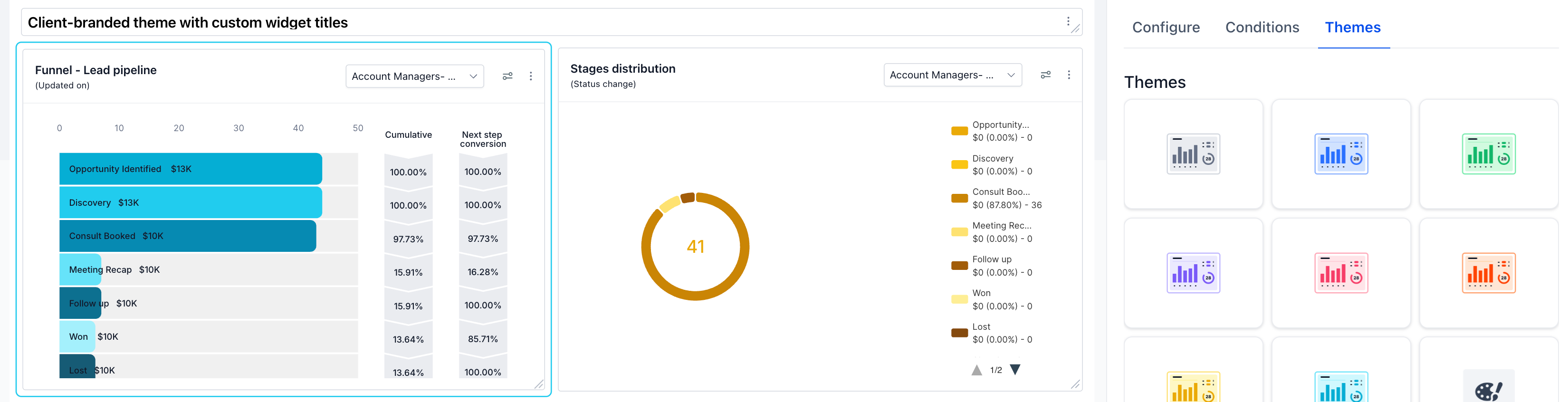
General widgets on your dashboard can now be edited from the dashboard itself. A new Conditions tab sets a permanent filter on any widget by assigned user, tags, source, lead value, custom field or attribution, so the filter holds every time the dashboard is opened rather than resetting. A date range override can lock a widget to a fixed period regardless of the dashboard’s own date filter, and a comparison mode shows the current period against last year or the prior period. Widgets can also be renamed, themed and duplicated. Open Dashboard, then Edit dashboard, then the three-dot menu on any general widget. For a business with several team members or client segments, each person can see numbers scoped to their own patch without rebuilding filtered views by hand. More detail Setup guide
A clearer app detail page in the Marketplace
The Marketplace app detail page has been rebuilt so the information that matters when choosing an app, including rating, install count, who it is built for, pricing, version and developer details, is visible up front. Content is organised into Overview, Pricing, Permissions and Reviews sections. Pricing shows monthly and yearly plans, free trials, and any tiered or usage-based charges. Permissions are grouped by capability and marked as read or write access, so it is clearer what an app can see or change before it is installed. Reviews get their own section with a rating distribution and sortable individual reviews. The new layout applies automatically the next time an app listing is opened. More detail
That is the fortnight. Missed the last one? Catch up on the 31 August to 13 September updates.
Already a Clientflow client? If you want to know more about any of these features, or would like them deployed in your account, get in touch with your usual contact on the Clientflow team.
Not yet a client? Book a call with the team, or see the full feature set on the platform capabilities page.
Clientflow is built on the HighLevel platform, delivered with Australian onboarding, support and expert implementation. Read how that works on our GoHighLevel Australia page.


