
Clientflow Platform Updates: 31 August - 13 September 2026
Nineteen features landed across this fortnight, and most of the weight sits in AI. Workflows can now generate images from a prompt and read the contents of an image sent to you, both as billable actions inside the builder. Conversation AI agents can be given working hours, so after-hours enquiries get acknowledged and picked up the next morning rather than answered at two in the morning or left on read. Publishing a workflow now runs through a validation gate that blocks a broken automation from going live. Here is everything from 31 August to 13 September.
AI across the platform
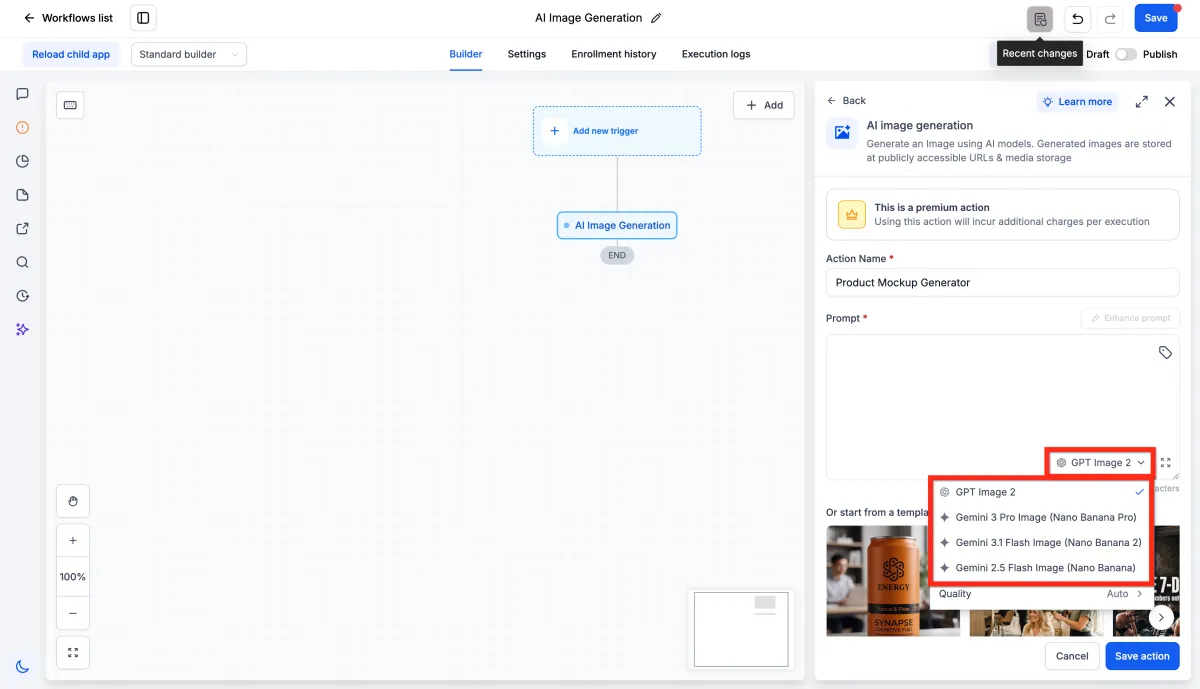
Generate images inside a workflow
Workflows can now produce an image from a text prompt using a new AI Image Generation action, found under AI Actions in the workflow builder. You pick a model, write a prompt or insert one from a contact field or an earlier step, use the Enhance Prompt button to expand a short brief, or start from a template such as Product Mockup or Promo Flyer. The result is stored in Media Storage and returned as a public image URL, ready to attach to an email or SMS, post to social, or save to a custom field. Two upgrades landed a few days later. The action now runs on GPT Image 2.5, in two variants: Flare is the default, producing higher quality output than the previous model at up to half the latency, and Sunburst is built for premium visual work needing tighter control across edits. Subjects and distinctive features carry through more consistently across variations, so a series of generated images holds together rather than drifting apart. The action also now accepts up to five reference images alongside the prompt, uploaded directly, pulled from the Media Library or linked by URL, with the URL option accepting dynamic values so a reference can come from a contact field or a previous step. Images are read in the order added, so a prompt can address each one by position, for instance placing a subject from one image into the setting from another with a logo from a third. This is a premium action billed per execution, with cost varying by model, quality and size. For a property services business wanting branded visuals built around a real logo and product shot rather than an approximation, a single action can now produce a different image for each contact or listing. More detail Model upgrade Reference images
Workflows can read the contents of an image
A new AI Analyze Image action sits alongside AI Image Generation under AI Actions. Give it an image URL and a prompt, choose one of two vision models, and set the detail level to Auto, High for small text, or Low for speed. It extracts text from receipts, invoices and screenshots, or returns a written description of what is in the image, and the result can be saved to a custom field, sent in a message, or passed to a webhook. The image must sit at a public URL rather than on a page containing it. This is a premium action with an added cost per run. For a property services business, this could turn a photo of a damaged fixture sent by a tenant into a text description ready for a work order. More detail
Conversation AI agents can be given working hours
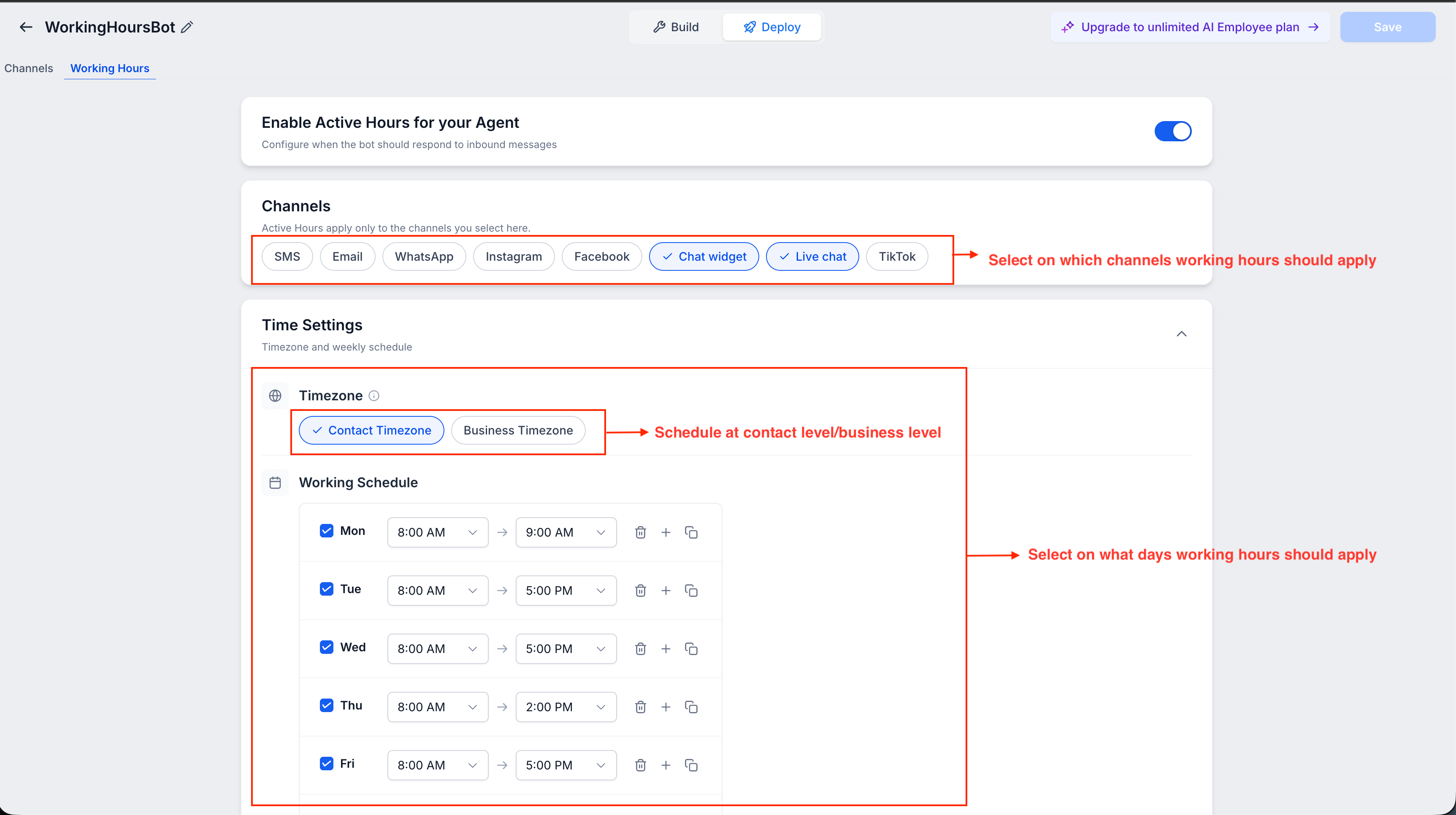
Each AI conversation agent can now follow its own working hours rather than replying around the clock. You set the days and times an agent should respond, choose which channels follow that schedule, covering SMS, email, WhatsApp, Instagram, Facebook, Chat Widget, Live Chat and TikTok, and decide what happens after hours: an automatic acknowledgement message, a tag applied to the contact, a notification to the team, and a follow-up once the business reopens. It runs on either the contact’s timezone or the business timezone, and a conversation already in progress can keep going past closing time until it goes quiet. It is under each agent’s settings in Conversation AI. For a property services business fielding enquiries outside trading hours, after-hours leads get acknowledged and picked up the next morning instead of being left unanswered. More detail
AI Studio now builds full-stack apps
AI Studio now builds full-stack web apps rather than static frontends. New projects run on TanStack Start, giving every page server-side rendering, so search engines and social link previews see full content instead of a blank shell. Server functions let AI Studio write backend logic that stays on the server, and new REST API endpoints let other systems call in over HTTP. A secrets vault stores API keys and tokens so they never appear in the browser or in view source. Existing React and Vite projects built before this update keep running as they are, with a migration path promised later. It applies when starting a new project in AI Studio. For a property services business running booking pages or client portals built in AI Studio, proper search indexing on those pages now works without a workaround. More detail
Find a marketplace app by describing what you need
Ask AI can now search the App Marketplace. Instead of browsing categories, you type a plain language request, such as asking whether an inspection scheduling or accounting integration exists, and Ask AI recommends matching apps with names, categories, descriptions and a link to view details or browse further options. Clientflow controls whether this discovery is switched on for client accounts, through Marketplace Settings under Marketplace Visibility, so it needs enabling before clients see it. For a property services business juggling several trade tools, this cuts the time spent guessing which marketplace category holds the integration they actually need. More detail
Workflows and automation
Publishing a workflow now runs through a validation gate
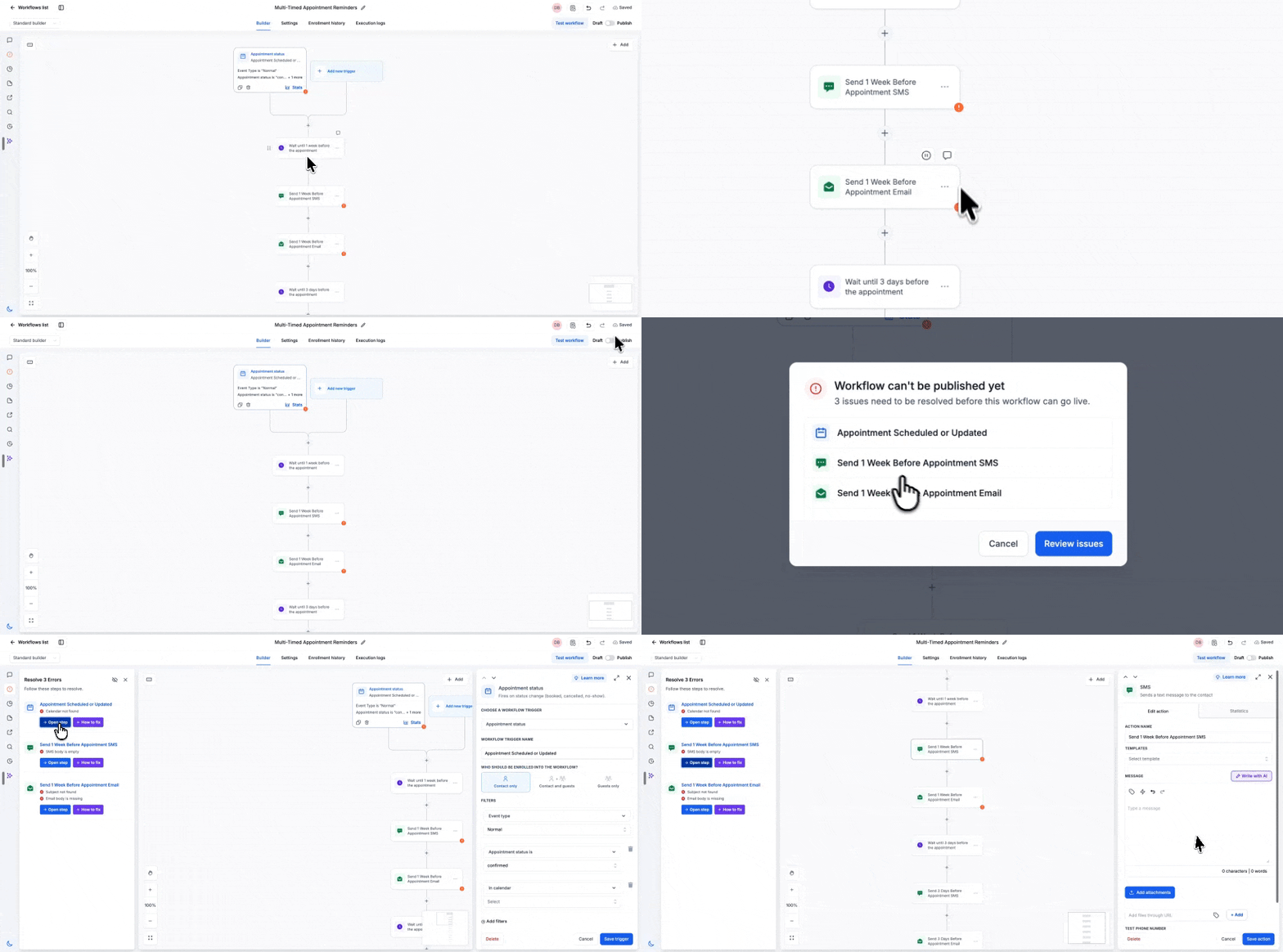
Publishing a workflow now passes through a validation gate before it goes live. Frontend and backend errors that used to surface separately are merged into one Highlight Error sidebar, so every issue lands in the same view regardless of where it originates. Each error offers two fixes: open the step directly, or let AI resolve it. Auto save and manual save now work even while errors remain on the canvas, so work in progress is never lost, and publish itself is blocked until every listed error is resolved. For a property services business, a broken automation, whether a missed trigger or an unconfigured action, gets caught before it reaches clients rather than failing quietly in production. More detail
Dynamic value chips now separate two kinds of error
Dynamic value chips in the workflow builder now show three states rather than two. A blue chip means the value can be filled from within that workflow. A yellow chip means the value is real on the platform but nothing in that particular workflow supplies it, so it renders blank unless another workflow passes it in via Add to Workflow. A red chip still means the value does not exist at all, catching genuine typos. Spacing inside handlebars no longer matters either, so both spaced and unspaced merge tags resolve the same way. It applies wherever dynamic value chips appear in the workflow builder. For a property services business chaining workflows together, such as passing invoice or booking details between automations, a deliberately cross-workflow value no longer reads as a broken configuration. More detail
The User login trigger now covers the new Client Portal
The User login workflow trigger now fires whenever a client logs into the new Client Portal experience, not only the legacy membership area. Existing workflows built on this trigger pick up the change automatically, with no rebuilding required. Client Portal triggers, being User login and Client portal file uploaded, have also been grouped into their own category in the workflow trigger picker rather than sitting under Courses and Membership. You will find it in Workflow Builder under Add trigger, searching for User login. For a property services business running client portals for landlords or tenants, login-based automations such as welcome sequences or account alerts now cover every client regardless of which portal experience they are on. More detail
Calls and messaging
Transfer a call to a staff member without a personal mobile number
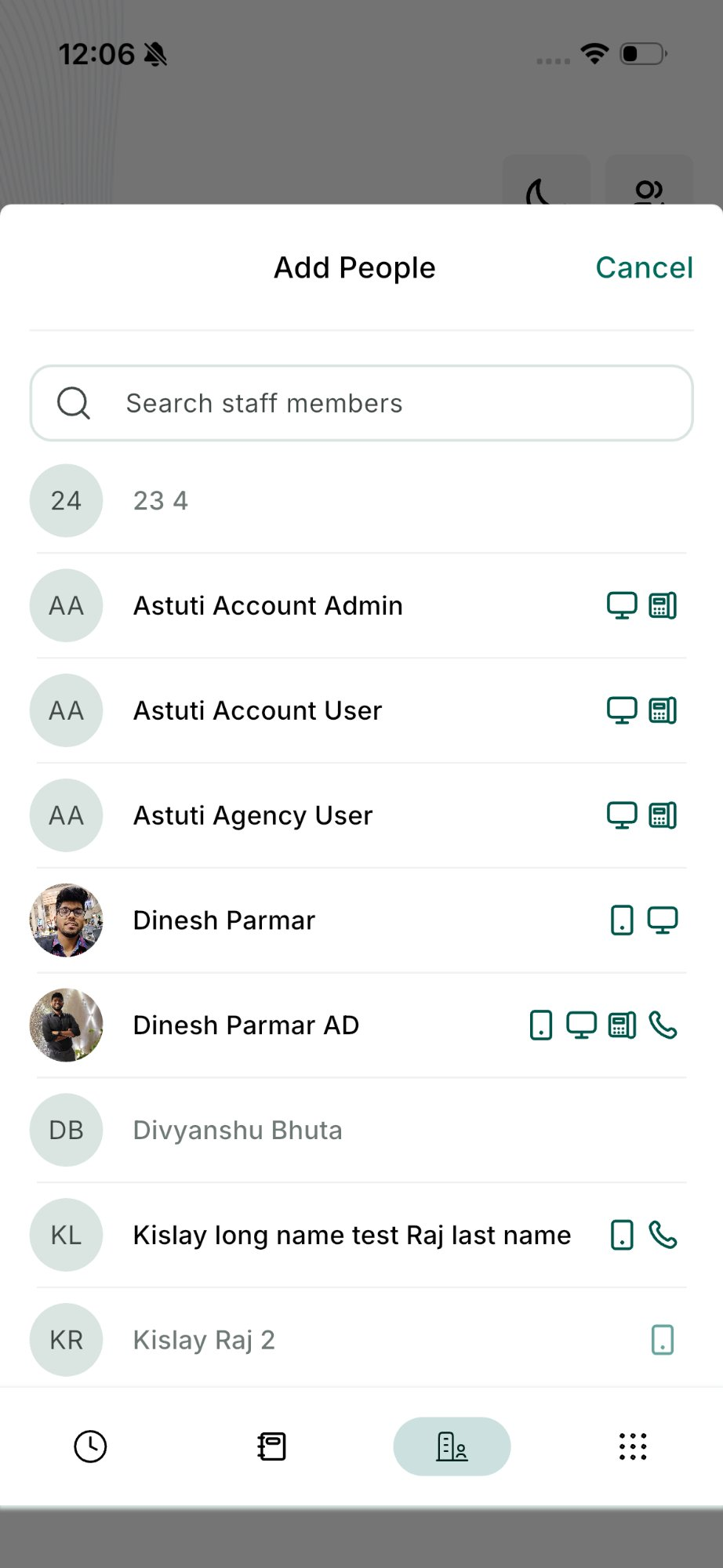
Staff without a personal mobile number can now receive transferred calls from the mobile app, sent through to their web app, physical phone, or SIP desk phone. During an active call, tapping the transfer icon shows which staff are available and which devices each one can be reached on, and the transfer works as a warm handover or a blind transfer, for both inbound and outbound calls. The person receiving the call can see who transferred it, which cuts down on confused pickups. One limitation for now: a call that has already been transferred once cannot be transferred again. For a property services business rostering staff across mobile and desk phones, a call can reach whoever is actually free to take it rather than whoever answered first. More detail
Toll-free verification now needs a privacy policy and terms link
Toll-free verification now asks for a Privacy Policy URL and a Terms and Conditions URL alongside the existing submission fields. From 15 September 2026, carriers will reject any new toll-free verification missing either link, so both fields are live now and required before you submit. They sit on Step 3, Messaging use case, just below the opt-in workflow images. Steps 1 and 2 are unchanged, and numbers already verified need no update or re-verification. For a property services business relying on toll-free calls or texts for bookings and reminders, adding these links to the phone setup now means a new number will not get held up later when it is needed in a hurry. More detail
Missed Call Text Back now picks a number that can actually send
Missed Call Text Back now chooses a number capable of sending the follow-up SMS, rather than always replying from the number a customer called. Some numbers, such as those in number pools, call tracking numbers, or unverified toll-free lines, can receive calls but are not eligible to send texts, which previously caused the follow-up to fail. The platform now falls back through a sequence: the called number if eligible, then a number that has messaged the contact before, then the account’s default outbound number, then any other eligible number on the location. Answered calls are unaffected, and DND and messaging preferences are still respected. It is in Phone System settings under Missed Call Text Back. For a property services business relying on missed-call follow-up to catch after-hours enquiries, this means fewer dropped replies and a better chance the lead hears back. More detail
Bookings and rentals
Customers can cancel their own rental booking
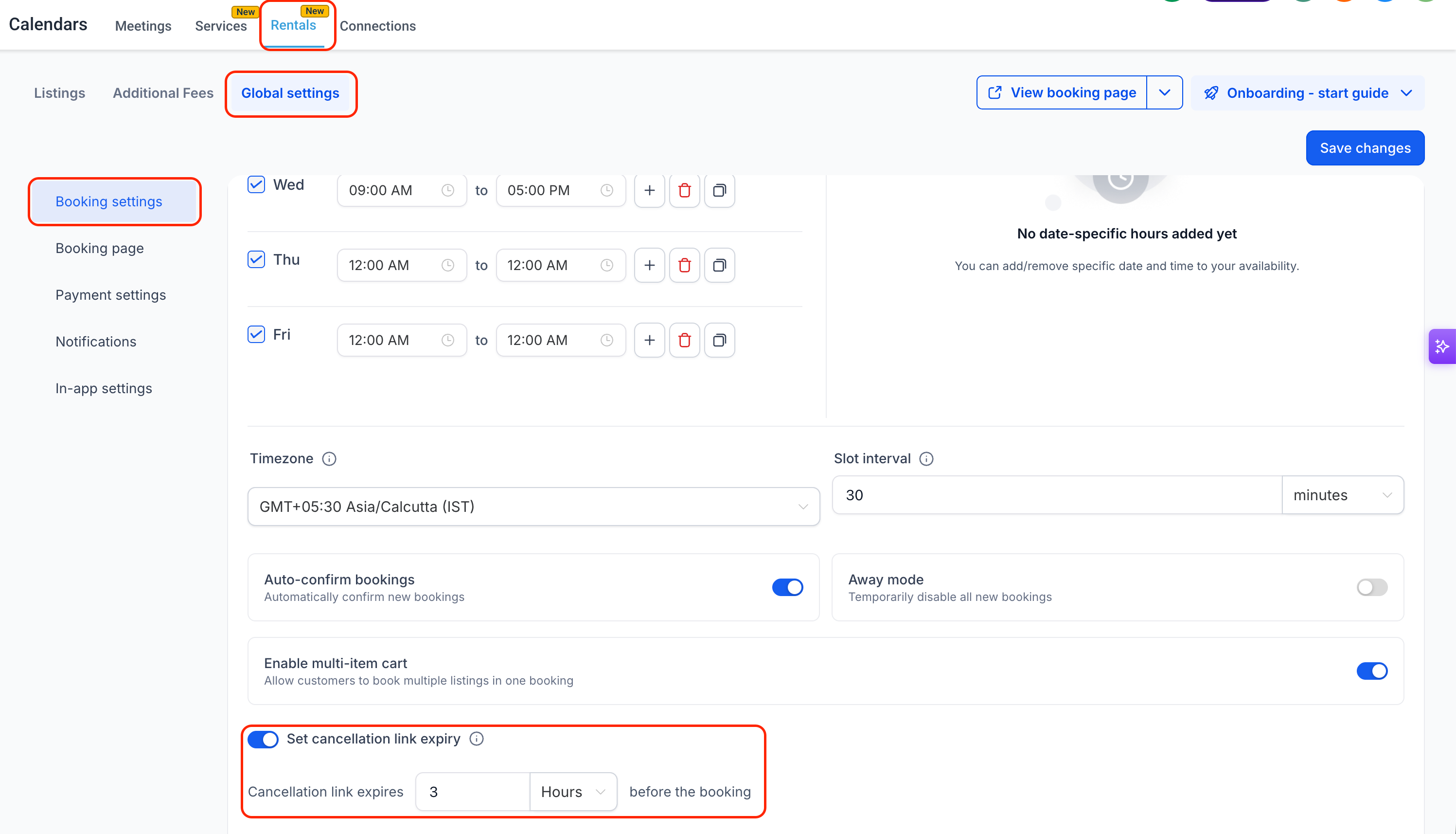
Customers booking through Rentals can now cancel an upcoming booking from a link in their confirmation or reminder notification, with no call or email needed. An optional reason field captures why, saved against the booking for context. You can set a cancellation window, in minutes, hours or days, under Global Settings then Booking settings, after which self-service cancellation closes. Left off, customers can cancel any time before the booking starts. Bookings covering more than one listing cancel together, and expired or already-used links show a clear message rather than an error. Refunds and security deposits always stay a manual decision. For a property services business taking rental bookings, this should cut the volume of routine cancellation requests landing in the inbox. More detail
Booking forms can control what happens after submission
Custom forms attached to bookings can now control what happens after a customer submits, not only which fields show during booking. A new toggle in Global Settings under Form and confirmation lets a form’s own rules, such as redirecting to a URL, showing a custom message or disqualifying a lead, take over the confirmation page across both Services and Rentals. If the form has no matching rules, the confirmation page falls back to the existing Global Settings behaviour, so nothing breaks for forms that do not use them. Banners at the listing and service level show whether a form’s rules will apply. For a property services business qualifying leads through booking forms, the confirmation experience can now match the answers a customer actually gave. More detail
Payments
Retry a failed subscription payment by hand
Subscription payments that fail and exhaust their automatic retries can now be retried manually from the Subscription Details page, for NMI, Authorize.Net, Square and Mercado Pago. Open Payments, then Subscriptions, select a subscription marked Unpaid or Past due, and retry the oldest unpaid charge on the saved card or a new one. Up to three manual attempts are allowed on the same card, after which a 24 hour cool-down applies before another attempt. The card used can also be set as the subscription’s new default payment method. This is limited to those four payment providers. For a property services business running recurring plans or maintenance subscriptions, it is a direct way to recover revenue that would otherwise have meant chasing the client separately. More detail
Marketing
Meta’s own campaign recommendations now appear in Ad Manager
Ad Manager now surfaces Meta’s optimisation recommendations for campaigns that have already gone live, inside the campaign Review screen. Each suggestion shows the affected element, the expected improvement, and an impact rating of high, medium or low, with a Review and Update button that jumps straight to the relevant section. Until now this meant switching across to Meta Ads Manager to see the same advice. Recommendations come from Meta and may shift as performance data changes, so applying one is not a guarantee of better results. For a property services business running Meta ads to fill the calendar, it means fewer tabs open just to catch an optimisation worth making. More detail
Communities and user management
Voice notes in community posts and comments
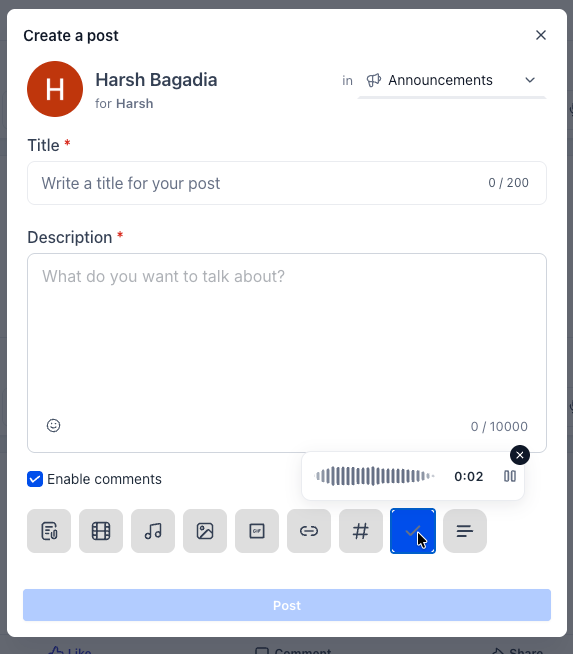
Members of a community can now record voice notes, or upload audio files, directly in posts and comments rather than typing a reply. A new mic button in the composer supports recording, pausing and resuming before sending, and several audio files can be attached to one post. Playback happens inline in the feed, with a waveform view for recordings and a timeline view for uploads, playback speeds of 1x, 1.5x and 2x, and autoplay to the next clip. It is currently on web only, with mobile app support still to come. For a property services business running a client or team community, it gives members a faster way to leave feedback or updates without sitting down to write one. More detail
A refreshed user management experience
The user management screens have been reworked. My Profile is now split into tabs, covering General and Security, plus Calendars, Conversations and Notifications inside an individual account. The Users listing and the create and edit user flows have a new layout, and Team and My Staff are now both labelled Users for consistency. Roles and permissions are organised into a left-hand panel with collapsible scopes, making individual modules faster to find. This is a navigation and interface change only, and existing permissions and user data carry over unchanged. It is available now via Labs, turned on with User Management - UI Refresh. For a property services team managing several staff logins, the clearer permissions layout should make it faster to check who can see what before handing over access. More detail
That is the fortnight. Missed the last one? Catch up on the 17-30 August updates.
Already a Clientflow client? If you want to know more about any of these features, or would like them deployed in your account, get in touch with your usual contact on the Clientflow team.
Not yet a client? Book a call with the team, or see the full feature set on the platform capabilities page.
Clientflow is built on the HighLevel platform, delivered with Australian onboarding, support and expert implementation. Read how that works on our GoHighLevel Australia page.


