
Clientflow Platform Updates: 3-16 August 2026
Thirty-four features this fortnight, and the one worth reading first costs you nothing to adopt: the AI Agent action in workflows now runs at up to half the price, automatically, with no change to how agents behave. Alongside that, CRM data can be pulled straight out of HubSpot without a single CSV, and full event management with ticketing and check-in has come out of request-only access into Labs for everyone. Here is everything from 3 to 16 August 2026.
AI and automation
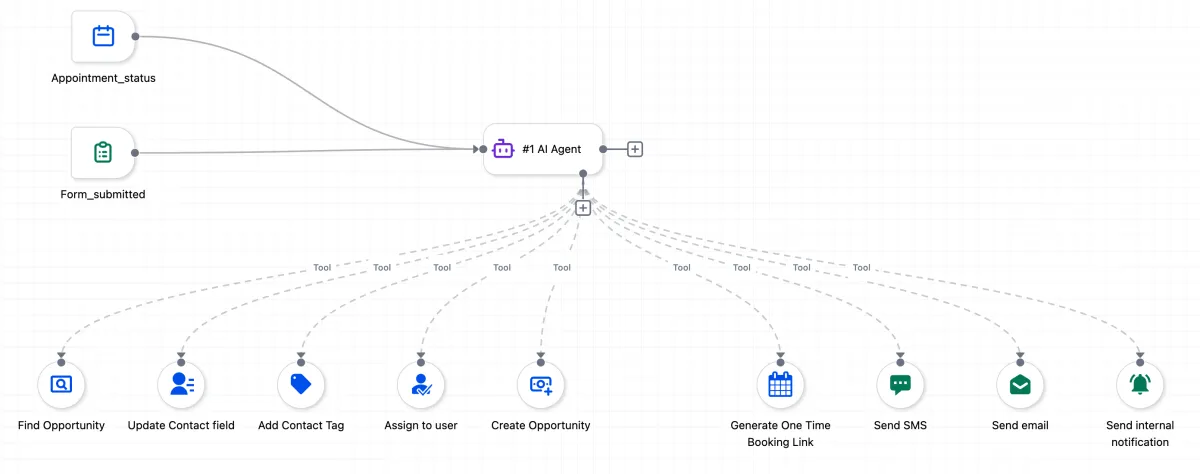
AI Agent Actions Now Cost Up to Half as Much
The AI Agent action inside workflows now runs at up to 50 per cent less cost, with no change to how agents behave or how they are set up. The saving comes from a set of pipeline changes: repeated context across agent steps is cached rather than resent on every call, system and tool prompts have been tightened, and lighter models handle supporting work like summarising while the core reasoning model is untouched. It applies automatically to every existing and new AI Agent action, with nothing to configure, and long conversations and multi-tool agents see the biggest drop. If cost was the reason you kept an agent on a handful of high-value jobs, that constraint just loosened. More detail

Version History in the AI Builder
The workflow AI Builder now keeps a running history of every change the assistant makes. Each build or edit produces a card in the chat, and any earlier iteration restores with one click. A purple border marks whichever card matches the live canvas, so the active version is always clear. Restoring an older iteration does not delete newer ones, and every change, whether from the AI or made by hand, appears together in the unified Version History tab. That makes the assistant safe to use for bold edits, since a change that removes a step or breaks a trigger can be undone in seconds rather than rebuilt. More detail
Explain This Workflow
Workflows that arrived from a template now show an “Explain This Workflow” pill at the top of the builder. Clicking it opens the AI Assistant with a full breakdown of the triggers, actions and branching logic, so anyone opening an inherited workflow can understand what it does without tracing every step by hand. The pill can be dismissed once it has done its job. From there you can ask follow-up questions, or describe a change in plain language for the AI Builder to apply. More detail
WhatsApp Analytics in the Workflow AI Assistant
The AI Assistant inside workflows now reports on WhatsApp performance alongside email and SMS. Ask a plain-language question about any WhatsApp step and it returns delivery, failure and read metrics from live data, including totals for sent, delivered, failed and pending. Name a time window such as the last two weeks and it compares against the prior period, flagging whether volume and delivery are trending up or down. No setup required. More detail
Available Quantity as a Workflow Filter
The Abandoned Cart and Order Fulfilled triggers can now filter on a product’s available quantity, and that quantity can be pulled into a workflow as a custom value. Add Global Products to the workflow filter, select a single price, then set the condition and number for Available Quantity. Two limits in this first version: it supports one price and one quantity value, and the filter cannot be used inside If/Else blocks yet. Useful for triggering a low-stock alert, or holding off on promoting something that has already sold out. More detail
Advertising and social
Build Ad Campaigns by Asking
Ad Manager now takes instructions through Ask AI rather than requiring campaigns to be built screen by screen. Describe what you need, a lead generation campaign on Meta or a search campaign on Google, and it gathers the details, sets up the campaign and audience, and saves it as a draft. Nothing publishes without explicit approval, and deleting a campaign or disconnecting an account also requires confirmation. It covers Meta lead generation, website traffic, engagement and sales, plus Google Search and Demand Gen, along with audience building and performance summaries. LinkedIn, workflows and templates are not included yet. More detail
Opportunity Score Reaches Google and LinkedIn
Ad Manager’s Opportunity Score, previously Meta only, now checks Google and LinkedIn campaigns before they go live. The Review screen shows a readiness score out of 100 with a Low, Medium or High summary, and recommendations tailored to the platform: Google checks keywords, audience, budget, creatives, tracking and bidding, while LinkedIn checks audience, location, budget, creatives, destination URLs and lead-gen setup. Suggestions are grouped by area and ranked by likely impact, and clicking one jumps to the relevant setting. The score is advisory and changes nothing automatically. It catches a missing tracking pixel or a thin audience before the spend goes out. More detail
Paste Google Ads Keywords in Bulk
Keyword management for Google Ads campaigns has been rebuilt. The old 40-keyword limit on positive and negative lists is gone, and keywords can be pasted in bulk into a larger text field, separated by new lines or commas, rather than typed one at a time. Duplicate entries and stray spaces are cleaned up automatically, and a match type applies to the whole batch before adding. Found under Ad Manager, Google Campaign, Ad Group, in the Positive or Negative Keywords section. Keyword eligibility still follows Google’s own requirements. More detail
Threads Posts Sync Into Social Planner
Existing Threads posts can now be pulled into Social Planner automatically, covering text, images, videos, carousels, GIFs and polls, along with engagement figures such as views, likes, replies and reposts. Once switched on, sync runs every 24 hours, and supported post types can be cloned and reused from Social Planner. This one sits in Labs as a beta feature, sync runs one way from Threads so deleted posts still appear locally, and polls can be viewed but not cloned. More detail
Calls and messaging
Callers Hear Their Own Country’s Ringtone
Callers outside the United States used to hear an American ringback tone while being forwarded, routed through a menu, transferred by Voice AI, or dialled out to. That unfamiliar tone reads as spam to a lot of people, who hang up before the call connects. The ringback tone is now localised to the country of the number involved, covering inbound forwarding, outbound calls, menu routing and Voice AI transfers, across 37 countries. Nothing to set up. For an Australian business fielding local enquiries, the phone sounds like a local call again. More detail
Choose Which Devices Handle Call Audio
The web dialer now lets you pick exactly which devices handle audio, rather than relying on the browser default. Set a main speaker, optionally ring a second device at the same time such as a headset alongside a desk speaker, and choose which microphone to use. Test buttons preview the speaker and second device before saving, and the microphone picker shows a live volume meter. The setting sits behind the gear icon in the dialer header. This is a Labs feature, switched on per account, and Safari supports only one audio output device, so Chrome or Edge give full control. More detail
Invoices and Booking Reminders Reach Do Not Disturb Contacts
Invoices, calendar notifications and system alerts now reach contacts even when they are marked Do Not Disturb. Marking a contact DND previously blocked every outgoing email, including the transactional ones people need to see, such as a payment reminder or a booking confirmation. Marketing and promotional sends still respect DND in full, so this affects only those three operational types. There is nothing to configure and it applies to existing DND contacts automatically. A client who opted out of marketing still gets their invoice instead of ringing to ask why nothing arrived. More detail
WhatsApp Usernames Are Captured as Contacts
WhatsApp is rolling out usernames, which let customers message a business without sharing a phone number. The platform now captures these as contacts automatically, using a business-scoped user ID in place of a number. Existing contacts, phone-based messaging and imports are unaffected, since this applies only to a customer’s first message after they switch a username on. The feature is in beta with Meta and rolling out region by region, starting in markets including Algeria, Ghana, Nepal, Colombia and Singapore, so it is groundwork rather than something Australian businesses will see this month. Contact capture is on by default when it does arrive. More detail
Website chat
Any Chat Widget Can Sit Inside the Page
Every chat widget type can now be placed inline on a page rather than appearing only as a floating bubble in the corner. Embedded placement, previously limited to Live Chat and Voice AI, now covers All-in-One Chat, Email and SMS, WhatsApp, Facebook, Instagram, Live Chat and Voice AI. An embedded widget opens automatically within the page, shows the full conversation, skips the floating bubble and the initial prompt popup, and cannot be minimised. On All-in-One Chat, visitors switch between channels without leaving the panel. Set it from the Chat Widget Builder placement settings, choosing Embedded rather than Sticky. More detail
Speech-to-Speech Voice Agents in the Chat Widget
The chat widget can now run native Speech-to-Speech Voice AI agents alongside the existing Voice AI agents, from the same Agent dropdown. The widget detects which agent type is selected and launches the matching experience, with two-way audio, mute controls and call status carried over unchanged. Switching an existing agent to a supported model updates any widgets already using it, with no need to re-save or re-embed. The Speech-to-Speech code only loads when a visitor actually starts a call with one of those agents, so normal widget performance is unaffected. Found under Chat Widget, Agent, and it needs Speech-to-Speech Voice AI turned on through Labs first. More detail

Bookings and calendars
Services v2: WhatsApp Notifications and Tabbed Categories
A bundle of updates to Services v2 covering notifications, booking layout and setup defaults. WhatsApp is now available as a notification channel alongside email and SMS for booking confirmations, reminders and follow-ups. Service and rental custom values can be selected inside the Email Builder rather than typed by hand. Service categories can display as top tabs on the booking widget, and several booking page defaults have been updated to cut setup steps. Found under Services v2 settings and the Email Builder. More detail
Reschedule Links Straight From the Appointment
A reschedule link can now be generated on demand from an existing appointment and copied to the clipboard, rather than hunting down the original booking confirmation email. Available across Meetings and Services, from the Appointment Actions menu on any appointment opened through Contacts, Conversations, Appointments or Opportunities. Existing appointment permissions still apply, so a user without appointment management access will not see the option. When a client rings to move their booking, staff send a working link on the spot. More detail
One Week Start Setting Across the Calendar
The day a week starts on, Saturday, Sunday or Monday, can now be set once and applied consistently across calendar views, appointment creation, availability, staff schedules, date pickers and business hours. The preference is configured separately for Meetings, Services and Rentals from each area’s Calendar Settings. Worth knowing: this covers the in-app scheduling experience, and booking widget preferences stay independent and need setting on their own. More detail
Contacts and pipelines
A Contact Overlay Instead of Losing Your Place
Clicking a contact’s name from an opportunity or an appointment used to take you to their full contact page, pulling you away from whatever you were doing. An overlay now keeps you in place. You can open a single-column view of contact details alongside conversations, a wider two-column view with an expanded conversations panel, or still jump to the full page if you prefer. The overlay respects any customisations already made to the contact details layout, so the view stays consistent wherever you open it. It covers opportunities and appointments, with more areas planned. More detail

Import Your HubSpot Data Directly
Moving CRM data out of HubSpot no longer means exporting and re-importing a stack of CSVs. A new importer connects to a HubSpot account and pulls across contacts, deals as opportunities, companies, custom fields, pipelines and stages, notes, emails, tasks and their associations. Start from Contacts, Companies or Opportunities, connect the account, choose which objects to bring over, and review the record counts before confirming. The import runs in the background, and an Import History table shows successful, skipped and failed records, with filtering and a CSV export. Existing matching records are not overwritten, and imported emails come across read-only. Worth testing on a fresh account before running it on a live one. More detail

Conditional Custom Fields on Opportunities
Opportunity forms can now show, hide or require fields automatically based on the pipeline, stage, status or other field values on the deal. Rules use single conditions or AND/OR logic, can reveal individual fields or whole folders, and can mark a field mandatory so an opportunity cannot be saved without it. Rules preview live before saving and apply across add, edit and bulk-edit on web and mobile. Switched on from Settings, Labs, then configured under Custom Fields for Opportunities. Only admins can create or edit rules, and validation applies to manual saves rather than API or workflow updates. More detail
Note Attachments Are Private by Default
Documents attached through notes on a contact record are now private by default rather than public. New uploads land in a “Notes attachments” folder, and you choose how to share each one: a public link, a private link, a one-time code link, or a password-protected link. Existing documents keep their current public status unless a private link is generated by hand, so the change applies to uploads from here on rather than retroactively. For anyone storing tenancy or compliance paperwork against a client record, the safer default removes a step you had to remember. More detail
The Review Trigger Covers Every Connected Platform
The New Review Received workflow trigger used to fire only for Google and Facebook. It now covers every review platform connected to the account, including Trustpilot, Yelp and TripAdvisor. A workflow can notify the team, start a follow-up, or route a review based on where it came from, whichever connected platform it landed on. Existing workflows built on the Google or Facebook trigger keep working exactly as before, so nothing needs rebuilding. If you collect reviews in more than one place, this closes the gap where everything outside Google and Facebook slipped past automated follow-up. More detail
Payments and documents
Rental Invoices Show the Real Unit Price
Invoices generated for rental bookings now break the price down properly, showing the true cost per unit and the actual number of units booked rather than folding everything into a single unit. A rental booked for three days across four units at $50 a day previously showed as one $540 line, and now shows a $135 unit price against a quantity of four, totalling the same $540. Pricing is calculated per unit before the total, which occasionally produces a one cent difference on invoices with non-round discount percentages, a rounding quirk rather than an error. Customers can see what they are being charged per item instead of a lump sum that invites a phone call. More detail

Redeem a Gift Card While Taking a Booking Payment
A customer’s gift card balance can now be redeemed by staff while collecting payment directly from an appointment, across Meetings, Services and Rentals, rather than only through customer-facing checkout. From the appointment’s Payments tab, select Collect Payment, then Charge a Card, then Redeem a Gift Card, and the balance applies before any remaining amount is charged to a saved card. Behaviour is the same whether the customer or the business starts the payment: a full balance covers the appointment outright, a partial balance reduces what is charged. On a phone booking, the gift card can be applied for the client rather than asking them to do it online. More detail
Up to Six Signer Roles on Documents and Contracts
Document and contract templates can now hold up to six signer roles, such as buyer, seller or witness, each with its own fields for signature and contact details. When a template is sent through a workflow, every role populates automatically rather than being added by hand each time, and any role’s name, email or phone can be overridden at the workflow level without touching the template. At least one fillable element must be assigned to Contact for the workflow send action to work, and roles auto-populate only on a workflow send rather than a manual one. Web only for now. For agreements needing a client and a guarantor, that removes a step from every send. More detail
Abandoned Checkouts Gains Export, Filters and Recovery Links
The Abandoned Checkouts page under Payments has been rebuilt with export and filtering. Customers can be searched by name or email, results filtered by email status, recovery status or date range, then exported to CSV with customer, cart, product and recovery details. Each abandoned checkout also gets a shareable recovery link you can send so the customer finishes their purchase. Exports over 5,000 records arrive by email rather than downloading directly, and a shortcut to abandoned cart notification settings now sits on the same page. Found at Payments, Orders, Abandoned Checkouts. More detail
Stores and funnels
A Full Store Inside a Funnel
A funnel can now carry an online store inside it, combining marketing steps with product browsing, cart, checkout and order confirmation in one flow. Adding a store creates five linked steps, being Product List, Product Details, Cart, Checkout and Thank You, and store elements such as Featured Product or Collection List can be dropped into any funnel step. A Store Products tab controls which products show and in what order. One store per funnel, and cloning a funnel carries the store setup across without duplicating the products. For anyone selling maintenance packages or add-on services, a funnel can now run from the offer straight through to a paid order without handing off to a separate store. More detail

Google Merchant Center Integration
Stores can now connect to Google Merchant Center as a marketplace app, syncing eligible products for visibility on Google Shopping and other Google surfaces. Once linked, pricing, inventory, images and variants keep syncing automatically, and the integration flags errors or warnings that could affect approval. Multiple store-to-account mappings are supported, though each store or Merchant Center account sits in only one active mapping at a time. Set it up from the Marketplace by installing the app and connecting a Google account. More detail
Courses, events and the client portal
Event Management Opens to Everyone Through Labs
Full event management can now be switched on from Labs rather than requiring a request. Once turned on, you can create free, paid, RSVP, in-person, online or hybrid events, build a branded event page with its own layout and custom CSS, sell tickets with promo codes, issue QR tickets, and check attendees in through the mobile app. Workflows can trigger off registration or check-in, so confirmation and reminder sequences run on their own. Found under Memberships once enabled. This is a beta feature living in Labs and needs switching on before staff can use it. For anyone running open homes or trade information sessions, ticketing and check-in in one place is a real addition. More detail

Course Announcements
Course creators can now post announcements inside a course rather than relying on email alone. Announcements support rich text, images and links, and can target learners in a single course or across all courses, with an optional email notification alongside the in-app banner and unread indicator. They are created, edited, cloned and deleted from the Courses admin area under Announcements, and learners see them through a banner, an unread marker and a dedicated list. Useful for pushing a schedule change or a compliance update to staff or contractors without a separate email that gets missed. More detail
Expired Portal Links Fall Back to a One-Time Code
When a contact’s client portal magic link expires, they are now redirected to a verification screen instead of hitting a dead end. A one-time code is sent to their email, shown with the address masked, and entering it restores access without an admin generating a new link. The fallback applies automatically to portal links using the current authentication method, with nothing to configure. For clients checking job updates or invoices through the portal, that removes a round of access requests over links that had simply gone stale. More detail
Reporting
Dynamic Values in Dashboards and Reports
Dashboard and report widgets can now pull in dynamic values rather than hard-coded text, using a new token picker. It works in widget conditions and in dashboard elements such as embeds, titles and text boxes, drawing on location fields including name, address, phone and timezone, user fields, and any custom values already set up. Each token resolves to the right value for whoever is viewing. Available to dashboard editors from Edit mode by clicking the token icon beside a text field. More detail
Tell a Widget Which Direction Is Good
Dashboard and report widgets showing trend badges, the small up or down arrow beside a percentage change, can now be told which direction counts as good. An increase is treated as positive by default, but metrics such as unsubscribe rate, bounce rate or cost per lead can be flipped so a decrease shows green instead. The setting lives in each widget’s Configure panel under Advanced settings, alongside date range and comparison range, and applies to Number, Line and Bar charts. Existing widgets keep the old behaviour until changed. It stops a rising cost per lead being coloured as an achievement. More detail
That is the fortnight. Missed the last one? Catch up on the 20 July - 2 August updates.
Already a Clientflow client? If you want to know more about any of these features, or would like them deployed in your account, get in touch with your usual contact on the Clientflow team.
Not yet a client? Book a call with the team, or see the full feature set on the platform capabilities page.
Clientflow is built on the HighLevel platform, delivered with Australian onboarding, support and expert implementation. Read how that works on our GoHighLevel Australia page.


