
Clientflow Platform Updates: 8-14 June 2026
Twenty-five features in the second week of June, and a few of them solve problems people have been working around for years. Emails can now carry multiple wordings of the same line and pick one at send time. A live call can be transferred to a teammate who has no personal phone number at all. And the mobile task manager has been rebuilt with recurring tasks and a link between tasks and deals. Here is everything from 8 to 14 June 2026.
Communication
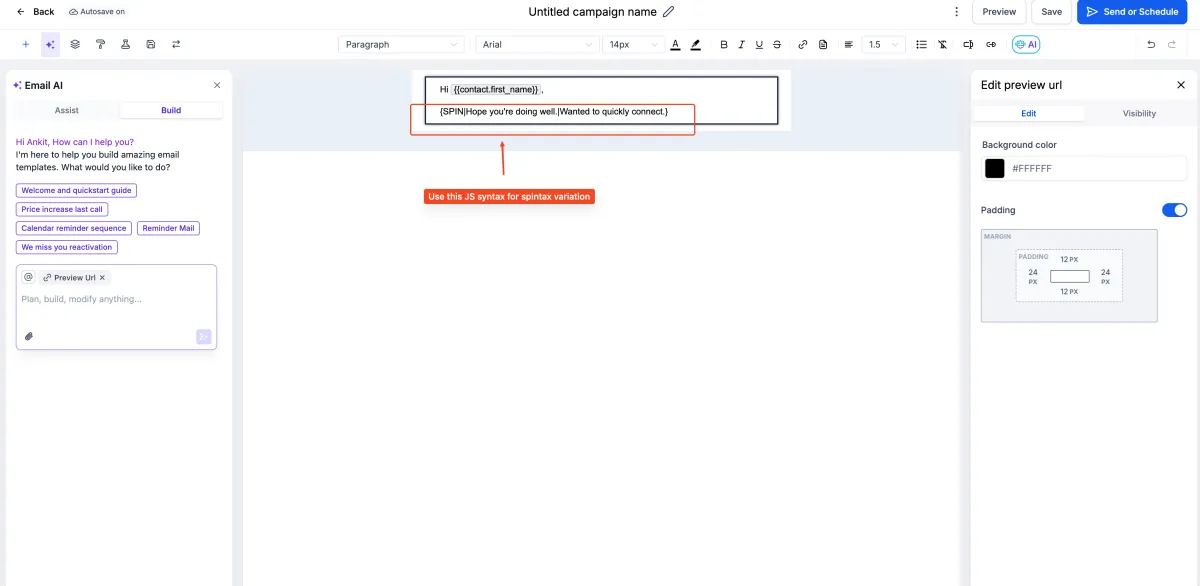
Spintax: Multiple Wordings in One Email
A single email template can now hold several variations of a word, phrase or sentence, with one picked at random each time it sends. Write them pipe-separated inside curly braces, in the form {SPIN|Hey|Hello|Hi} there, and it works in the subject line, the preview text and the body. Custom values can sit inside a spin block, so merge fields still work.

The point of this is deliverability. Sending the identical wording to a large list is one of the signals that gets mail filtered, and spintax reduces that uniformity without you maintaining separate versions of the same email. It also lets you test different phrasings without setting up a formal A/B split. More detail
Transfer a Call to Any Device a Teammate Uses
A live call can now be transferred to a team member who has no personal phone number configured, by routing it to whatever devices they do have. The web app, a mobile, and a SIP desk phone all ring at once. Warm and blind transfers are both supported, on inbound and outbound calls, and the recipient sees a transferred call indicator in the web app.

Enabled through Labs. Mobile app support was flagged as coming, re-transferring an already-transferred call is not supported, and staff without configured devices do not appear in the transfer list. For any business where calls need to reach the right person without handing out personal mobile numbers, this is the mechanism. More detail
Email Sequences Arrive in Beta Labs
Email Sequences has come out of private beta and into Beta Labs. It sends a series of emails as one continuing thread rather than separate messages, with conditional sending based on open or delivery status so later steps depend on what the recipient did, and a Stop on Reply option that halts the sequence the moment someone responds. Designed and plain text emails are both supported, and analytics run at sequence level and step level.

Enable it under Settings then Beta Labs, then build sequences under Marketing, Email, Campaigns via Create New Sequence. Enrolling contacts through workflows, building sequences with Email AI, and per-step A/B testing are all listed as coming. More detail
CRM and pipelines
Mobile Task Manager Rebuilt
Tasks in the mobile app have been rebuilt. Recurring tasks repeat hourly, daily, weekly or monthly with a customisable end date. Tasks can be linked to an opportunity, which ties the work to the deal and the revenue behind it, and a single task can carry several contacts. List and board views are both available, a progress ring shows how much of today’s load is done, and tasks organise themselves into Overdue, Today, This Week and Upcoming. Task cards surface contact and opportunity detail without opening the task.

Create one from the Tasks tab with the plus button, adding a title, due date, contacts, opportunity and assignee, and switch on Repeat for a recurring task. Available in version 4.18.0. A homepage task widget and better filtering and grouping are listed as coming. More detail
Reorder Pipelines
Pipeline order in the Opportunities view was fixed, which left naming conventions as the only way to influence it. You can now drag pipelines into the order you want by their handle, or use Move to position from the three-dot Actions menu for precise placement. The order persists across refreshes and sessions. It is an account-level setting restricted to admins, so everyone sees the same order rather than each person setting their own. More detail
An All Pipelines View
The pipeline dropdown in Opportunities now offers All Pipelines, which shows every opportunity across every pipeline in one list. It works in list view only and is disabled in board view. The resulting view can be saved as a smart list, though smart lists saved this way are list type only. If you run separate pipelines for different service lines, this is the single place to see everything open. More detail
Control Who Can Create Pipelines
A Create Pipeline permission has been added, so pipeline creation can be granted or withheld per role rather than being open to everyone. It gates cloning and duplicating as well as creating from scratch. Set it under Settings, My Staff, then the user’s Roles and Permissions, in the Opportunities section. Changes take effect immediately. Ad hoc pipelines created by well-meaning staff are one of the quieter ways reporting gets fragmented, and this closes that off. More detail
Community Membership Questions Write to CRM Fields
Membership questions on a community can now be mapped to CRM custom fields, so a person’s answers land on their contact record automatically when they join. Set it up under Community Settings, Membership Questions, Add Question, then the Custom Fields tab, and pick the field to map to. Answers then appear in contact details under the folder holding that field. That turns the join form into a data capture step that can drive approval automation, segmentation and follow-up rather than sitting inside the community tool unused. More detail
Automation
Goal Events Can Watch Task Status
Task lifecycle events existed as workflow triggers but not as goal conditions. The Goal Event action now accepts Task Status as a goal type, with a choice of Task Created or Task Completed, and filters by task name or assignee. So an onboarding task being ticked off in the CRM can advance the contact to the next goal and send the next message, without anyone moving them along by hand. Internal work getting done now drives customer-facing follow-up. More detail
Customer Replied: Better Message Filters
Two changes to the Customer Replied trigger. A new Has Attachments filter checks whether an incoming message carries a file, on a yes or no basis. And the message body filter has been consolidated: the old Contains Phrase and Exact Match Phrase filters are now one filter with contains, does not contain, exact match, empty and not empty conditions. Existing workflows using the older filters keep working unchanged, so nothing needs rebuilding. Inbound replies can now be triaged without extra branches: route messages with attachments one way, messages containing a keyword another. More detail
Internal Notifications Reach Followers and Opportunity Owners
The Internal Notification action can now notify contact followers, opportunity followers, or both, and Opportunity Owner has been added as a recipient. The follower checkboxes are additive, so followers are notified alongside whoever you chose as the main recipient, and everyone is deduplicated so nobody gets the same alert twice. Followers are resolved when the action runs. Email, in-app, SMS and WhatsApp are all supported. Opportunity followers are skipped if there is no opportunity, and anyone missing the required address for a channel is skipped for that channel. Existing actions are unchanged. More detail
Book Appointment: Timezone Control
The Book Appointment action now takes a timezone, either fixed or dynamic, including the contact’s own. The start date and time is interpreted in that timezone before the booking is made, so the appointment lands at the right absolute time. With no timezone set it falls back to the account timezone. The timezone is used both to interpret the start time and to check slot availability, and with Override Availability on, appointments book without any availability check at all. If you have ever had an automated booking land three hours out for an interstate contact, this is the fix. More detail
Better Field Search in the Workflow Builder
The field dropdown now ranks the best match at the top, whether it is a standard or a custom field, and search results appear in one combined list rather than split into sections. Clear the search and the dropdown returns to its Standard Fields and Custom Fields grouping. The trigger filter interface has been refreshed alongside it. The change applies to every field dropdown throughout the builder. More detail
Marketing
Meta Pixel: Event-Level Suppression of Legacy Events
For accounts moving to the new Events tab, suppression of legacy events has changed from a single global switch to control per event, so configuring one new event no longer quietly disables other tracking. A legacy event is now suppressed only when its direct replacement is configured. PageView and ViewContent events now carry a privacy-safe customer identifier on both the browser pixel and the Conversions API, which improves deduplication, and Purchase and InitiateCheckout events send fuller order data including value, currency and product IDs. Accounts not yet on the Events tab see no change. Configure events through the Events tab rather than mixing in manual scripts, as combining the two can produce inconsistencies. More detail
LinkedIn Moves to the Marketplace Architecture
The LinkedIn integration has been rebuilt on the marketplace architecture, which changes how connections authenticate and handle credentials. Existing connections keep working and no workflow needs reconfiguring. It sits behind a Labs toggle named LinkedIn Marketplace Migration; new connections made with it on use the new architecture immediately, and everyone else migrates automatically when it leaves Labs. The reason to care is what it enables next: connecting more than one LinkedIn account to a single location. More detail
Reporting
SLA Widgets in Dashboards
Four SLA widgets have been added to the Conversations section of the widget panel: SLA met trend, SLA breached trend, average response time trend, and SLA performance across users and channels. Each filters by assigned user and by channel, covering calls, SMS, email, web chat, Facebook, Google Business Profile and Instagram. SLA met and SLA breached are also available as dimensions in custom metrics. Date ranges are capped at one year. Add them through Edit Dashboard then Add Widget. This is how you find out whether enquiries were answered on time before a client tells you they were not. More detail

Payments
Mobile Invoices Warn Before You Lose Changes
Editing an invoice or estimate in the mobile app and backing out before saving now brings up a confirmation, offering to save and close or discard. It appears only when there are actual unsaved changes, so an unchanged record still closes straight away. For anyone quoting on site from a phone, this is the difference between losing a set of line items and not. More detail
Websites and stores
Buttons That Add to Cart, Buy Now or Open a Collection
Website buttons can now trigger ecommerce actions through their Link To setting. Add to Cart takes a product, opening a product detail modal if All Prices is selected or adding straight to the cart for a single price. Buy Now behaves the same way but goes to checkout with the product pre-loaded. Collection links the button to a filtered collection page. Set it on a button element in the Website Builder, then publish.

Worth knowing the limits: websites only, not funnels; a store must already exist; buttons disable themselves if the linked product or price is deleted; and a deleted collection sends customers to a 404. More detail
Add to Cart Straight from Product Lists
An Add to Cart toggle can now be switched on for product list pages and featured products elements, so customers add an item without opening the full product page first. Single-variant products show an Add to Cart button; multi-variant products show Choose Options and open a modal instead. Product detail page styling carries into the modal so it stays consistent. Variant selections reset if the modal is closed and reopened, and products with every variant out of stock hide the buttons while remaining on the page. Fewer clicks between browsing and cart generally means fewer abandoned carts. More detail
Blogs: A New Author Layout
Blog posts get a card-based modern author layout, now the default for new posts, alongside the existing classic one. The author profile can show a photo, name, role, bio, social links and email address, with long bios condensing behind a Read More so they do not swamp the page. It is responsive across desktop, tablet and mobile. Configured under Sites, Blogs, Blog Post Settings. Existing posts keep their current layout unless updated, there are no dedicated author profile pages, and only one author per post is supported. More detail

SEO Subscription Management
Cancelling an SEO subscription has moved from a one-click unsubscribe to a guided Manage Subscription flow. You choose whether to keep or remove the SEO fixes already applied to the site before the subscription ends, and whether to cancel immediately or run to the end of the billing cycle. A scheduled cancellation can now be reversed in-app rather than through support. Found under SEO then Settings then Manage Subscription. The gain worth having is not accidentally stripping SEO changes already made to your site. More detail
Booking and rentals
Rentals: Filter the Booking Page by Date
Customers can now filter a rentals booking page by date range before browsing. They set a start and end date in the availability filter, click Apply, and see only the listings free for that period. Opening a listing pre-fills the booking details from those dates. Availability is validated across all booking modes and supports date selector, date and time selector, and fixed duration listings, respecting each listing’s inventory, lead time, buffers, duration requirements and advance booking limits. Nightly rentals requiring at least one night do not appear when the start and end dates are identical. More detail
Rentals: Duration Discounts and Notice Periods Behave Sensibly
Duration-based discounts and minimum scheduling notice used to calculate from the underlying booking duration in hours, which produced odd results on day, night, weekly and monthly rental configurations. Both now evaluate against the listing’s configured rental period instead, so a discount set for a week applies to what the listing itself calls a week. Notice periods set in days, weeks or months behave the same way. Hour-based configurations are unchanged and still enforce exact times. Applies automatically with no setup. More detail
Appointments Sort Chronologically in Contacts and Conversations
Upcoming appointments now list soonest first, and past appointments list most recent first, in both the Contacts and Conversations tabs, with a View button for quick access to any of them. When a customer rings or replies, you can see in seconds when they are next booked in and when you last saw them. More detail
Media
Upload Images Straight from a URL
Media Storage can now import an image from a public URL, so an asset no longer has to be downloaded to your device first. It shows a thumbnail preview before importing, detects the filename and dimensions automatically, validates the link, format and file size, and requires you to confirm you have the right to use the image. The import lands in whichever folder is currently open. Found under Upload then Upload from URL. Useful for anything supplied by a photographer, supplier or stock library as a link. More detail
That is the week. Missed the last one? Catch up on the 25 May - 7 June updates.
Already a Clientflow client? If you want to know more about any of these features, or would like them deployed in your account, get in touch with your usual contact on the Clientflow team.
Not yet a client? Book a call with the team, or see the full feature set on the platform capabilities page.
Clientflow is built on the HighLevel platform, delivered with Australian onboarding, support and expert implementation. Read how that works on our GoHighLevel Australia page.


