
Clientflow Platform Updates: 25 May - 7 June 2026
Twenty-seven features across the fortnight, and the useful ones are quietly practical rather than flashy. A new AI action pulls structured data out of an enquiry email and drops it straight into fields. Housecall Pro connects to workflows natively, so job activity can drive follow-up without a connector in between. And Reviews AI now handles Facebook reviews as well as Google, either suggesting a reply or answering on its own. Here is everything from 25 May to 7 June 2026.
AI
AI Data Extract in Workflows
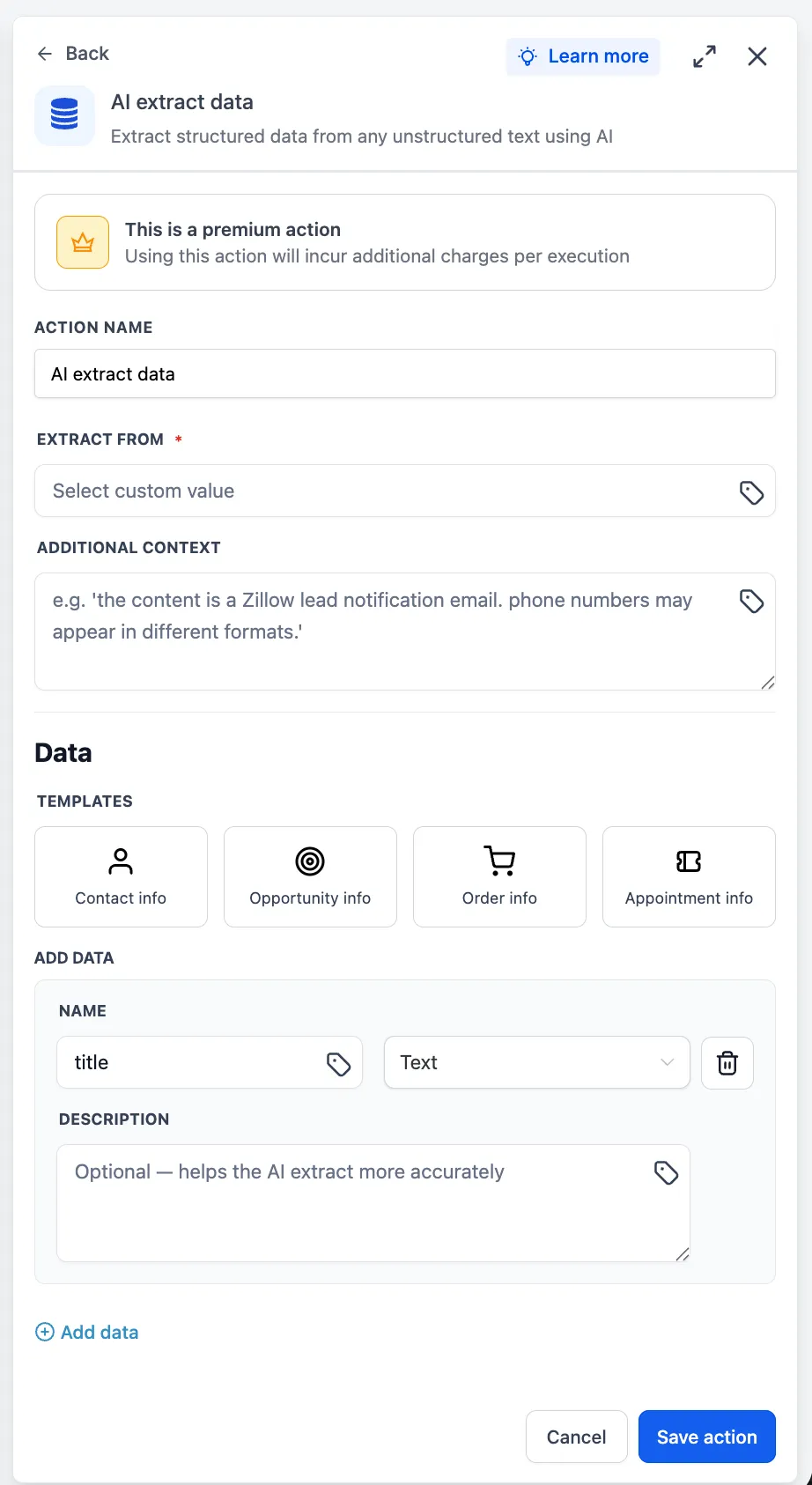
A new AI action that turns unstructured text into typed variables you can use. Point it at an inbound email, an SMS or a webhook payload, and it returns clean fields ready for the next action in the workflow. You choose the input through the custom value picker, optionally add a context note to sharpen the extraction, and either pick a pre-built template for a common pattern or define your own fields. The extracted values become workflow variables straight away.

The practical version: an enquiry email arrives with a name, a suburb, a job type and a rough budget buried in a paragraph of prose. This reads it and fills the fields, without a third-party tool or a manual copy and paste. More detail
Conversations AI: Suggestions Ready Before You Open the Thread
Suggestive mode used to generate a reply when you opened the conversation, so you waited. The AI now drafts the response in the background the moment a message arrives, and the suggestion is already sitting there when you open the inbox. The suggestion card has been redesigned for faster review, you can send it in one click or edit it first, and if further messages arrive while a suggestion is pending it refreshes to match the latest context. Nothing is ever sent automatically. More detail
Conversations AI: Better Audio Understanding
Transcription accuracy for voice messages and audio notes has improved, language support has expanded to include Arabic, Bengali, Hebrew, Tamil, Urdu and more than ten others, and audio processing handles edge cases more reliably. The underlying speech recognition copes better with accents, pronunciation variations and noisy recordings. It applies automatically wherever Respond to Audio is switched on in bot settings, with no configuration needed. If your customers leave voice notes, fewer of them will be misread. More detail
Email Builder: Fix with AI
When a campaign fails validation because of invalid custom value syntax or a missing subject line, a Fix with AI action now appears. It applies the correction, generates any required variants, and logs every change with an explanation in the Email AI chat window so you can see exactly what it altered. Triggered from Send, Schedule or the checklist. Requires Email AI to be enabled in Labs first. A companion Beautify with AI feature covering mobile responsiveness, alignment and spacing is listed as coming. More detail
AI Studio: User Permissions
AI Studio now has its own permission levels: View AI Studio for read-only access, and View and Manage AI Studio for full read and write. Every AI Studio component and API is protected accordingly, so creating and editing is limited to the people you intend. The module has also moved onto the current identity and access management framework, which makes enforcement consistent with the rest of the platform. If you have staff or contractors who need to see what has been built without being able to change it, that is now possible. More detail
Ask AI: Your Chat History Is Yours
On the mobile app, Ask AI chat history now shows only your own sessions. Several people working in the same account previously saw each other’s chats in the history list. Each person now sees only the conversations they started, and the list refreshes when switching accounts or users. It applies to the chat history list only, not to live chat or new messages. Available from version 4.18.0. More detail
Automation
Housecall Pro: Native Workflow Triggers and Actions
Housecall Pro now connects directly to workflows, with no third-party connector in between. Two triggers, Job scheduled (which fires on new bookings and on reschedules) and Job completed, and one action, Create new customer. Both triggers return the full job payload including a nested customer object, so field mapping downstream is consistent. Creating a customer needs a first and last name, with email, company, mobile and home numbers optional.
Authenticate with an API key from Housecall Pro’s API Key Management section, add the trigger or action inside a workflow, and test before publishing. These are premium actions billed per execution, and Housecall Pro bills its own plan usage separately. For anyone running jobs through Housecall Pro, review requests and follow-up sequences can now fire off real job completion rather than someone remembering. More detail
AI Builder: Ask Questions About Your Workflows
The workflow AI assistant now answers questions about your automations rather than only building them. Ask in plain language and it draws on live data from your account: entries, status breakdowns, completion rates, goal conversions and where contacts drop off, with trend analysis. It covers email and SMS delivery and engagement for messaging steps, how contacts are distributed across conditional branches, where a specific contact currently sits and how long they have been there, trigger firing rates with rejection reasons, workflow search across the account by name, status, tag, action or editor, and version history.
It is read-only and never modifies a workflow, it uses your timezone, and it reports actual data rather than inventing numbers. Open the AI assistant inside any workflow and ask. No setup. More detail
Test Action for Integration Steps
Every external-app action step in the workflow builder now has a Test Action button. It validates the configured inputs and makes a real API call against the connected app, with workflow variables, custom values and transformations resolved exactly as they would be at runtime. The test drawer shows Data In, the resolved inputs actually sent, beside Data Out, the raw response. Returned output fields are populated automatically so you can map them into later steps. The button is enabled only when every referenced custom value resolves. This replaces publishing an integration and waiting for a real contact to find out it was misconfigured. More detail
Klaviyo: Workflow Triggers and Actions
A native Klaviyo connection with four triggers and seventeen actions. The triggers cover New event, New profile, Profile added to list and Profile added to segment, each polling every five minutes rather than firing instantly. The actions cover profile lifecycle management, list operations, segment lookups, tag management, campaign discovery and campaign sending, with consent handled independently for email and SMS. Lists, segments and campaigns are looked up at runtime, and a pre-staged campaign draft can be sent from a workflow. Connect from the Apps tab in the workflow builder or through Settings then Integrations. All components are premium, and Klaviyo bills its own plan usage. More detail
Browse AI: Workflow Triggers and Actions
Web scraping and site monitoring connect natively through Browse AI. One instant webhook-backed trigger, New Completed Task, fires when a robot task finishes and returns the captured data plus task metadata, filterable by robot. Four actions cover Run Task, Bulk Run Tasks, Get Task and Get Bulk Run, and workflow variables can be used in every input field. Connect by pasting the Browse AI API key from its Settings then API Keys page, then use Find New Records or Test Action to validate before publishing. Currently in beta, supports multiple connected accounts, and billed per execution. Useful for on-demand scrapes of a customer-submitted URL, or watching a competitor’s site and feeding changes into the CRM. More detail
CRM
Reviews AI: Facebook Replies
Reviews AI now handles Facebook reviews as well as Google, in two modes. Suggestive mode generates a draft reply you review, edit and send yourself, found at Reputation then Reviews, via AI Reply. Automatic mode lets a Reviews AI agent respond on its own according to the rules you set, configured at Reputation then Settings then Reviews AI, via Create Agent. When setting up an agent, the review source can be All sources, all Google pages or all Facebook pages, and the existing agent settings still apply: rating conditions, tone, language and page-level control. An unanswered public review costs more than a slow one, so this is worth switching on. More detail

Audit Logs Cover Preference Changes
Audit logs now record preference and subscription changes: which contact was affected, who made the change, when, and both the previous and the updated value. It covers preference updates made by a logged-in user and subscription type changes made in the Preference Management Hub, and entries can be exported. Found under Settings then Audit Logs. A dedicated History tab on contact preferences, showing a full timeline including source and legal basis, is listed as coming. If a customer ever disputes being contacted or unsubscribed, this is the record that settles it. More detail
Marketing
Ad Manager: Draft Meta Lead Forms
Meta does not allow a published lead form to be edited, which makes the first save unforgiving. You can now save a Meta lead form as a draft from inside the Ad Manager campaign flow, reopen it through an inline edit icon, and publish only when it is right. Drafts carry a Draft badge in the form selection dropdown with a creation timestamp. Campaign validation now detects draft or incomplete forms before publishing and warns about incomplete field mappings. A draft cannot be used in a live campaign until published. More detail
Social Planner: LinkedIn Polls
LinkedIn polls can now be created, scheduled and published from Social Planner instead of natively on LinkedIn. The composer takes a question of up to 140 characters and between two and four options of 30 characters each, with a duration of 1, 3, 7 or 14 days, and shows a preview before publishing. Polls cannot carry images, video, PDFs or other media, and a LinkedIn variant containing a poll cannot carry attachments. Found under Marketing, Social Planner, then Add Poll after selecting a LinkedIn account. More detail

Social Planner: Alt Text on Images
Images in Social Planner posts can now carry alt text, added at the point of scheduling rather than by going back and editing the post on the platform afterwards. Single-image and multi-image posts are both supported, and each image in a carousel takes its own description. Hover an image and select Alt Text to add it, with a visual indicator showing which images already have one. Publishing is platform-aware, so the text goes through to the platforms that support it. More detail
Ad Template Library: Full Campaign Previews
Ad templates now show the whole campaign structure before you create anything: campaign to ad set or ad group to ads, across Meta, Google and LinkedIn, with every ad visible at each level rather than one sample. A placement-specific preview panel shows how each ad will look, covering Feed, Story and Reels on Meta, Search, YouTube and Gmail on Google, and LinkedIn’s native placement. Sidebar navigation switches between ad sets or ad groups. Templates you have built yourself with multiple sets or groups are supported. More detail
Communication
Rich Text Formatting Matches Between Mobile and Web
Formatted notes, emails and tasks now look the same whether they were written on the web or on a phone. Line spacing, block quotes and blank lines are preserved across devices, email snippets and mixed formatting keep their structure, and switching between web and mobile editing no longer corrupts the layout. It covers contact notes, Conversations emails, tasks, appointment notes and invoice terms. Available in version 4.14 on iOS and Android. Complex tables and deeply nested lists may simplify slightly on mobile, and unusual web fonts may substitute, but the structure holds. More detail
Payments
Invoices: Accounting Sync Dashboard
A dashboard monitoring what is and is not syncing between your invoicing and QuickBooks, Xero or Wave. It shows live success and failure counts per platform across invoices, transactions and contacts, lets you open an individual record to see exactly why a sync failed, and retries a failure in one click. Found under Payments then Invoices and Estimates then Accounting Sync. Wave currently syncs invoices only, the dashboard is web only, and retry is per record with no bulk option. Bookkeeping errors that used to surface at the end of the quarter now surface the day they happen. More detail

Reporting
SMS Widgets for Dashboards
SMS now has its own section in the dashboard widget panel, alongside email. Five widgets ship with it: SMS by status, incoming SMS count, SMS by source type, SMS by sender, and SMS volume over time. Each is configurable and can be filtered by delivery status, direction, source or sender, and those filters combine. SMS has also been added as a dimension in custom metrics, so you can build your own. Add them through Edit Dashboard then Add Widget. More detail

Websites and stores
Product Custom Values on Product Pages
Product detail pages can now pull product information dynamically instead of having it typed into each page. The available tokens cover product name, description, type, label, ratings, price, SKU, stock status, subscription details and shipping dimensions, and variant-based values update when a customer switches variant. Supported in heading, sub-heading, paragraph, bullet list and rich text elements, on product detail pages and custom product detail pages only. They do not work on listings, checkout, landing pages, funnels, blogs, webinars or calendars, and unsupported elements include buttons, FAQs, countdown timers, image captions and form fields. A missing value renders blank. One template can now serve a whole catalogue. More detail
Automatic Alt Text on Store Images
Store images now generate descriptive alt text automatically from information the store already holds: product names, collection names, store name, variant names, payment methods and element context. Main product images use the product name, gallery images add an index, variant images combine product and variant, collection covers use the collection name, and header logos fall back to the store name. Product cards, featured products, related products, cart items and checkout thumbnails all carry it. No manual action, no new interface, nothing to configure. Better image SEO and better accessibility without anyone writing alt text product by product. More detail
QR Codes from the Funnel Builder
A funnel step can now generate its own QR code without leaving the builder. Click the QR icon beside the funnel URL at the top of the screen and download it as PNG, SVG or PDF, with an Edit QR option for customisation. Requires a connected or hosted domain. For a trade or property services business, this is the practical route to a scannable link to your booking or quote-request funnel on a vehicle wrap, a yard sign, a flyer or a trade show banner, with no separate QR tool or subscription. More detail

Shopify Connects in One Click
Connecting a Shopify store no longer requires a custom app or manually generated API tokens. It now runs on OAuth: enter your store URL, choose sync preferences, authorise on Shopify’s standard permission screen, and you are back in about a minute. Found under Settings then Integrations then Shopify. Access is scoped and revocable. Every existing sync capability for customers, orders, products and collections is retained, and anyone already connected through the custom app method keeps working with no migration. More detail
Booking, quizzes and files
Calendly Reschedules Behave Like Native Ones
A reschedule made in Calendly is now treated as a genuine reschedule of the existing appointment rather than a new booking. The existing appointment is updated with the new time, flagged as Rescheduled, and the previous details are kept for tracking, with reschedule tags and workflow conditions applied. Workflows filtering on Rescheduled = True now fire correctly for Calendly reschedules. If you run both systems, reminder and follow-up automations stop duplicating or misfiring when a client moves a booking. More detail
Quiz Results Pages: Defaults Across Every Section
The smart default behaviour that existed only on the call to action section now applies to the individual category, category score and overall score sections too. Configure the first tier in a category, whether Low, Medium or High, and those values populate as defaults across the remaining tiers. A real-time preview shows changes across all tiers at once. Configuration now keys off category and tier IDs rather than tier labels, which stops values clashing when tiers share a name. New quizzes get the behaviour automatically; existing quizzes need re-saving to pick it up. More detail
Media Library: Preview Far More File Types
You no longer need to download a file to check what is in it. The Media Library now previews PDFs with page navigation and zoom, Word documents with formatting intact, Excel and CSV spreadsheets with tabs and columns, audio in MP3, WAV, OGG and M4A, 3D models with rotation, and text and code files with syntax highlighting. Select a file or right-click and choose Preview, and the right viewer opens. Size limits apply: 50MB for PDFs and 3D models, 15MB for Word and spreadsheets, 5MB for text, 100MB for audio, and spreadsheets cap at 1,000 rows by 100 columns. PowerPoint, ZIP archives, fonts and legacy Word files now show a clear unavailable message rather than failing quietly. More detail
That is the fortnight. Missed the last one? Catch up on the 16-24 May updates.
Already a Clientflow client? If you want to know more about any of these features, or would like them deployed in your account, get in touch with your usual contact on the Clientflow team.
Not yet a client? Book a call with the team, or see the full feature set on the platform capabilities page.
Clientflow is built on the HighLevel platform, delivered with Australian onboarding, support and expert implementation. Read how that works on our GoHighLevel Australia page.


