
Clientflow Platform Updates: 20 July - 2 August 2026
Twenty-eight features to close out July, and the search ones are the story. Every site can now serve an llms.txt file, which is how AI assistants work out what a site is for, and pages published without schema markup can now have it generated automatically. Between them they cover the two things that determine whether a business shows up when someone asks an AI assistant for a local provider. Elsewhere, the client portal has been rebuilt as one connected experience, and Conversations AI gets the prompt testing that Voice AI got in April. Here is everything from 20 July to 2 August 2026.
Websites and search
Native llms.txt for Every Domain
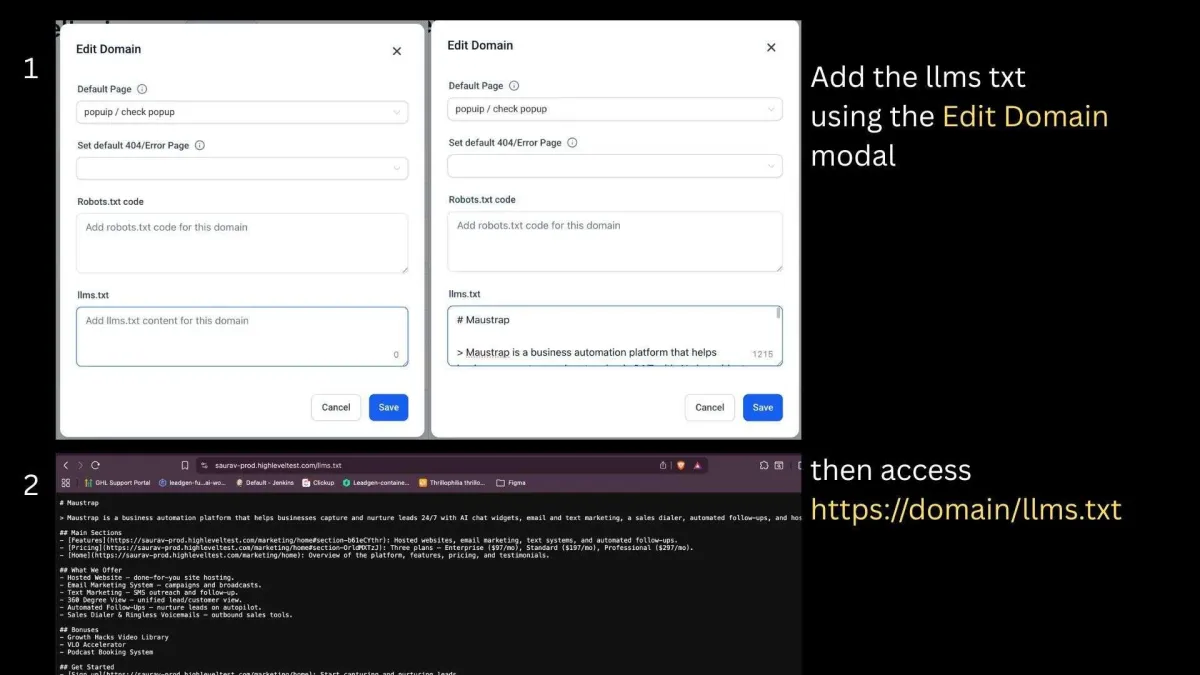
An llms.txt file is a Markdown site map served at the root of a domain, and it is how AI crawlers work out what a site is about. Every connected domain can now have its own, hosted natively at https://yourdomain/llms.txt and edited in the platform rather than uploaded.

This matters more than it sounds. AI crawlers and newer site audits, including Google PageSpeed’s agentic browsing check, actively look for the file at the site root. Without one, AI assistants have a harder time understanding what your business does, which can cost you visibility in exactly the place more people are now starting their search.
Found under Funnels and Websites, Settings, Domains, then the domain’s Edit Domain modal. Add the content and save, and it publishes instantly. More detail
Schema Markup Generated Automatically on Publish
Pages published without schema markup can now have it generated for them. The setting runs in the background so it does not delay publishing, preserves any existing schema, and never overwrites markup you added by hand. It covers every publishing method, including builder publish, save-triggered publishes and version-history publishes, and applies to websites, funnels and webinars.

Found in Settings under the SEO and AEO section, toggled per asset. Existing assets default to off, so nothing changes unless you switch it on; new assets default to on. Structured data is what earns rich search results and what helps AI systems understand and cite your content, and this removes the reason most businesses never get around to adding it. More detail
Schema Markup: Inline Validation Errors
Errors in the schema JSON view used to surface as general alerts, which left you hunting through a JSON-LD script for the problem. Error markers now appear inline on the exact lines at fault, and hovering one gives a plain-language explanation. Validation handles nested fields, complex structures and multi-schema payloads, and errors clear one at a time as you fix them so progress is visible.
Found under Edit Page, SEO and AI search optimization, Schema Markup, then Add or Edit Schema and switch to JSON view. Works across Product, Organization, FAQ, LocalBusiness, Article, Recipe and Event types. More detail
Save Progress on Forms, Surveys and Quizzes
Respondents can now pause partway through a multi-step form and come back to it. Switch on the save exit confirmation toggle in the settings for the individual form, survey or quiz, and progress is preserved automatically when someone leaves before submitting. On return they get a Resume Progress modal offering to continue or start again, and the modal picks up your branding automatically, taking the call-to-action button colour from the configured footer colour and the font from the configured label font.

Multi-step items only, and existing forms are unaffected until you enable it. On any longer intake or qualification form, this recovers enquiries that would otherwise be abandoned halfway. More detail
Generate a PDF from Every Submission
A new toggle in the settings for a form, survey or quiz produces a formatted, printable PDF from every submission, containing all questions and responses, the submission date and time, and the contact’s details. The files store under Contacts then Documents, organised by type and attached to the contact who submitted, reachable on desktop and mobile. Naming follows a set convention: FormName_ContactName_YYYY-MM-DD_HHMM for forms and surveys, with a Result_ prefix for quizzes.
Configured per asset, and not retroactive, so only submissions made after you enable it generate documents. For quotes, intake forms and applications, this creates the paper trail without anyone copying answers into a document. More detail
Entrance Animations on Sections, Rows and Columns
Entrance animations are no longer limited to individual elements. They can now be applied to sections, rows and columns, with the library expanded to include Fade, Slide, Bounce, Flip, Rotate and Zoom, and special effects. Parameters cover duration from 0.1 to 3 seconds, delay up to 5 seconds, scale from 0.5x to 2x, and easing, with a live preview on hover before you commit.

Animations applied to a layout block sequence hierarchically and automatically, so there is no manual delay calculation and no custom CSS, and reordering or editing blocks updates the sequence without breaking the timing. A mobile toggle is included, with motion disabled on mobile by default. Found in the Animations tab in the sidebar after selecting a section, row or column. More detail
Hover Animations for Buttons
Buttons gain 21 built-in hover effects configurable from the sidebar, replacing what was previously a choice between elevate and wobble. The effects group into scale, rotation, movement, background, border and shadow categories, each exposing the parameters that apply: duration from 0.1 to 3 seconds, delay, easing, colours, distances, and blur and spread for shadows. Named effects include Grow, Shrink, Pulse, Bounce In, Rotate, Float, Sweep To Right, Radial In, Ripple Out, Underline From Center and Glow, among others. Hovering an effect card previews it live on the selected button.
Hover states disable automatically on touch devices and screens under 1024px, entrance animations take priority with hover activating only after they finish, and cloned or sticky buttons animate identically. Output is clean CSS with no markup bloat. Found in the Animation tab in the sidebar after selecting a button. More detail · Effect list
Store Builder: Clearer Placeholder Images
The realistic stock product photos used as placeholders across store pages have been replaced with illustrations, which makes it obvious at a glance which product slots are still unconfigured before you publish. It covers the product listing, product detail, cart, checkout and thank you pages, plus the featured product, featured products, upsell and collection elements, with standardised placeholder text and previews now showing subscription badges and collection image placeholders.
Enabled through Labs by searching for Page Builder: New Image Placeholders, then reloading the builder. Configurable per account and reversible. Visual only, with no layout or functional change, and it applies only to disconnected product or collection placeholders. More detail
AI
Prompt Optimizer Comes to Conversations AI
The prompt testing that arrived for Voice AI in April now covers chat agents. It generates realistic customer scenarios and runs actual conversations against a cloned copy of your agent, evaluates the results, identifies failures and rewrites the prompts, all without touching the live agent.

It runs in three phases. Configure generates contextual test scenarios from the agent’s prompt, language, knowledge base and settings, with past scenarios reusable. Test sends actual customer-style messages and waits for real replies, tracking actions including appointment booking, handovers and workflow triggers, and returns full transcripts with scoring. Improve analyses the failed conversations and generates better prompts, with an Auto Optimize mode that runs repeated attempts until it hits target accuracy, and a diff viewer showing what changed.
Two things to know: real actions do execute during testing, and the AI evaluation scores are directional rather than precise. Test contacts are cleaned up automatically, long conversations time out, and the live agent is only changed on your manual approval. More detail
AI Studio: A Form Submitted Workflow Trigger
Forms on an AI Studio website can now start a workflow directly. Previously submissions relied on external tracking alone, which still works alongside this. With the trigger in place, a submission can fire notifications, emails, SMS, tags or an opportunity straight away.
One caveat worth reading: forms created before this release need refreshing before the trigger works. Open the AI Studio project, ask it to re-trigger form integration, reconnect the form to CRM tracking, publish, test with a submission, then refresh the workflow builder to configure the trigger. More detail
Ask AI on Mobile Reads Your Files
Ask AI in the mobile app now accepts images and documents in the chat composer. Tap the paperclip and pick from Camera, Gallery, Files or Media Library; files upload in the background and appear as chips ready for the assistant to read. Photograph an invoice, attach a contract, or pull a file you already uploaded, and ask about it, instead of retyping the contents.
Requires version 4.21.0 or later. Larger document limits, more file types including spreadsheets and plain text, in-app attachment previews and attachment history across sessions are all listed as coming. More detail
Automation
Associate Records Automatically
A new Associate Records workflow action links records across the CRM based on matching field values, covering contacts, companies, opportunities and custom objects. You identify the target records with field-based filters, and merge fields from the enrolled record can be used as the filter criteria. Where more than one record matches, you choose whether to associate the earliest created, the latest created, or all of them. Existing association labels can be applied and cross-object associations are supported.
The worked example is a property business associating a buyer with property records matching their preferred suburb, property type and bedroom count. Available through Labs, enabled under Settings then Labs. More detail
Twenty Private Integration Tokens per Account
The private integration token limit has gone from 5 to 20 per account, so more integrations and workflows can each run on their own credential rather than sharing one. The reason that matters is practical: with separate tokens, one integration can be revoked or rotated without breaking every other connection at the same time. Managed from the token section within the account. More detail
CRM
Choose the Sender for Review Requests
A default phone number, for SMS and WhatsApp, and email address can now be set for review requests at account level, and that sender is used automatically across manual requests, campaigns and workflows. Configured under Reputation then Settings, in the email or phone review request section.
Review requests only work if people open them, and a message from the number they already recognise from booking, quoting and invoicing gets opened considerably more often than one from an unfamiliar sender. More detail
Review Drip Campaigns: Target an Exact Date Range
Reviews AI drip campaigns targeted reviews by a fixed review age. You can now define an exact review date range when creating a campaign, and preview eligibility before launching, including the total number of matching reviews, with validation preventing empty campaigns. Found under Reputation, Settings, Reviews AI, Drip Campaign. Existing age-based campaigns keep working unchanged. If you have a backlog of unanswered reviews, this lets you work through it a period at a time. More detail
Marketing
Threads Comments in Social Planner
Threads joins Facebook, Instagram, LinkedIn, TikTok, Communities and Bluesky in the unified comment management view, so comments on Threads posts can be read and replied to without leaving the platform. Replies support text, images, emojis and location attachments, though what actually goes through depends on what Threads itself allows. Comments sync by webhook for near real-time visibility. Found under Marketing, Social Planner, Comment Management. Existing Threads users must reconnect their accounts, because additional permissions are now required. More detail
Post Sync for LinkedIn and TikTok
Social Planner can now import posts you published directly on LinkedIn and TikTok, bringing them into the same view as scheduled content. LinkedIn sync pulls historical posts and tracks reactions, comments and shares. TikTok sync imports published videos and tracks likes, comments, shares and views, with engagement refreshed every 24 hours. Enable it under Marketing, Social Planner, Settings after connecting the account.
Both are in beta and the limits are worth reading. LinkedIn supports organisation pages only, not personal profiles, and PDF, event, poll and article posts have no in-app previews. TikTok supports both personal and business accounts but synced videos cannot be cloned into new posts. On both, deleted posts remain visible in Social Planner. More detail
Communication
Email Action in Company and Custom Object Workflows
The Send Email action was limited to contact-type workflows. It now works in company and custom object workflows too, reaching the associated contacts without extra workflow logic or manual triggering.
Enable it under Settings, Labs, then add a Send Email action to a company or custom object workflow, choose the association labels identifying the recipients, and configure the email. Up to ten association labels per email action, emails use the domain configured for bulk email, and a contact appearing under several labels receives only one message. Custom object workflows additionally offer sending to the earliest associated contact, the most recent, or all of them. If you track properties, sites or assets rather than people, this removes a workaround. More detail
Email AI Suggests Countdown Timers
Email AI now recognises time-sensitive emails and offers to add a countdown timer. It identifies campaigns that would benefit from urgency, such as a limited offer, a launch, a webinar or an expiring quote, then offers to use an existing timer or create a new one, collecting the end date, style preferences and destination link before embedding it. Existing timers are reused where available, it falls back gracefully if timer setup is skipped, and it does not suggest timers for content with no deadline in it. More detail
Separate Email Template for Welcome Badges
Badge notifications have been split, with a new Welcome Badge Issued notification type separate from the existing Badge Issued. That means the first badge email a new member receives can carry different wording and a different call to action from every subsequent one. Found under Client Portal then Email Settings, where Welcome Badge Issued now sits alongside Badge Issued and Certificate Issued. Badges triggered by enrolment route through the welcome pathway automatically. More detail
Payments
Gift Cards Redeem in Offline Payment Flows
Gift card redemption was limited to customer-facing checkouts. It now works in business-initiated payments too, covering orders, invoices, contact-based charges and subscriptions. Supported at Payments then Orders then Record Payment, Payments then Invoices then Record Payment, Contacts then Charge Now, Contacts then Create Subscription, and Payments then Subscriptions then Create Subscription.
Enter the customer’s gift card code during payment and click Apply. If the balance covers the full amount the payment completes on the card alone; if not, the balance is applied first and the remainder charged to the saved payment method. Gift cards are not yet redeemable on future dated or scheduled subscriptions. This removes the manual reconciliation that used to follow a gift card being redeemed over the phone or at the counter. More detail
Selling Products in Forms and Surveys, Rebuilt
The product-selling capability in forms and surveys has been rebuilt around a single right-side payment configuration panel, so you connect a payment provider and configure products without leaving the builder. From that panel you can connect the provider, enable price level selection so customers choose a pricing tier, and offer variant selection. Required selections are validated before submission, and price and variant choices carry through to checkout, invoicing and payment processing on both desktop and mobile. Existing forms and surveys keep working unchanged. This makes it practical to take payment for a specific service tier or option directly on an enquiry or booking form. More detail
Client portal and communities
One Portal Instead of a Row of Tabs
Client Portal, Courses, Communities, Billing, Shared Files, Affiliates and Account Settings have been unified into a single connected experience on shared architecture. The dashboard shows courses in progress with a Continue Watching section, community memberships and activity, pending invoices, recently shared files and pinned communities. Customers reach invoices, estimates, contracts, shared files and affiliate management without leaving the portal, and courses now read as an extension of it rather than a separate destination.

The performance numbers are quantified: content loads in around 0.4 seconds and becomes interactive about a second sooner, and public pages score 92 to 100 on Lighthouse against a previous 75 to 85. Branding stays consistent from login through courses, communities and billing. Generally available. More detail
Communities Rebuilt Inside the Portal
Communities has been rebuilt to sit alongside the rest of the portal. The discussion feed now shows comments, replies and attachments in the feed itself, members get six reaction options, unified search across posts and members, and improved profiles with clickable group details. Admins get expanded moderation through a three-dot menu covering pinning and unpinning posts, moving posts between channels, disabling comments, banning users, downloading recordings and deleting content. Settings are reorganised into sections for details, access levels, member permissions, branding, themes and membership questions. No migration needed: existing content, members, courses and settings transfer automatically. More detail
Get Notified When a Client Uploads a File
Admins and users can now receive in-app notifications when a contact uploads a file through the Client Portal’s shared documents section, with up to ten files at a time. Preferences are set per staff member under Settings, My Staff, then the staff member’s notification settings. In-app notifications only for now. Where a job cannot start until the paperwork lands, this shortens the gap between a client sending it and someone acting on it. More detail
Courses and certificates
Course Progress Analytics Rebuilt
Course analytics has been rebuilt into a unified dashboard with course and enrolment date filters. It reports completion rate, average progress and time to complete, each with period-over-period comparison, alongside a learner journey funnel tracking Enrolled, Started and Completed, and a member progress table covering enrolment, activity, completion and session detail. CSV export is supported, with email delivery for larger exports. Page loads are around 43 per cent faster with roughly 90 per cent less data downloaded.
Enable New Course Progress Analytics in Labs, then find it under Memberships, Courses, Analytics, Course Progress. Assessment and revenue analytics are listed as coming. If you sell or deliver training, this shows you exactly where people stall. More detail
Certificates: Custom Credential Expiry
Certificates and certificate templates now support expiry, set to Never, a fixed date, or a relative duration from the issue date of 3, 6, 9, 12, 24 or 36 months. Reminder offsets notify recipients ahead of expiry, and calculations are timezone-aware. Expiry details show in both credential and template listings, and newly issued credentials calculate and store their own expiry from the settings. For anyone issuing training or compliance certificates, this replaces the renewal spreadsheet. More detail
A Layers Panel in the Certificate and Badge Builder
The certificate and badge builder gains a Layers tab showing the full canvas stack. Clicking a layer selects the element, layers reorder by drag and drop, and each can be locked so it cannot be moved, resized, deleted or edited by keyboard shortcut. Unlocked layers can be deleted from the panel. Most usefully, invalid custom field placeholders are flagged with an error pill and a manual save warns when any remain, which stops a broken merge field reaching a recipient on a certificate with their name on it. More detail
That is the fortnight. Missed the last one? Catch up on the 6-19 July updates.
Already a Clientflow client? If you want to know more about any of these features, or would like them deployed in your account, get in touch with your usual contact on the Clientflow team.
Not yet a client? Book a call with the team, or see the full feature set on the platform capabilities page.
Clientflow is built on the HighLevel platform, delivered with Australian onboarding, support and expert implementation. Read how that works on our GoHighLevel Australia page.


