
Clientflow Platform Updates: 16-24 May 2026
Twenty-one features to finish May, and the wait action is the one to read. It has been rebuilt around what you are actually waiting for rather than a stack of nested dropdowns, and it now handles recurring schedules, dynamic durations pulled from a custom field, and waits measured in seconds. Elsewhere, AI agents can search your knowledge base at runtime instead of carrying it in their prompt, and company fields are now available as custom values everywhere in the platform. Here is everything from 16 to 24 May 2026.
Automation
Wait Action: Rebuilt
The wait action has been redesigned from the interface up. The nested dropdowns are gone, replaced by a card selection screen that asks what the contact should be waiting for, which is the question you were trying to answer anyway.

The additions matter as much as the redesign. Recurring wait schedules handle weekly, monthly and yearly patterns. Waiting until a specific date is now a single step rather than a wait plus a separate Set Event Start Date action. Seconds are supported as a time unit, which makes fast sequences possible. Wait durations can be pulled dynamically from a custom field, so the delay can vary by contact. Wait types are grouped to cut down the clutter, and the card ordering is context-aware, so “wait for the contact to reply” moves to the top when the wait follows a send action.
There is also a Wait AI option: describe the behaviour you want in plain language and have it configured for you. More detail
Integration Steps Show Their Fields Before You Connect
Adding a workflow action for an integration you had not yet connected used to mean discovering the problem after saving. The action or trigger panel now shows a connect banner and a preview of every available field in a locked state before any account is linked, so you can see what the step will offer before committing to the connection. Clicking “Connect your account” opens the integration setup in a new tab, so you keep your place in the workflow. Once connected, the fields unlock and the account appears in the panel, with a dropdown to choose between them where an integration supports several. If a connected account is later removed or becomes invalid, the step reverts to the locked state rather than failing quietly. More detail
Math Operation in Company and Custom Object Workflows
The Math Operation action, which performs a calculation on numeric fields and stores the result for use later in the same workflow, now works in company-based and custom object-based workflows rather than contact workflows only. A custom object workflow can add material cost to labour cost and write the total onto the project record without anyone touching a calculator. More detail
AI
AI Agent: Knowledge Base Search
The AI Agent workflow action can now search your knowledge base during execution rather than carrying business information in its system prompt. It fetches only the relevant chunks it needs at the moment it needs them, whether that is a service detail, a price, a policy or a booking rule. That keeps the context window lean, cuts token usage and produces more accurate answers, because the agent is reading the specific thing it was asked about instead of scanning a wall of pasted text. Search queries can be static or determined by the AI, and the number of chunks returned is configurable. More detail

AI Agent: Update Custom Values
The AI Agent action can now write to custom values as part of its reasoning. That replaces the If/Else trees people were building to set a custom value based on the day of the week, contact data, a date format, a timezone or a pipeline stage, all of which the agent can now resolve in a single step. Both the target field and the new value can be set explicitly or left for the agent to work out from context. More detail
CRM
Company Fields as Custom Values Everywhere
Company fields, standard and custom, can now be referenced as custom values throughout the platform. Anywhere you use the custom value picker, a Company group appears, and those values resolve at runtime from the company associated with the contact. It works in Workflows, the email builder, email campaigns, Conversations, Documents and Contracts, bulk actions and Conversation AI. So a contract can pull the company name, an email can reference the industry or account tier, and Conversation AI can answer using company data. Anyone doing business-to-business work has been building workarounds for this. More detail

Company Smart Lists
Saved views for the Companies section, holding filters, sort order and visible fields, ready to reopen without rebuilding. You can create several, duplicate one to spin up a variation, and export filtered results to CSV. Sharing controls give team members view or edit access, and a direct link can be sent to whoever needs a specific list. The Manage Smart Lists page shows every saved view in one place. Available through Labs, then found under Contacts, Companies, + List. More detail
Communication and email
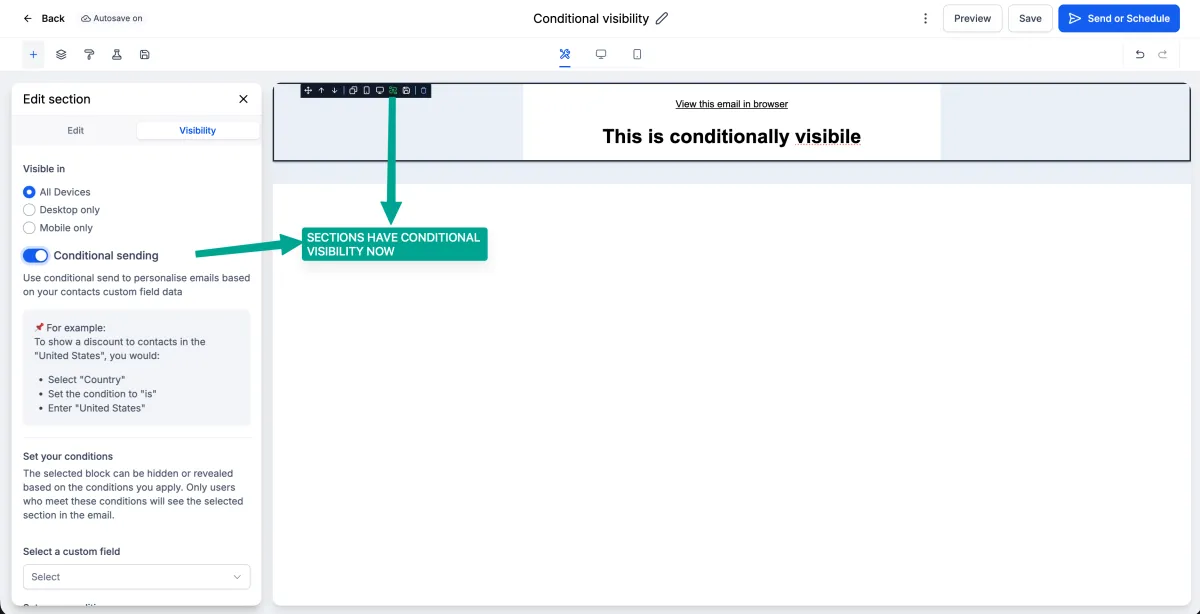
Conditional Visibility: Layouts, and IS EMPTY / IS PRESENT
Two upgrades to conditional visibility in the email builder. Visibility rules can now be applied to a whole layout block rather than element by element, with layouts gaining their own Visibility tab beside Edit. And two new operators, IS EMPTY and IS PRESENT, allow rules like showing a download button only when an attachment field is present, or hiding a greeting when the first name is empty. All custom fields, including attachment fields, are now available in the conditional visibility dropdown. Together these cut a lot of repetitive setup out of personalised email design. More detail

Failed Sends on Unverified Domains Now Tell You
Emails could keep attempting to send after the mapped domain lost its active status, which meant messages quietly went nowhere. Sending is now blocked when a campaign domain moves from Active to Inactive or Unverified, the failed attempt is logged, and a message appears in Conversations explaining that the email failed because the domain is not verified. A domain verification problem now announces itself rather than costing you a week of unexplained silence. More detail
Preference Changes Logged in Conversations
When a contact’s communication preferences change, whether the contact made the change or someone on your team did, it is now logged in the Conversations view. Opting out of SMS or updating email consent appears in context alongside the rest of the conversation history rather than only in the Contacts module. More detail
Client Portal Domain Setup Moves
Client Portal domain configuration has moved out of Notifications Domain Configuration and into the main Domain Configuration page under Dedicated Domain Setup, which puts all email domain settings in one place. Alongside that, Client Portal emails now appear in the Conversations inbox with the rest of a contact’s communication. Configure it under Email Services, Dedicated Domain Setup, Domain Configuration. More detail
Websites, forms and funnels
Load the Chat Widget Only on Interaction
A new “Load on user interaction” toggle in the chat widget builder holds the widget back until a visitor scrolls, clicks or touches the page, with an automatic fallback load after about eight seconds if nothing happens. The widget is one of the heavier things on a page, so deferring it improves page speed scores and cuts blocking time on mobile while still being there for anyone who wants it. Found under Sites, Chat Widget Builder, Chat Window tab, Additional Options. Existing widgets are unaffected unless you turn it on. More detail

Manage Fields Shows Every Field, Not Just Ones With Data
The Manage Fields view for forms, surveys and quizzes only showed fields that had already received submission data, so a newly added field stayed invisible until someone filled it in. Every field defined on the form now appears straight away, with unselected ones listed under Add Fields. That means you can set up your columns and build your views before the first submission arrives rather than after. Found under Sites, then Forms, Surveys or Quizzes, three-dot menu, View Submissions, Manage Columns. More detail
Custom Modal Height on Embedded Forms
Forms, surveys and quizzes embedded on an external site as a popup, polite slide-in or sticky sidebar had a fixed modal size, which left some embeds too tall and others cramped. You can now set a modal height when generating the embed code, under Integrate then Embed Code. Existing embeds are unchanged unless you add a value. The builder also now disables the Preview, Integrate and Save buttons until it has fully loaded, so clicks no longer land on nothing. More detail
Gradient Backgrounds on Form Buttons
Buttons in the form, survey and quiz builder can now take a gradient background as well as a solid colour, with linear, radial and angular types, an adjustable angle and multiple colour stops. Select a button element and open Button Background in the style settings. Existing button styles are untouched unless you change them. More detail
Quiz Results: Content per Scoring Category
Personality-style quizzes showed the same result page content regardless of which category someone scored in, which rather defeats the purpose. Each category can now carry its own text, images, video, call-to-action text and links, applied to either the highest-scoring or lowest-scoring category. The first category can act as a default template to speed up the setup. Found in the quiz builder under Customize Result Page, by adding an Individual Category section. More detail
Keyboard Navigation in the Product Image Lightbox
Where the product detail page has Open Lightbox zoom enabled, customers can now press Escape to close it and use the arrow keys to move between images, wrapping from the last back to the first. The lightbox takes focus when it opens so the keys work immediately, and the thumbnail strip scrolls to keep the active image visible. Mouse interaction is unchanged. More detail
Marketing
Facebook Lead Ads: Merge Contacts by Name
Merging Facebook contacts by name previously applied to Messenger conversations only. It now extends to Lead Ads form submissions, and the setting has been split into two under Settings, Business Profile, General, so Messenger and Lead Form submissions can be controlled independently. Lead form submissions often arrive without a consistent phone number or email, which is exactly when name matching earns its keep and stops your CRM filling up with duplicates. More detail
Marketing Audit Report Widget: Editable Field Labels
The website widget for the marketing audit report had fixed field copy. You can now customise the labels and placeholder text for First Name, Last Name, Phone Number, Email, Business and Website, so “Business name” can become “Company name” and “Phone number” can become “Best number to reach you”. Small wording changes on a lead capture form are one of the few things that reliably move completion rates. More detail
Media and community
Media Centre: Upload and Download Whole Folders
Folders can now be dragged and dropped straight into the Media Centre, with the original structure including subfolders preserved, and downloaded as a single zip file. Progress tracking shows how nested files are being processed during an upload. For anyone moving a real library of images and documents into the platform, or pulling one out for backup, this replaces a great deal of clicking. More detail

Share a Meeting Recording Straight to a Community
Meeting recordings now have a Share as Post option that publishes the recording into a community channel without leaving what you are doing. Go to your profile avatar, Manage Profile, Meetings, View Recordings, then the three-dot menu on the recording, and choose the community and channel from the modal. Useful for anyone running regular calls or training sessions who wants members to find the recording without being sent a link. More detail
That is the fortnight. Missed the last one? Catch up on the 11-15 May updates.
Already a Clientflow client? If you want to know more about any of these features, or would like them deployed in your account, get in touch with your usual contact on the Clientflow team.
Not yet a client? Book a call with the team, or see the full feature set on the platform capabilities page.
Clientflow is built on the HighLevel platform, delivered with Australian onboarding, support and expert implementation. Read how that works on our GoHighLevel Australia page.


