
Clientflow Platform Updates: 16 February - 1 March 2026
The back half of February leaned heavily into the workflow builder, with drag-and-drop step placement, expanded error checking and the ability to pause a single step while testing. Elsewhere a desktop app arrived, AI agents learned to read spreadsheets, and local listings gained duplicate cleanup. Here is everything from 16 February to 1 March.
Automation
Drop steps straight onto the canvas
The advanced workflow builder now lets you drag a trigger or action from the sidebar and drop it directly where you want it. Drop at the end of a branch to extend it, or between two existing steps to insert it, and the connections are made for you. You can map out the shape of an automation visually before filling in any configuration. More detail
Pause a single step while you test

Individual action nodes can now be switched off without deleting them. A disabled node appears dimmed and is skipped during execution while the rest of the workflow runs normally. Testing a change no longer means deleting an action and rebuilding it afterwards, or cloning the whole workflow. It also prevents test runs from firing real emails or updating live records. More detail
Errors caught before you publish
Save-time error checking now covers far more of the builder: 48 actions rather than 14, and 28 triggers rather than 26. If-Else and Wait actions get their own stronger validation, checked when you save rather than failing mid-execution. Misconfigured steps are highlighted in the canvas so they are quick to find. More detail
See exactly where a contact went
Highlight Contact Path now shows much more than the route taken. Open Enrolment History or Execution History and you can see which nodes errored, which steps were skipped, whether the contact is still in progress, and clear entry and exit indicators. When a contact did not finish a workflow as expected, this usually shows you why in one glance. More detail
Tag filtering on triggers, much sharper
Trigger tag filtering gained multi-select and two new operators, Any Of and None Of, alongside Equals and Not Equals. Several tag filters can be combined on one trigger with AND logic, so you can express conditions like “has Hot Lead, and does not have Do Not Contact or Existing Client” at the point of entry rather than with an If/Else afterwards. It launched on the contact triggers and was extended days later to Opportunity Created, Opportunity Changed, Opportunity Status Changed, Pipeline Stage Changed and Invoice triggers. More detail
Monday.com automation without a middleman

Monday.com now connects natively to workflows. Actions available now can create boards, groups, columns, items and sub-items, update item details, archive or delete boards and groups, fetch all items from a board, and search items by column value or ID. Triggers responding to Monday.com events are listed as coming soon. Connect via the workflow action selector or under Settings, then Integrations. Each action includes a test so you can verify it before going live. More detail
Build workflows by talking
You can now dictate to the AI Builder instead of typing. Click the mic in the prompt box and describe the workflow aloud; it transcribes and builds from that. Works in every supported language, and with the AI Assistant as well as the builder. More detail
Conversational editing now covers branching logic
The AI Builder can now edit If-Else and Wait steps through chat, which previously required dropping into manual configuration. For Wait actions you can change delays, window settings and reply conditions, add or remove timeout branches, and convert between wait types without losing branch configuration. For If-Else you can add or remove branches, change conditions and AND/OR operators, and append conditions, with downstream actions on untouched branches preserved. More detail
AI
AI agents can read your spreadsheets
Knowledge bases now accept a Table Source: upload a CSV and your AI agents can answer natural-language questions about the data in it. Files up to 50,000 rows, 500 columns and 50 MB are supported, with the 20 most relevant columns indexed. Because rows are converted to embeddings, the agent works on meaning rather than exact keyword matches, so “which customers have overdue invoices” works without any formula or query language. Rows that informed an answer are cited so you can verify them. Filtering, comparison and sorting queries are noted as coming. Setup guide
Automatic conversation summaries and transcripts

Conversation AI can now produce a structured summary and full transcript at the end of each session, triggered by inactivity, a bot sleep event or a manual message. Summaries can be written to a contact field, used to start a workflow, or emailed to whoever needs them, and both summary and transcript are available as workflow variables for downstream steps. Enable it in Labs, then configure per bot under Bot Goals, with optional settings for inactivity time, minimum message count and notification routing. More detail
Bring your own agents into Ask AI

Custom Agent Studio agents can now be connected into Ask AI, extending it past its built-in capabilities. You map an agent, add a description and list the capabilities that tell Ask AI when to route a query to it, and any input variables the agent needs can be mapped to custom fields or collected from the user at the time. The default Ask AI agents keep working alongside your custom ones. More detail
Booking appointments from Instagram DMs
Conversation AI can now run appointment booking on Instagram. With Instagram connected, an inbound DM can be handled by a booking bot in autopilot mode: it offers to book, pulls live availability from the linked calendar, confirms a time and creates the appointment, with the booking logged and attributed to Conversation AI. The bot can be set to pause after booking, allow rescheduling, or cap how many messages it sends. Worth defining bot goals and knowledge base carefully so it sounds like your business.
Communication
A desktop app for macOS and Windows
There is now a native desktop application, giving you the full platform in a standalone window with native notifications, rather than another browser tab. Sign-in routes through your default browser and returns you to the app. Useful for anyone who keeps the platform open all day. Setup guide
Customers can send files in live chat

Live chat widgets now accept file attachments from visitors: up to five files per message, each under 20 MB, as JPG, JPEG, PNG, HEIC or PDF. Visitors use the paperclip, drag files in on desktop, or pick from camera or gallery on mobile. Images preview inline in the inbox; HEIC and PDF show a download link. Conversation AI can optionally respond to image attachments, though not yet to PDFs. Live chat widgets only. More detail
Deskphone transfers and extension dialling
Calls that arrive through an IVR and land on a deskphone can now be transferred to another deskphone by dialling a teammate’s extension mid-call. Extension-to-extension calling between deskphones is also available, so dialling 3001 rings whoever holds that extension. Deskphones only for now, not the web or mobile apps. More detail
Tighter enforcement on email delivery blocks
Accounts generating excessive delivery blocks from email providers now get a warning email first, then a 12-hour sending suspension on a first occurrence and 24 hours on a second. Excessive blocks damage deliverability for everyone on shared infrastructure, through blacklisting, spam placement and throttling at Gmail, Yahoo and Outlook. The practical takeaway is to keep list hygiene tight and watch your bounce and unsubscribe rates. More detail
CRM and listings
Find and remove duplicate listings

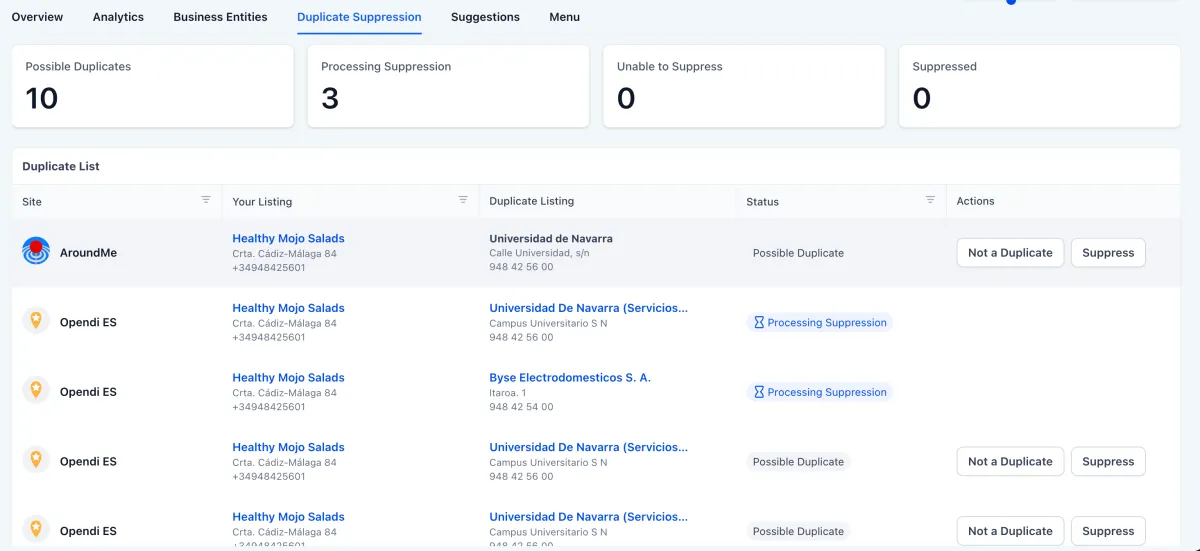
Duplicate directory listings split your local search authority and show customers conflicting information. A new Duplicate Suppression tool scans monthly, shows what it finds, and lets you submit a suppression request to the publisher (reviewed in around 24 hours) or mark an entry as not a duplicate. Status indicators track each request from Possible Duplicate through to Suppressed. More detail
Split business hours for listings
Business hours on listings can now carry multiple time blocks in a single day, which matters for anyone who closes over lunch or runs split shifts. Options cover split hours, 24-hour operation, always open without set hours (for online or appointment-only businesses), single continuous hours and closed. Copy to all days applies a schedule across the week in one click. More detail
Payments
Different payment providers per channel
You can now set a preferred payment gateway per channel rather than one default for everything. Funnel order forms, forms, stores, calendars, invoices, invoice auto payment, payment links, courses, communities and surveys can each use their own provider. If a preferred provider is later disconnected, that channel reverts to the default. You can also combine one non-PayPal provider with PayPal on a single checkout to give customers more options. Setup guide
Websites and stores
Up to 100 products per page
Product list pages can now show up to 100 products per page, up from 24. Adjust it via the Product List element’s Layout settings in the builder. For a large catalogue this cuts the amount of pagination a customer has to click through. More detail
Product titles show in full
Product titles no longer truncate with an ellipsis on the product detail page, cart, side cart, checkout, thank you page, upsell element, collection list and featured product element. Titles wrap across lines without breaking the layout. On by default. The product list page and featured products element still truncate. More detail
Courses and communities
Gate courses behind private channels
Community admins can restrict a course so only members of designated private channels can see it in the Learning tab. That makes tiered membership practical without separate platforms: a VIP channel can unlock advanced training that the general community never sees. Access level is set when creating or editing the course. More detail
Voice search in courses
Students can search course content by speaking instead of typing. The mic sits in the course search bar, transcribes the query and runs the search. Handy on mobile. More detail
Email AI 2.0
Email AI has been rebuilt as a guided, brand-aware experience in the email builder, available through Labs. Generate a complete styled email from a text prompt or a reference URL or image, with your Brand Board applying fonts and colours automatically. An assist mode helps sharpen prompts, conversational commands (rewrite, shorten, translate, add section, change theme) refine the draft in place, and version history lets you roll back. Two beta caveats: complex custom HTML from a reference will not reproduce exactly, and sample images must be swapped for licensed assets before sending. Setup guide
That is the fortnight. Missed the last one? Catch up on the 2-15 February updates.
Already a Clientflow client? If you want to know more about any of these features, or would like them deployed in your account, get in touch with your usual contact on the Clientflow team.
Not yet a client? Book a call with the team, or see the full feature set on the platform capabilities page.
Clientflow is built on the HighLevel platform, delivered with Australian onboarding, support and expert implementation. Read how that works on our GoHighLevel Australia page.


