
Clientflow Platform Updates: 2-15 February 2026
Early February was a strong fortnight for measurement and reach: Google Demand Gen campaigns arrived in Ad Manager, external websites can now be tracked with native analytics, and the Conversation AI can book across multiple calendars from a single bot. Here is everything that shipped between 2 and 15 February.
Advertising and marketing
Google Demand Gen campaigns in Ad Manager

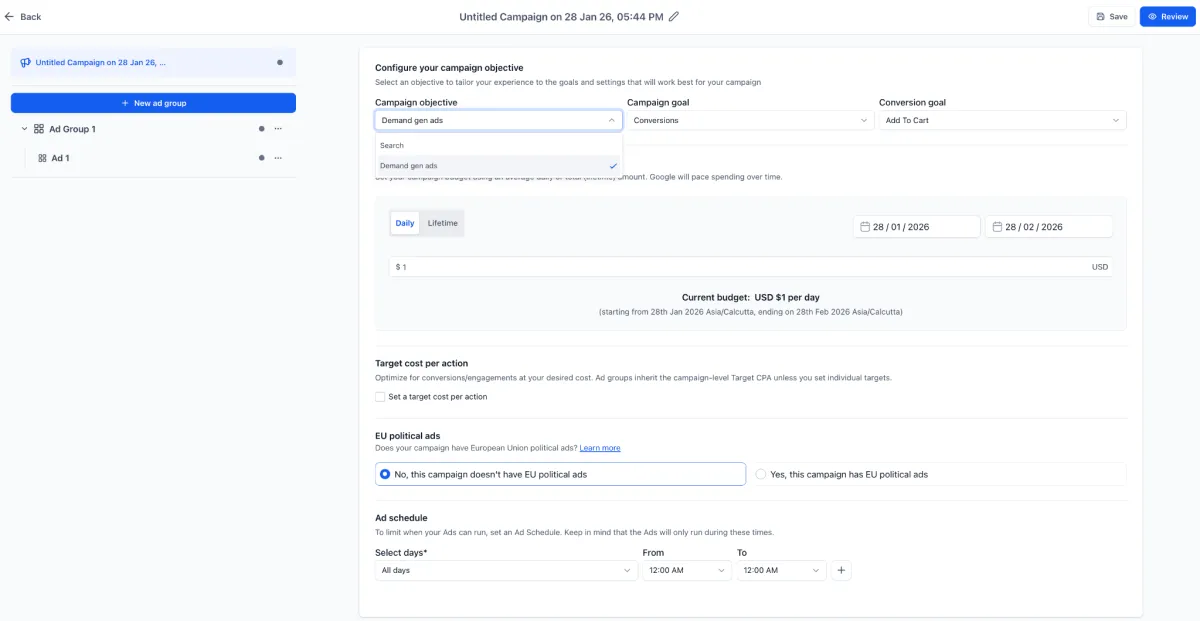
Ad Manager now supports Google Demand Gen alongside Search. Demand Gen is built for upper and mid-funnel reach using visual and video ads, consolidating what used to require separate Discovery, YouTube and Gmail campaigns. Ads run across YouTube (in-feed, in-stream and Shorts), Google Discover, Gmail Promotions and the Display Network. Formats include single image, single video and carousel up to 10 cards, with targeting by geography, language, placement, interest and affinity audiences, in-market audiences, remarketing, lookalikes and demographics. A live preview shows the ad before you publish. More detail
Bulk social scheduling via advanced CSV

Social Planner gained an Advanced CSV option for scheduling large batches of posts at once, covering Instagram Stories and Reels, Shorts, Google Business Profile, TikTok, Pinterest and more. The XLSX template carries platform-specific settings including post type, watermark, media optimisation, tags, categories, first comments, Pinterest board selection and YouTube privacy. Find it under Marketing, then Social Planner, then New Post, then CSV Upload. A basic CSV option remains for straightforward imports. More detail
Social analytics dashboard
Social Planner now has a consolidated statistics dashboard covering Facebook, Instagram, LinkedIn, YouTube, Pinterest, TikTok, Google Business Profile, Threads and Bluesky. It reports posts, likes, followers, impressions, comments, reach and engagement as KPI cards and graphs, with filtering by platform and account, top-performing posts, and demographic breakdowns where the platform provides them. Setup guide
Link click tracking on social posts
When you use the built-in link shortener on a social post, click performance is now tracked automatically with no extra setup. You get total clicks per link, performance by platform, and trends over time. Assign a campaign name to group several posts that share a link for comparison. Find it under Marketing, then Social Planner, then Statistics, then URL Tracking. Setup guide
RSS publishing improvements
Social Planner’s RSS feed publishing now handles higher feed counts per cycle, with better feed management in the interface. If you publish content regularly, posts distributed via RSS also benefit from the click tracking and campaign analytics above. Setup guide
Reporting
Native analytics for external sites and forms
Websites hosted outside Clientflow can now feed analytics straight into your account. Install a tracking script in the head of any external page and the External Tracking dashboard reports page views, form views, responses, completion rate, average time on page and bounce rate, with date filtering and breakdowns by domain, page and form. Audience data covers device type, browser, geography and traffic source. Set it up under Sites, then External Tracking, then view results under Sites, then Analytics. Setup guide
Marketing audit reports in 13 languages
Marketing audit reports can now be shared in any of 13 languages, selected at the point you generate the share link or send by email or SMS. Recipients can also switch language themselves from a dropdown on the report page. Web reports only for now; multilingual PDF export is planned. Setup guide
AI
One bot, many calendars

Conversation AI can now book appointments across multiple calendars from a single bot, routing each request to the right calendar based on rules you set, with a fallback calendar for anything that does not match. Cancellation, rescheduling, calendar links and post-booking workflows all continue to work, and the booking record shows which calendar was used. Previously each bot was tied to one calendar. More detail
Separate sleep controls for the AI bot
The Conversation AI bot now has two independent sleep settings: one for when a human sends a manual message, and one for when a workflow sends a message. Previously both shared a single toggle, which could wake the bot unintentionally. Useful anywhere human agents and automations work the same inbox. More detail
300 AI models through one workflow action
OpenRouter is now available as a workflow action, giving access to more than 300 models from OpenAI, Anthropic, Google, Meta, Mistral and others through a single integration. Set the system prompt, user prompt, model and output variable in the Generate Response action. Handy for using a cheaper or more specialised model for a particular task without managing separate API connections. Setup guide
Automation
Drag and drop steps in the standard workflow builder
The standard builder now lets you drag any action or trigger node to a new position on the canvas. Reorganising a long workflow no longer means deleting and recreating steps. More detail
Recover abandoned carts
A new Abandoned Cart trigger fires when a customer adds products and starts checkout but does not finish. Set a delay (one hour by default), then run whatever follow-up sequence you like. Find it under the e-commerce trigger category in the workflow builder. Setup guide
Trigger on fulfilment and on reviews
Two more store triggers arrived alongside it. Order Fulfilled fires when an order is marked fulfilled, so shipping confirmations, review requests and upsells can run automatically. Product Review Submitted fires when a customer leaves a review, which you can branch on by rating to send a thank you, an offer, or an internal escalation. Order Fulfilled setup guide
Automate on engagement score
Workflows can now trigger when a contact’s engagement score changes, with comparison operators for equal to, not equal to, greater than, less than and empty. A matching action adds or subtracts points from a contact’s score. That makes it practical to segment by behaviour, escalate warm leads, or run a reward flow for your most engaged contacts. More detail
Conversations
Schedule WhatsApp messages

WhatsApp messages can now be scheduled for a future date and time. Template messages can go out at any future time; free-form messages can be scheduled up to 24 hours from the last inbound message, within the open customer service window. The WhatsApp phone numbers settings page was also redesigned to show your messaging limits and quality rating with explanatory tooltips. More detail
A2P registration, rebuilt around getting approved

The Trust Centre and A2P registration flow have been rebuilt to reduce avoidable rejections. All trust products sit in one layout with clear descriptions, and registration now includes an AI-assisted review screen where you verify everything before submitting, plus inline tooltips, worked examples for business number, address and opt-in consent, and a compliance checklist. More detail
A2P resubmissions are now free
Resubmitting an A2P campaign after a rejection no longer incurs a fee. Correcting and resubmitting a campaign now costs nothing. More detail
CRM
The new contact list is out of early access

The rebuilt contact list and SmartLists 2.0, covered in the last roundup while still in beta, are now live for everyone. You get the cleaner unified list view, quick search and drag-and-drop column management, and the AND/OR filter builder, with noticeably faster load times than the old interface. More detail
Search finds secondary emails and phone numbers
Contact search now matches on every email address and phone number stored against a record, not just the primary. If a client gave you a second mobile eighteen months ago, searching it will now find them. More detail
A confirmation step before bulk pipeline deletions
Bulk deleting opportunities and pipelines now requires you to type DELETE to confirm. Deletions process in the background and stay recoverable for 60 days through Bulk Actions or Audit Logs, with restoration limited to admins. Restoring a pipeline brings back its stages and opportunities too. Setup guide
Elsewhere
A cleaner integrations page
The integrations page has been redesigned so connected and available services are quicker to tell apart at a glance, which takes some friction out of setting up or reviewing a connection.
That is the fortnight. Missed the last one? Catch up on the 19 January - 1 February updates.
Already a Clientflow client? If you want to know more about any of these features, or would like them deployed in your account, get in touch with your usual contact on the Clientflow team.
Not yet a client? Book a call with the team, or see the full feature set on the platform capabilities page.
Clientflow is built on the HighLevel platform, delivered with Australian onboarding, support and expert implementation. Read how that works on our GoHighLevel Australia page.


