
Clientflow Platform Updates: 19 January - 1 February 2026
The last fortnight of January brought 31 updates, with AI doing most of the lifting. Website visitors can now hold a voice conversation with an AI agent in the browser, every recorded call can be transcribed automatically, and the contact page has been rebuilt end to end. Here is everything that shipped.
AI
Talk to your website: the Voice AI chat widget

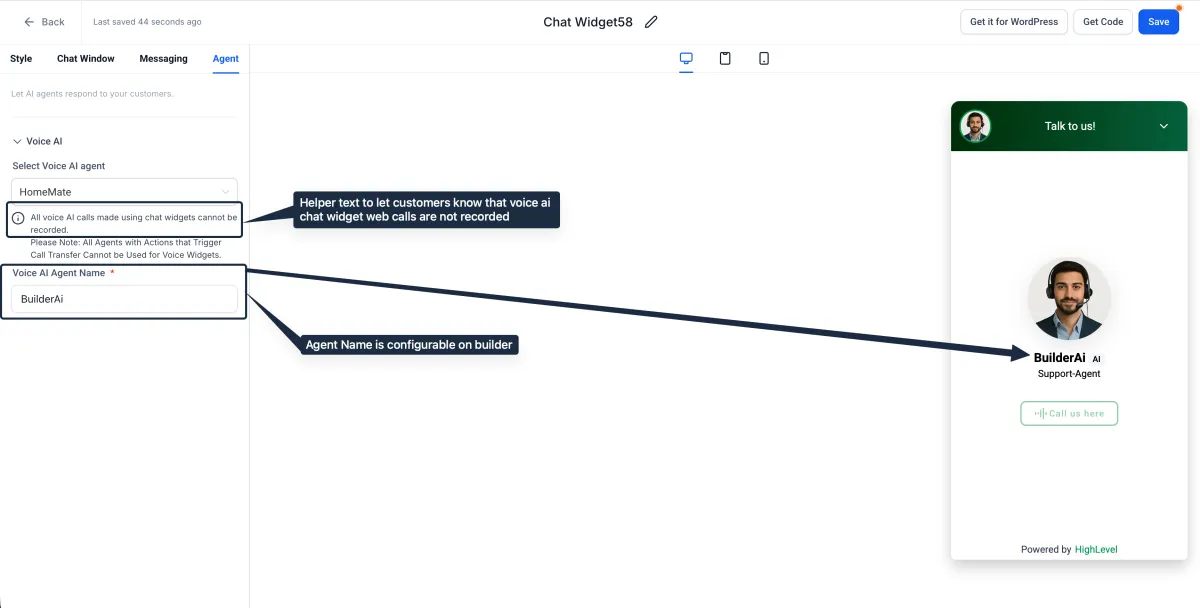
Visitors to your website or funnel can now speak with a Voice AI agent in real time using their browser microphone. No phone call, no app, no download. Create a chat widget, select Voice AI as the type, assign an agent and embed the code. Built-in reCAPTCHA keeps bots out. This is in early access; contact us and we will enable it for your account. More detail
Every recorded call, transcribed automatically
Recorded inbound and outbound calls now generate transcriptions with no manual effort, attached directly to the conversation for reference. Enable it under Settings, then Phone Numbers, then Advanced Settings, then Voice Calls, and switch on Call Transcription. No more relistening to a 20-minute call to find one detail. More detail
Agent Studio: agents that start themselves
AI agents can now launch automatically from platform events rather than waiting on an API call or manual start. Three triggers are available: a form is submitted (field values pass straight to the agent), a tag is added to or removed from a contact, or a new inbound chat message arrives. Agents can be tested before publishing without touching live contacts. Setup guide
Agent Studio: routing, templates and version control
Three more Agent Studio upgrades landed in the same fortnight. An AI Router node classifies inbound intent and routes contacts down different branches without hand-written rules. A template library provides pre-built agents for lead qualification, appointment booking and FAQ handling. And version control lets you save, compare and roll back published agent versions, so iterating on a live agent carries less risk. Setup guide
The workflow AI Builder is now a proper copilot
The AI Builder in workflows has been rebuilt. It streams its work in real time with a step-by-step progress card, handles compound requests (“add a wait step and then a review request”), remembers context across the conversation, preserves your chat history when you reopen the sidebar, and autosaves as it goes. More detail
Better answers from the AI Assistant
The AI Assistant in workflows now sources its answers more effectively, targeting the queries where it previously came back incomplete. Response quality continues to improve with usage. More detail
CRM
The contact page, rebuilt

The contact detail page has been redesigned around a unified layout: core details (name, owner, tags, followers) sit upfront, companies, opportunities and custom objects are grouped in one Associations panel, conversations sit in the centre, and collapsible side panels remember your preferred layout. Auto-save can be enabled globally by admins under Settings, then Contacts, then Details Tab. You also get search and filtering within fields, keyboard shortcuts to move between contacts, and inline editing of related records. In early access; ask us to switch it on. More detail
SmartLists 2.0

The SmartLists framework has been re-engineered, with load times up to 40 per cent faster. Column layouts, filters and sorting now persist between sessions. Filtering supports nested AND/OR logic and grouping for complex conditions, a quick search bar speeds up switching between saved lists, and lists can be shared with per-teammate edit permissions. The improvements apply across contacts, opportunities, companies, tasks and custom objects. More detail
Smart Tags on your pipeline
Opportunity cards can now carry colour-coded Smart Tags driven by rules you define: Deal Value over $10,000, Last Contacted more than 30 days ago, and so on. Six pre-built tags come standard: High Value, Stale Deal, New Lead, At Risk, No Next Step and Unassigned Deal. Configure them under Settings, then Pipelines, then Smart Tags. In early access; ask us to enable it. More detail
Bulk delete and restore for opportunities
Opportunities can now be deleted in bulk (with a typed confirmation to prevent accidents) and restored within 60 days, either from the Bulk Actions page or from Audit Logs. Admin permissions are required for both directions. Setup guide
Conversations and WhatsApp
A redesigned Conversations inbox
The Conversations tab received a visual overhaul: a cleaner four-panel layout, advanced tag filtering with AND/OR operators, and an upgraded email composer with full-screen drafting. Two workflow-level improvements matter most day to day. Filter combinations can now be saved as named views, so your common queues (say, unassigned SMS, or open WhatsApp threads) are one click away. And the unread counter now updates in real time across all tabs, rather than refreshing only when you switch views. Setup guide
WhatsApp voice notes play natively
Voice notes sent from Conversations now arrive as native WhatsApp voice messages that play inline, instead of downloadable audio files. Recipients with transcripts enabled in WhatsApp can tap Transcribe on any note. No configuration required. More detail
Send media through WhatsApp workflows

A new WhatsApp Media workflow action sends images, videos, documents and audio automatically, with caption support on images, videos and documents. Product showcases, how-to videos and PDFs can now go out as part of any automation. Standard WhatsApp size limits apply. More detail
Required fields in the chat widget
Any chat widget contact form field can now be marked mandatory, including custom and dropdown fields. Visitors cannot submit until required fields are complete, and the same enforcement applies when an agent requests details mid-conversation. More detail
Automation and integrations
Google Forms connects natively

Workflows now integrate with Google Forms directly, with no third-party connector in between. A trigger fires when a new response arrives (checked every five minutes), passing the individual answers, respondent details and timestamp into the workflow, and four lookup actions with Found/Not Found branches let you fetch forms and responses for conditional logic. Responses map to CRM fields. More detail
Opportunity triggers that fire only when something actually changes
The Opportunity Changed trigger now supports Has Changed and Has Changed To operators. Previously it fired on any update to a matching opportunity, including a note being added. Now you can fire only when a specific field changes, or changes to a specific value. Works on standard and custom fields; existing workflows keep their current behaviour. More detail
Finding fields in workflows just got quicker
The field pickers for custom values and If/Else conditions now surface search matches even when a field lives inside a nested folder, with clearer grouping and tooltips for long field names. The experience is consistent across the platform. More detail
Two new public APIs
For custom integrations: a Calendar Schedule Management API reads and updates calendar availability programmatically (time slots, days, buffers), and a Service Booking API covers the full booking lifecycle: retrieve, create, update and delete service bookings including staff and resources. Useful when syncing bookings with external systems. If you have an integration in mind, talk to us about a build.
Marketing
Recycle your best content with Category Queues
Social Planner can now automatically re-schedule previously published posts tagged with a category, on a repeating basis. Evergreen tips, promotions and blog links keep circulating without manual re-scheduling. Queues can be paused, resumed or deleted at any time, and queued content stays editable before posting. More detail
Force Sync for business listings
When a business listing update to Google, Bing or Apple Maps is stuck in processing, Force Sync tells the listing engine to prioritise it. Sync everything at once or target a single publisher from the Listings tab. More detail
Cleaner PDF exports of form submissions
The PDF generated from a form or survey submission now uses a better-structured layout that is more readable when shared or filed. Setup guide
Tidier community navigation
If you run a community, you can now show or hide individual navigation tabs, keeping the member experience focused on the features you actually use.
Websites and funnels
Redirect management, redesigned
The URL redirect interface now supports full domain-level 301 redirects alongside page-level ones, with live previews of the destination as you configure. If you are restructuring a site or migrating URLs, this removes most of the friction. It also matters for SEO: proper 301s preserve the authority your old URLs have earned. More detail
Keyboard shortcuts across the page builder

Press Shift + / in any builder (funnels, websites, webinars, stores, blogs) for the full shortcut list: save, undo, publish, preview, navigate elements, open panels, add sections and format text without touching the mouse. More detail
Quiz CTAs configure themselves across tiers
When you set the call to action on the first result tier of a quiz, the content, name and link now apply as defaults to the remaining tiers. Leave a tier’s CTA blank and the button is hidden for that outcome. More detail
Reporting
New engagement metrics for your sites
Site analytics gained three metrics: average time on site, average session duration, and bounce rate (visitors leaving within 30 seconds). Together they show which pages hold attention and where drop-off happens. More detail
Faster dashboards
Dashboards and reports load noticeably faster, particularly with large datasets or many widgets, thanks to optimised queries and rendering.
Courses
Clone content between courses
The course builder can now import lessons, modules or an entire structure from another course, with videos, thumbnails, formatted descriptions, quiz questions and assignments included, and everything editable after import. Proven content no longer gets rebuilt from scratch. More detail
That is the fortnight. Missed the last one? Catch up on the 1-18 January updates.
Already a Clientflow client? If you want to know more about any of these features, or would like them deployed in your account, get in touch with your usual contact on the Clientflow team.
Not yet a client? Book a call with the team, or see the full feature set on the platform capabilities page.
Clientflow is built on the HighLevel platform, delivered with Australian onboarding, support and expert implementation. Read how that works on our GoHighLevel Australia page.


