
Clientflow Platform Updates: 13-17 April 2026
Thirty-four features across the middle of April, most of them landing on the 13th. Opportunity forecasting arrives in Labs and replaces the forecasting spreadsheet, TikTok direct messages and comments now land in the Conversations inbox, and WhatsApp finally supports more than one number per account. Here is everything from 13 to 17 April 2026.
AI
Conversation AI: Knowledge Base Triggers
You can now tell the AI exactly when to consult a particular knowledge base, instead of leaving it to decide. Set up to four triggers, each with up to seven knowledge bases attached, and when a trigger matches during a conversation the AI prioritises that source. Configure nothing and the existing automatic behaviour continues unchanged, so nothing breaks on setups you have already built. This is the fix for a bot that gives a vague answer when someone asks about your pricing or your refund policy: point the trigger at the right knowledge base and the answer comes from your material. More detail

Voice AI: Prompt Optimizer
Testing a voice agent prompt used to mean letting real callers find the problems. The Prompt Optimizer generates realistic test scenarios from your agent’s existing prompt, language, call direction and configured actions, then runs actual voice calls against a clone of your agent rather than the live one. It scores each call against the expected outcome and explains what passed or failed. Where calls fail, it produces an optimised prompt variation and tests that too. You apply the new prompt only when the results satisfy you, and production is untouched until you do.
Ask AI: Formatted Responses
Ask AI now renders its replies as formatted output rather than raw markdown, so headings, bullet points, bold text, tables and code blocks display properly in the chat panel. For anything longer than a sentence or two, particularly drafts, plans and data summaries, the output is now readable where it sits instead of needing to be pasted somewhere else first. More detail
Automation
Workflow Trigger Statistics
Clicking a trigger now shows enrollment activity in place: how many contacts attempted the trigger, how many matched the filter criteria and how many were blocked. From there a full dashboard lets you investigate individual contacts, see the top reasons for unmatched enrollments, and search for a specific contact to find out why they did or did not enter the workflow. Available in both the standard and advanced builders. When an automation is not reaching the people you expected, the answer is now inside the builder rather than somewhere else. More detail

Workflow Templates Library
A library of pre-built workflows you can browse by category and use case, then install directly. Templates arrive with triggers, actions and settings already configured and can be edited afterwards to suit your business. The catalogue covers the common ground: lead follow-up sequences, appointment reminders, review request campaigns and onboarding flows. Worth a look before you build something from scratch.
Inbox Automation
Workflows can now be triggered by and act on conversation inbox events, so incoming messages can be routed, assigned to a team member or answered with a follow-up reply according to rules you define. Configured in the Workflows module against the Conversations inbox. Most useful where message volume is high enough that first response and routing have become a job in themselves.
Calendars and booking
Personal Meeting Links
Communities and the Client Portal now give you a permanent, reusable meeting room URL rather than a new link for every session. One consistent address goes in your email signature, your bio and your website, and attendees always know where to go. The update also adds a Recordings Hub holding all your past live sessions, where you can watch, download or delete them, which turns consultation calls and onboarding sessions into a library you can reuse for training. Noise cancellation has been improved as well. More detail

Calendar Booking Forms: Extended Conditional Logic
Disqualify Lead logic now runs before the appointment is created. If a prospective booker meets your disqualification conditions, no appointment is scheduled and no payment is taken, and they see the redirect or message you configured instead. Redirects and custom messages defined in the form now behave consistently after submission, and a new “Use Custom Form Rules” setting on the confirmation page gives you control over what happens after booking. Show and hide field logic continues to work through the booking flow. Qualification now happens at the point of booking rather than after an appointment you did not want. Support in Services v2 and Rentals flows is planned. More detail
Services v2: Category-First Booking
The booking page can now ask customers to pick a category before it shows individual services, rather than presenting everything at once. For a business with a long service list, that turns a wall of options into a guided path that matches how customers actually think about what they need. More detail
Services v2: Flexible Service Discovery
A new toggle, “Allow customers to explore other services”, under Global Settings then Booking Page Settings, controls whether customers can browse beyond the service or category link they arrived on. Leave it on and someone who clicked a link for one service can find and book any of the others, which is how you cross-sell. Turn it off and they stay scoped to the link you sent, which is what you want for a targeted campaign or a staff-specific booking link. It works independently of the existing multi-service selection toggle, so the two can be combined however suits. More detail
Services v2: Image Visibility Control
A toggle to show or hide service images on the customer-facing booking page, applied across all services on the page. Some businesses sell better with photos, others want a clean text layout. Previously this needed custom CSS. More detail
Calendars: Auto-Navigation to Missing Setup Fields
Saving a calendar with a required field missing used to fail silently, with nothing to indicate which field or where. The save now scrolls to the validation error if it is on the open tab, or moves to the right tab and highlights the field if it is elsewhere. More detail
Calendars: Granular Permissions on Mobile
Staff permission restrictions set on desktop were not being enforced reliably in the mobile app, which meant team members could reach and change appointments outside their assigned scope from their phone. Mobile now follows the same permission model as desktop. More detail
Mobile App: Unified Appointment Screen
Booking an appointment in the mobile app used to run across several screens. Contact selection, service or calendar selection, date and time, and notes now sit on one screen. Relevant to anyone booking work in from a job site rather than a desk. More detail
CRM
Pipeline Smart Tags
Colour-coded, rule-based labels for opportunity cards, so you can read a pipeline without sorting or filtering it. Six tags come pre-built: High Value, Stale Deal, New Lead, At Risk, No Next Step and Unassigned Deal. You can define your own against any opportunity field, including deal value, last contact date or assigned user, and a live preview shows how a tag will look on the card before you save it. Tags are switched on for display through Customise Card settings. Available through Labs. More detail

Direct Messaging from the Contact Record
You can now message a contact from inside their record without opening the Conversations inbox. It sends through whichever channels are connected for that contact, and the message is logged to their activity history as normal. Useful if you spend your day in the CRM view rather than the inbox.
Communication
WhatsApp: Multi-Number Support
WhatsApp was limited to one number per account, which was a problem for any business running more than one line. You can now connect and manage several numbers, routing conversations and campaigns to the appropriate one. A business with a sales line and a service line can keep those conversations apart without workarounds, and automations can target the right contacts through the right number. More detail
TikTok Messages and Comments in Conversations
Connect a TikTok account through Integrations and incoming TikTok direct messages arrive in the Conversations inbox, where you can reply to them. Automations can use a Customer Replied trigger filtered to TikTok, with a TikTok Interactive Messages action for automated responses, and comment automation runs off a TikTok Comments on a Reel trigger so you can reply to comments automatically. Every interaction is tracked in the CRM alongside your other channels. More detail

Private and Anonymous Call Handling
Incoming calls from withheld numbers can now be captured properly. Turn it on under Phone System, Voice, Other Settings, Inbound Calls, Allow Private Calls. The contact is saved with a name in the format “Private caller from [country code] at [timestamp]” and tagged “private phone number”, so you can find and follow up with them through normal workflows. Real enquiries from people who withhold caller ID no longer disappear. More detail
Chat Widget: All-in-One Chat in the Customer Replied Trigger
The Customer Replied trigger now accepts All-in-One Chat as a reply channel, then filters further by chat type, either Chat Widget or Live Chat, and then by the specific widget configuration. Workflows fire only for the chat interaction you meant, which removes the workarounds previously needed on unified chat setups. Existing workflows are unaffected and need no migration. More detail
Email Preference Management Refinements
A round of fixes based on feedback since launch. Subscription category names can now be edited after creation rather than deleted and recreated, and the character limit has gone up to 100. The pre-set “One-on-One” subscription type has been removed from new configurations. An inline note now clarifies that preference settings apply only to transactional and notification emails. Saving takes an explicit confirmation step, and archived categories show a proper empty state with guidance rather than a blank screen. More detail
Search by ID in Conversations, Trigger Links and Snippets
You can now search conversations, trigger links and snippets by their unique ID rather than name or content. When several items share similar names, this is the way to land on the exact one. More detail
Reporting
Opportunity Forecasting
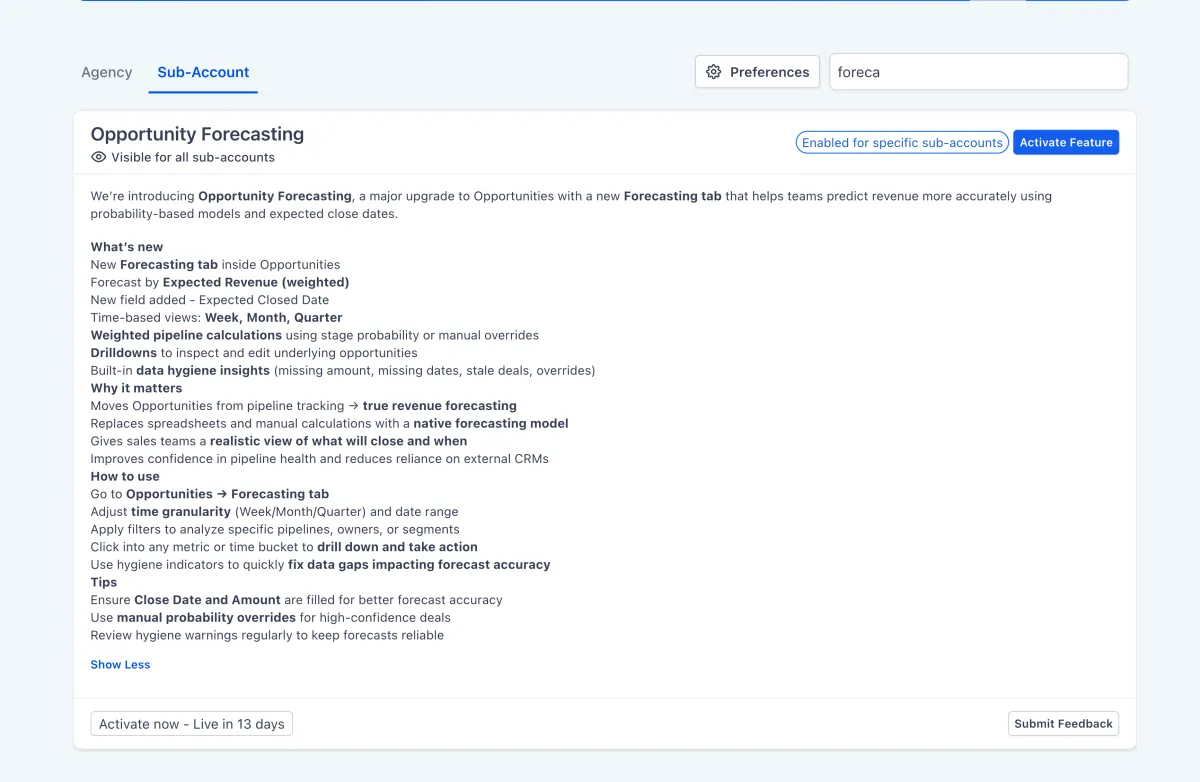
A Forecast tab inside Opportunities, now in Labs, showing expected revenue based on deal probability and expected close dates. The dashboard covers maximum potential revenue, probability-weighted expected revenue, won revenue and open opportunity counts. A timeline view tracks deals across week, month or quarter, and you can drag and drop an opportunity to change its close date. Data hygiene cards surface deals missing close dates or values, or sitting overdue, and a risk classification flags deals as high, medium or low risk based on how far they have slipped. For anyone currently forecasting in a spreadsheet, this is the replacement. More detail

Agent Logs: Metrics Dashboard
Agent Logs now include a metrics dashboard showing aggregated performance across conversations and calls, rather than requiring you to read individual log entries to spot a pattern. If you run agents for reception, qualification or support, this is the quickest way to tell which ones are working and which need their prompts revisited.
Marketing
Listings: Google Business Profile Holiday Hours
Special and holiday hours for your Google Business Profile can now be managed inside Listings, without logging in to Google separately. Public holidays and seasonal closures push straight through to the listing. Holiday hours are among the most commonly forgotten updates, and the cost of forgetting is a customer standing outside a closed door. More detail
Reputation Management: Dashboard Redesign
The Reputation Management dashboard has been rebuilt with a cleaner structure for monitoring and responding to reviews across connected platforms. Live on all accounts with the module enabled. More detail
Websites and funnels
Funnel AI Reimagined
A substantial rebuild of AI page generation for funnels and websites. Rather than producing a whole page in one pass, the AI now works in stages: thinking, design planning, section planning, then generating sections in parallel. Section-specific guidance covers each part of a page separately, from hero and navigation through to pricing, testimonials and footer, and the image pipeline has been rebuilt end to end. The result is a first draft that needs materially less reworking before it is usable. More detail

AI Studio: Pre-Render SEO for Published Sites
Sites published through AI Studio now get server-side pre-rendering, which generates a static HTML snapshot of each page at publish time. When a search crawler arrives it receives complete, readable content rather than an empty shell waiting on JavaScript. This is applied automatically with no configuration, and it addresses a real weakness in how JavaScript-heavy pages get indexed. More detail
Synchronised Countdown Timers
The dynamic countdown timer from the email builder now works in funnels and websites, and the two stay in sync. Each contact gets their own timer counting down from when they received or opened the email, and it carries the same deadline through to the landing page. Set the duration once under Marketing, Countdown Timers, then add it to a page from the Add menu. It removes the mismatch where an email promises two hours and the page it links to says something different. Currently in Labs. More detail
Brand Board Colours in the Forms and Surveys Builder
The colour picker in the Forms and Surveys builder now shows your brand palette alongside default and global custom colours, so styling buttons, input fields, labels and shadows no longer means pasting hex codes. Default colours are shared across Forms, Surveys and Quizzes. An Add option opens Brand Settings so you can create a new custom colour without leaving what you are doing, and selected brand colours are saved as brand-linked values. More detail
Page Builder: Per-Side Border Controls
Border width can now be set on each side individually, and border radius per corner, without custom CSS. Five additional border styles have been added: double, groove, ridge, inset and outset. Existing pages continue to render as they did, with no migration needed. More detail
Media
Media Picker Across Forms, Surveys and Quizzes
The Forms, Surveys and Quizzes builders now use the same global media picker as the rest of the platform, replacing the older file asset picker. You can browse, select and upload from central Media Storage when working with image upload elements, rich text editors, quiz result builders and QR codes, and every upload flows into Media Storage so assets can be reused rather than uploaded again. More detail
Payments
Card Capture on Document Signing
Payment card details can now be collected at the same moment a recipient signs a document or contract, rather than through a separate payment link afterwards. The card capture element is added to document templates in the builder and processed through your connected payment integration. For anyone who needs both a signed agreement and a deposit before work starts, that is now one step for the client instead of two.
Mercado Pago
Mercado Pago is now supported natively in Payments. It is the dominant gateway across Latin America, so this matters if you sell into Colombia, Argentina, Chile, Mexico, Uruguay, Peru or Brazil, and not otherwise. More detail
That is the stretch. Missed the last one? Catch up on the 6-12 April updates.
Already a Clientflow client? If you want to know more about any of these features, or would like them deployed in your account, get in touch with your usual contact on the Clientflow team.
Not yet a client? Book a call with the team, or see the full feature set on the platform capabilities page.
Clientflow is built on the HighLevel platform, delivered with Australian onboarding, support and expert implementation. Read how that works on our GoHighLevel Australia page.


