
Clientflow Platform Updates: 16-29 March 2026
A big fortnight. AI Studio can now build a complete website or funnel from a description, Canva plugs straight into media storage, and the mobile app gained a full payments tab. Filtering across the CRM was also rebuilt from the ground up. Here is everything from 16 to 29 March.
AI
AI Studio builds the whole page for you

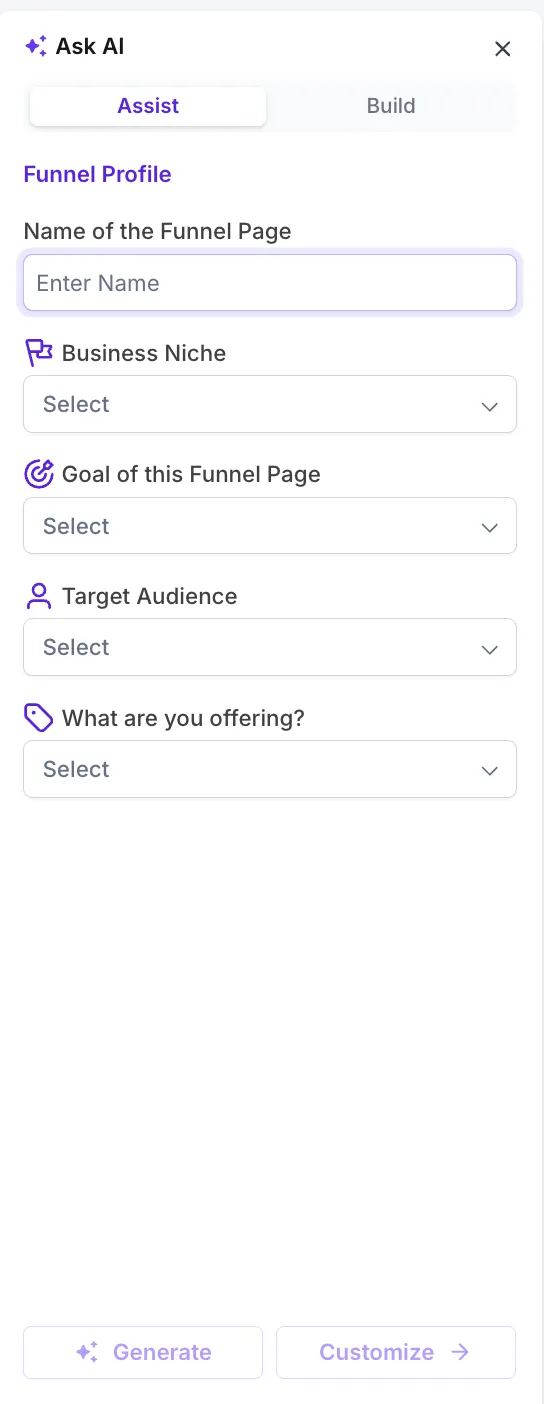
AI Studio creates complete funnels and websites from a description. Assist Mode walks you through a few questions about the business and the goal; Build Mode takes a detailed brief and builds to it. Chat Mode then edits the live page by instruction, with the AI and standard builder settings side by side so you can adjust anything by hand. It can also work from a URL or image you share as a reference, and generates SEO titles and descriptions as it goes. More detail
The AI can book Services v2 appointments
Conversation AI now books directly into the Services calendar, across SMS, live chat, Facebook, Instagram and WhatsApp. A customer describes what they need, the AI checks availability and confirms the booking with no manual step. For a service business fielding booking enquiries at all hours, that is the closest thing to a receptionist that never sleeps. More detail
Conversation AI answers email now
Inbound email joins the channels Conversation AI can respond to. It processes the message and replies from your configured settings and knowledge base, preserving threading and subject lines, and you can design custom email response templates in the Design Editor. Routine enquiries get answered at 2am without anyone touching them. More detail
Ask AI as a full workspace on mobile
Ask AI is now a full-screen workspace in the mobile app, able to trigger more than 500 marketplace actions from a single conversation: adding leads to sequences, booking appointments, pulling transactions, moving pipeline stages. It also drafts blog posts, images and post-ready content, and answers platform questions without leaving the app. Responses stream in real time. Currently limited to admin-level users, with wider access rolling out. More detail
Import any email as an editable template
Forward an email from your inbox, or an existing template from HubSpot, ActiveCampaign, Mailchimp or elsewhere, to a dynamic import address, pick your editor, and it arrives as a fully editable template. Useful when moving across from another platform with campaigns worth keeping. Requires Email AI enabled through Labs. More detail
CRM
Filtering, rebuilt across the board

Advanced Filters 2.0 standardises operators and behaviour across contacts, opportunities, tasks, custom objects and companies. The headline addition is a full set of date operators: today, tomorrow, yesterday, this week, this quarter, this year, before a date and after a date, which finally fixes future-date filtering. String operators now behave consistently whatever the field type, DND status filters cover SMS, email, call and WhatsApp, and numeric filtering gained more options. The Pipeline filter category is now called Opportunity. More detail
Colour-coded pipeline stages
Each pipeline stage can carry its own colour, and pipelines can be created or edited straight from the dropdown without going into settings. On a busy board, colour tells you where everything sits at a glance. More detail
Import companies from CSV
Company records can now be bulk imported through a guided four-step flow: upload, map fields with preview data, verify, execute. You can create new companies, update existing ones, or both, with duplicate detection on Company ID and protection against overwriting fields with blanks. Results land on the Bulk Actions page with success, error and warning counts plus a downloadable audit report. In Labs; ask us to enable it. More detail
Companies link to opportunities and custom objects
Company records can now be associated with opportunities and custom objects, not just contacts. If you sell to businesses rather than individuals, your deals and projects can finally hang off the organisation where they belong. More detail
Notes on custom objects
Custom object records now take notes, the same as contacts and opportunities, and workflows can add them automatically through the Add Note action. If you track properties, vehicles, projects or equipment as custom objects, the commentary now lives with the record. More detail
Automation
Keyboard shortcuts in the workflow builder
Both builders gained a full shortcut set: copy and paste whole branches, zoom, recentre the canvas, move between nodes with arrow keys, open panels. Press K at any time for the overlay listing them by category. More detail
Attach media library files in workflows
Workflow actions can now pull files straight from Media Storage rather than re-uploading the same document into every automation. Handy for onboarding guides, price lists and service agreements that go out repeatedly. More detail
Fathom meeting recordings trigger workflows
Fathom, the AI meeting recorder, now has native triggers and actions. A workflow fires once a recording is processed, and can pull the transcript and AI summary to draft a follow-up email, create tasks or notify the team. Post-call admin handles itself. More detail
Math results carry through the workflow
The Math Operation action now saves its result as a reusable variable available in later steps, rather than requiring you to write it to a custom field first. You can also feed one calculation into another for multi-step maths. More detail
Company fields in workflows
Company-level details (name, phone, email, website, address) are now available in the custom value picker and in If/Else conditions. For a contact linked to a company, these populate dynamically in messages, notes and branch logic. They stay blank where no company is linked. More detail
Two new goal events
Invoice Paid and Review Request Clicked can now be set as workflow goals, which stop a sequence the moment the contact does the thing you were chasing. A payment-chasing sequence ends when the invoice is paid; a review campaign ends when the link is clicked. Nobody gets a reminder for something they already did. More detail
Merge duplicate contacts automatically
A new Merge Contact action finds and merges duplicates as part of a workflow, matching on email, phone or both. The older record is always kept and the newer one merged into it, so history survives, and every merge is logged in execution history with the matching criteria used. More detail
Assignments skip inactive team members
Round-robin assignment can now pass over team members marked inactive, so leads stop landing with someone on leave or no longer with the business. More detail
Richer sticky notes, now in both builders
Sticky Notes 2.0 brings notes to the Standard builder and adds images, logos, colour coding, formatted text and links, with free resizing and positioning. If someone else maintains your automations, this is how they explain themselves. More detail
Restore a workflow version from either builder
Version history now records which builder each version came from, and restoring one switches you to the right builder automatically and loads it exactly. Previously, working across both builders made older versions unreliable to restore. More detail
Advertising and marketing
Meta hybrid campaigns: form and website together

Meta lead campaigns now support three conversion locations at ad set level: Instant Forms, Website, and a new hybrid of both. With the hybrid, you attach a lead form and a destination URL to the same ad and let Meta decide which to serve each person. Website and hybrid campaigns need a pixel dataset and conversion event configured. One caution: conversion location cannot be changed after publishing, which is a Meta limitation rather than a platform one. More detail
Meta pixel tracking through the Conversions API
Key actions on funnels and websites (page views, product views, checkout starts, payment details, purchases) now track through both the browser pixel and Meta’s server-side Conversions API. Browser-only tracking loses a meaningful share of conversions to ad blockers and browser restrictions, so this makes return-on-ad-spend figures more trustworthy and audience targeting better fed. More detail
Shareable ad previews
You can now generate a link showing exactly how a Meta ad will appear across formats, and send it to whoever needs to approve it. No test ads, no screenshots, no account access required for the reviewer. More detail
Canva connects to media storage

Canva now connects directly into Media Storage, so you can browse, edit and import designs without switching tabs or downloading files. Connect it through the App Marketplace via OAuth. Everyone can view and download designs; whoever installed the connection keeps edit access. Re-imported edits track duplicates so you do not end up with five copies. Disconnecting later leaves already-imported files in place. More detail
Facebook post history syncs in
Connecting a Facebook page now pulls your existing posts into Social Planner, so historical content sits alongside scheduled and published posts rather than starting from an empty planner. Insights refresh every 24 hours. More detail
Communication
WhatsApp Marketing Messages API
WhatsApp messaging can now run through Meta’s Marketing Messages API, which prioritises delivery to more engaged recipients and delivers up to 9 per cent better rates on Meta’s own testing. It also unlocks conversion tracking, creative optimisation, GIFs, deep links and extended message time-to-live, plus cost metrics per template, per click and per delivery. More detail
Invalid domains blocked before sending
Emails to addresses on known-invalid or restricted domains are now blocked at the point of sending. Those addresses generate bounces, bounces damage sender reputation, and reputation determines whether your legitimate email reaches the inbox. This runs automatically with no list cleaning required, which matters most when importing older contact databases. More detail
Payments
A payments tab on mobile

Contact and opportunity records in the mobile app now have a dedicated Payments tab. From a contact you can charge on the spot, raise an invoice or estimate, manage saved cards and see lifetime value. From an opportunity you can create invoices and estimates already linked to the deal. Filter chips switch between transactions, invoices, estimates and subscriptions. More detail
Cards on file, from your phone
Customer payment cards can be saved, viewed and managed from a contact record in the mobile app, then reused for future charges, subscriptions or in-person payments without re-entering details. More detail
Attachments and payment plans on mobile
Two more mobile payments additions. Invoices and estimates now take up to 10 file attachments (20 MB combined), included when the document emails out, which suits anyone sending photos of completed work or terms alongside a bill. And estimates now support payment plans: a deposit on acceptance, then instalments on fixed dates or regular intervals, including percentage splits. Breaking a large quote into instalments is often what gets it accepted. Attachments · Payment plans
Track cost price and margin per product
Products can now carry a cost price and margin alongside the selling price. Switch on Add Margin, enter either an amount or a percentage, and the other calculates itself. Cost data flows into transaction exports, invoices and calendars, and a Line Item Cost Price column appears in the transactions CSV. Existing products are untouched unless you turn it on. Profitability tracking without a side spreadsheet. More detail
Autopayment on by default
Invoices with payment schedules and recurring invoices raised from the dashboard now have autopayment enabled by default, rather than needing it switched on each time. Scheduled charges collect on their due date against the saved payment method. More detail
Cheapest shipping first
Shipping options at checkout now sort by price ascending with the cheapest pre-selected, and free shipping goes to the top and is chosen automatically when available. Sorting recalculates when the customer changes address or cart. No configuration needed. More detail
Reporting
An SLA dashboard for response times

Conversations analytics gained an SLA performance dashboard showing how often your response-time targets are met or missed, with breakdowns by team member and channel and trends over time. Admin access only, and it works with the new Conversations interface. More detail
Messaging analytics rebuilt
SMS analytics in phone settings has been rebuilt with period-on-period comparison indicators, charts for failure rates over time, a breakdown of why messages failed (carrier filtering, invalid numbers and so on) and opt-out rates against safe thresholds. Click any summary card for the underlying message log. If your texts are not arriving, this is where you find out why. More detail
Filter your site analytics
Funnel, website and webinar analytics now filter by country, channel, page title and referrer, and the filters combine, so you can isolate organic search traffic from one country. Find it under Sites, then Analytics, then Advanced Filter. More detail
Dashboards remember your filters
Dashboards and custom reports now retain the date range and filters you last used, saved per user, rather than resetting every time you navigate away. More detail
Websites and stores
Blog domains and automatic sitemaps
You can now build out a blog site before attaching a custom domain, and sitemaps update automatically when posts are added or changed, which is what gets new posts discovered and indexed. Custom tags can also be applied to posts. More detail
Product page presentation
Three store improvements landed together. Product detail pages gained small, medium and large image size options with a cleaner directional layout separating image from information. Image zoom can now be set to off, click or hover magnification, or a full-screen lightbox with navigation, which matters for anything where texture or detail drives the purchase. And selecting a variant now switches the displayed image to match, rather than leaving a static main photo regardless of choice. Layouts · Zoom · Variant images
Bookings
Let the customer supply the address
A new booking location type asks the customer for their own service address at the time of booking, which suits any business that travels to the client: trades, cleaners, trainers, consultants. Choose the Ask the Booker location option on the service, and the address saves to both the booking and the contact record. No follow-up call to ask where they are. More detail
That is the fortnight. Missed the last one? Catch up on the 2-15 March updates.
Already a Clientflow client? If you want to know more about any of these features, or would like them deployed in your account, get in touch with your usual contact on the Clientflow team.
Not yet a client? Book a call with the team, or see the full feature set on the platform capabilities page.
Clientflow is built on the HighLevel platform, delivered with Australian onboarding, support and expert implementation. Read how that works on our GoHighLevel Australia page.


