
Clientflow Platform Updates: 15-21 June 2026
Twenty-one features to close out June, and the integrations are where the value sits this week. Housecall Pro has gone from two triggers and one action a fortnight ago to nine triggers and fourteen actions. Calendly now connects natively in both directions. And Instagram can finally be connected on its own, without a Facebook page in the middle. Here is everything from 15 to 21 June 2026.
Automation
Housecall Pro: Nine Triggers and Fourteen Actions
The Housecall Pro connection has been built out to cover the whole field service lifecycle. Nine triggers: jobs created, scheduled, finished and cancelled; estimates created, scheduled and finished; lead created; and customer created. Most poll every five to ten minutes rather than firing instantly. Fourteen actions cover customer operations including create, retrieve, update, find and address management, along with job and appointment management, estimate creation and retrieval, and lead operations.
Connect with an API key from Housecall Pro’s app store, then add a trigger or action inside a workflow, set any filters, and test before publishing. Multiple accounts are supported through a dropdown.
For a trades or property services business, this is the piece that closes the gap between the job management system and the marketing system. A finished job can start a review request. A new estimate can start a follow-up sequence. A cancelled job can start a win-back. None of it needs anyone to re-key a thing. More detail
Calendly: Native Triggers and Actions
Calendly now connects directly to workflows, with five triggers and nine actions. The triggers are Invitee created, Invitee cancelled, Invitee no show created and New routing form submission, all instant, plus Event cancelled which polls every five minutes. The actions cover Create one-off meeting, Book meeting for invitee, Find event, Cancel an event, Mark invitee as no show, Create contact, Find contact, Update contact and Find user.
Connection is through OAuth, with each connected account labelled by name and email, and a webhook subscription scope filter for user or organisation level. One-off meetings support durations up to 720 minutes with a configurable timezone. Worth knowing: a reschedule appears as two separate events, a cancellation followed by a new booking. If your bookings still come through Calendly, appointment activity can now drive reminders, follow-up and no-show recovery in the CRM. More detail
Opportunity Owners and Followers in If/Else Branches
Opportunity owners and followers can now be used as conditions inside an If/Else branch. The owners and followers assigned at the moment the workflow reaches the step are what get evaluated, so the branch reflects the live assignment rather than something stored earlier. Set it as the condition field on any If/Else action. The obvious use is routing an opportunity into a different follow-up sequence once an owner has been assigned. Existing workflows are unaffected unless you configure it. More detail
Wait Action: TikTok DM Replies
TikTok Interactive Messenger can now be selected as a reply channel on the Wait until the contact replies action, so a workflow can pause and resume when someone answers a TikTok DM. Set the wait type to “Until the contact replies”, then choose TikTok Interactive Messenger in the Reply to field. If you are running DM campaigns on TikTok, the conversation can now drive automated follow-up rather than requiring someone to watch the inbox. More detail
Workflow Builder Opens Up to Four Times Faster
Opening a workflow from the list has been optimised behind the scenes, with initial load times reported as up to four times faster in many cases. The gain is largest on first load, and the actual improvement varies with workflow complexity, browser state, network and device. Nothing changes about how workflows are built or run. The reason this matters is behavioural: automations that are slow to open tend to be left alone rather than maintained. More detail
Workflow Builder: Sidebar Toggle
The main navigation sidebar can now be opened from inside the workflow builder, so you can reach a calendar, form or pipeline the workflow refers to without leaving it. Click the toggle in the top-left corner or press Cmd+ on a Mac, Ctrl+ on Windows. Navigation only, with no effect on how workflows run. More detail
AI
Ask AI: Interactive Answers on Mobile
Ask AI responses on the mobile app now render as usable components rather than plain text. Ten types are supported, including charts, data tables, code blocks, approval flows and question wizards, all rendering natively on the phone. The release also adds real-time streaming of answers, searchable conversation history and a live indicator showing the reasoning as it works. Requires version 4.18.1, on iOS and Android, with dark mode support. A canvas preview pipeline covering nine further preview types is built and will switch on from the back end without an app update. Asking for a number and acting on the answer between jobs is now practical. More detail
Ask AI on Mobile for the Whole Team
Ask AI on mobile was limited to admin users. It now follows the same per-user access controls already used on the web, so anyone an administrator has granted permission to can use it from their phone. Supporting changes include a non-blocking banner when teammates still need access configured, in-chat explanations instead of generic errors when a usage limit or policy block is hit, and offline retry screens when access verification fails. Grant access through web settings, then sign in on version 4.18.1 or later. More detail
AI Studio Connects to the Media Library
AI Studio can now browse and reuse assets from the Media Library rather than requiring re-uploads. In chat, Media Library images work as reference images to guide generation, and asset links can be inserted into prompts directly. In Visual Edits, an image element can be swapped using a Media Library button beside the Image URL field. In Publish, the favicon and social sharing images can be set from the library. Direct uploads still work, and assets stay with the project when it is remixed or turned into a snapshot. The practical gain is brand consistency across AI-built pages without hunting for the same logo every time. More detail
CRM
Find Every Review Profile You Already Have
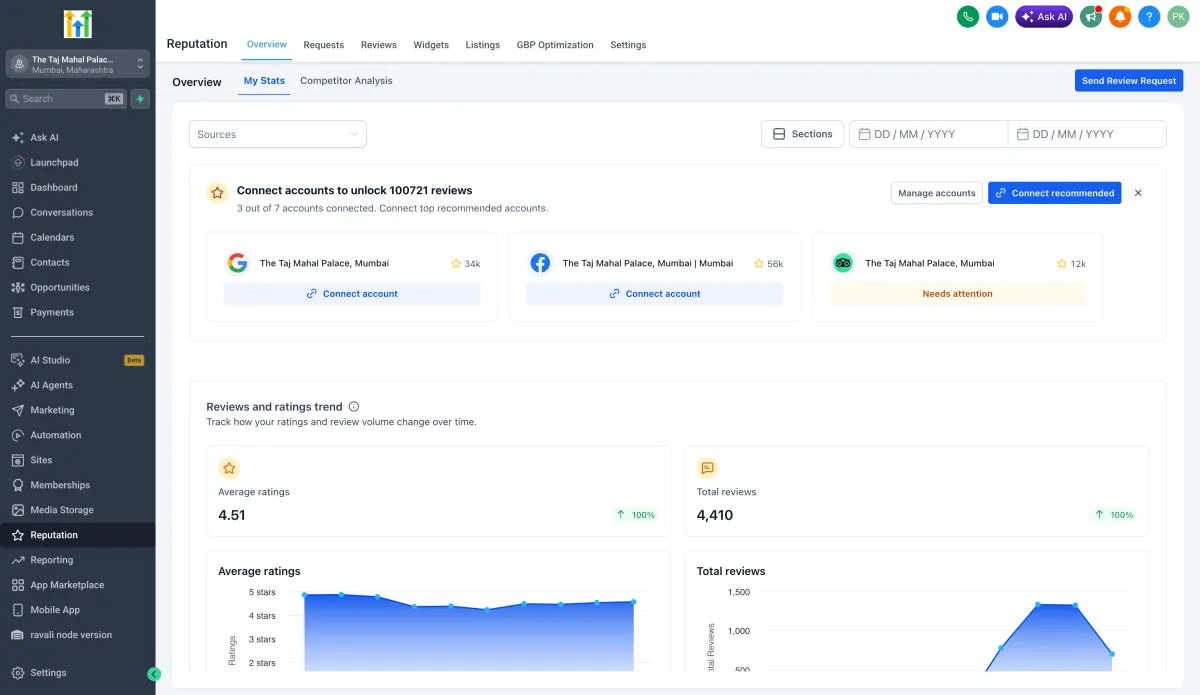
Reputation now automatically detects review profiles for your business across more than 52 platforms, including Google Business Profile, Facebook, TripAdvisor, Yelp, Trustpilot, Booking.com and Agoda. Each detected profile shows the business name, an address preview and the review count before you connect it, and a top recommendation card points at the highest-priority profile to connect first based on review volume. Confidence indicators mark each match as High, Medium or Multiple, and where several listings exist for one platform you can compare them.

In-app notifications flag high-confidence discoveries. Connect from Reputation, Overview, or Reputation, Settings, Integrations, and keep the results accurate with View page, Integrate different profile, or Not my business. Most businesses are being reviewed in more places than they realise, and this is how you find out where. More detail
Communication
Instagram Connects Directly, Without a Facebook Page
Linking an Instagram account no longer requires a connected Facebook page. A dedicated Instagram integration card appears under Settings then Integrations once the Labs feature is enabled, and it gives a single view of every connected Instagram account, covering both new direct connections and existing page-based ones, with an account-level toggle for messaging and automations. Instagram Direct conversations sync into the CRM and Instagram interactions can drive workflows.

The limits are worth reading before switching over: accounts connected through a Facebook page cannot be disconnected on their own, turning on the direct connection automatically disables the page-based connection for that account, and switching off the messaging toggle stops both messaging and automations. The direct connection will also be a prerequisite for upcoming Instagram features including DM to followers and poll reply automation. More detail
Campaigns on the Mobile App
The mobile Campaigns module has been rebuilt so campaign performance can be checked and diagnosed from a phone. Campaign cards show status at a glance, whether Succeeded, Failed, Scheduled, Paused or Draft, with last updated and last executed dates. An Overview tab holds campaign metadata and headline send metrics, with emails previewable inline. A Statistics tab brings web-level metrics to mobile, covering delivery, opens, clicks, bounces and unsubscribes, plus a recipient list filterable across eleven status categories. Search by name or filter with status chips from the Campaigns tab. Available in version 4.18.0. More detail
Marketing
Delete Published Posts from Social Planner
Posts can now be deleted from Social Planner in draft, scheduled or published state, and in most cases removed from the social network itself rather than only from the planner. Native deletion works for Facebook, LinkedIn, Google Business Profile, YouTube, Pinterest, Threads, Bluesky and Community. Instagram and TikTok posts can only be removed from Social Planner, because those platforms do not permit third-party deletion. If the connected account’s access has expired you are prompted to reconnect. Available in both post list and calendar views, through the three-dot menu, with a tick box to also delete from the platform. When a post goes out with the wrong price on it, this is the fastest route to fixing it. More detail
Meta Campaigns Get Validated Before Submission
Ad Manager now checks a Meta campaign when you click Publish and flags missing or incorrect information rather than letting a submission through to fail later. Error indicators highlight the specific fields at fault with clearer messaging, and blocking errors prevent submission until they are resolved. A progress modal shows while the campaign processes, and success and failure notifications have been improved. Currently Meta only, with Google and LinkedIn validation flagged for the following quarter. Passing validation is not the same as Meta approving the campaign, which still happens separately under their own policy review. More detail
Reporting
Google Ads Widgets for Dashboards
A Google Ads section has been added to the dashboard widget panel with eleven widgets: total conversions, conversions over time, total cost, cost over time, total clicks, clicks over time, total impressions, impressions over time, clicks by campaign, conversions by campaign, and cost per click. Each takes filters for campaign, campaign type, zero impressions, zero conversions or PPC markup. Google Ads metrics are also available as dimensions in custom metrics, so ad data can be combined with other modules.

Google Ads must be connected first under Settings then Integrations, or the widgets show no data. Then add them through Edit dashboard and Add widget. Spend, clicks and conversions now sit on the same screen as leads and pipeline instead of behind a separate login. More detail
Payments
Xero Sync: Choose Which Contacts Come Across
Xero sync used to import every active Xero contact. Two new settings now control it: which contacts sync, with a choice of all contacts, only customers, only suppliers, or specific Xero contact groups; and whether suppliers are routed separately to business records or kept with regular contacts. Existing integrations are unchanged unless you opt in. Found under Payments, Invoices and Estimates, Accounting Sync, then Manage on the Xero connection.
Web only, Xero only for now, and group filtering needs the groups to already exist in Xero. This stops your CRM filling up with suppliers and one-off accounting contacts who should never receive marketing, which is a list quality and deliverability problem as much as a tidiness one. More detail
Websites and funnels
Blog Post AI Uses Your Brand Boards
Blog Post AI can now apply your existing Brand Voice and Design Kit at the point of generation rather than leaving you to edit the output into shape. Brand Voice governs tone, writing style and personality; the Design Kit governs visual identity. New brand assets can be created without leaving the flow. Found under Sites, Blogs, Create with AI, by enabling Apply Brand Boards and selecting a voice and kit before generating in either Assist or Build mode. Both selections are optional, so skipping them leaves generation behaving as before. Blog Post AI itself is enabled from Beta. More detail
Search the Layers Panel
The layers panel in the website and funnel builder now has search, so an element can be found without scrolling a nested tree. Search by element name, type or ID, case-insensitive. Results come back as a flat list grouped by page and popup with match counts, and clicking one selects the element and jumps to it on the canvas. Hide, show, edit, clone and delete can all be done from the results list, with colour-coded icons distinguishing sections, rows and columns. One click clears the search and restores the full tree. It searches the current page only, not other pages or funnel steps. More detail

Recover an Expired Domain Without a Support Ticket
An expired domain can now be recovered inside the platform. The grace period has been extended from 28 to 40 days: within days 1 to 40 you get a standard renewal popup at the normal fee, and between days 41 and 70 a recovery modal appears combining the renewal fee and the registry redemption fee. After day 70 in-product recovery ends and the domain moves to External status. Opening Domain Settings and clicking Recover runs a live status check and routes you to the right flow, so there is nothing to configure. Auto-recharge is disabled during recovery to avoid payment problems, redemption fees are charged at registry rates with no markup, and expiry runs on UTC. Some extensions including .co and .uk may still need support if the zone has already been deleted. Losing the domain your site and funnels run on is an expensive mistake, and the window to avoid it just got wider. More detail
Rentals and courses
Rentals: Calendar Sync Respects Your Rental Times
Date-only bookings imported from external booking platforms were blocked midnight to midnight, which often blocked adjacent dates that were actually available. Imported bookings without specific times now use your configured rental times or rental hours instead, across both date selector and fixed duration modes. Imported events that do carry start and end times block only that duration rather than the whole day. Changing your booking mode or rental times automatically recalculates future and ongoing imported events. Fewer bookable days lost to over-blocking, and availability that matches reality. More detail
Courses: Progress Links, Better Redirects and Hourly Drip
Three changes to Courses. A Course Progress quick link now sits in Contact Actions under Offers, going straight to a member’s analytics rather than through several screens. Post-login redirects now return someone who clicked a shared course or lesson link to that lesson rather than dropping them on the library homepage. And drip scheduling now supports hourly intervals, unlocking content between 1 and 23 hours after enrolment or access, set from the course outline by clicking the status pill on a lesson or module and choosing Drip Hours. That last one makes same-day intensive programmes possible without daily gaps. More detail
That is the week. Missed the last one? Catch up on the 8-14 June updates.
Already a Clientflow client? If you want to know more about any of these features, or would like them deployed in your account, get in touch with your usual contact on the Clientflow team.
Not yet a client? Book a call with the team, or see the full feature set on the platform capabilities page.
Clientflow is built on the HighLevel platform, delivered with Australian onboarding, support and expert implementation. Read how that works on our GoHighLevel Australia page.


