
Online Course Platform Australia: Sell Courses in Clientflow
Clientflow is an Australian all-in-one CRM with an online course platform built in. You get unlimited courses, communities and video hosting, drip scheduling, certificates and badges, and a checkout that calculates tax from the learner’s billing address, with live sessions running inside the course through Labs. All of it sits inside the flat $345 a month.
Most Australian property services businesses are sitting on a course they have never built. The buyers agent who explains the same six things about auction strategy to every first-home buyer. The stager who runs a workshop for real estate offices twice a year. The inspector whose pre-purchase advice would make a decent paid guide.
What stops it is rarely the content. It is the tooling: another subscription, another login, and another list of members who exist there but not in your CRM. Clientflow puts courses, communities, live sessions and certificates in the same account as your contacts, calendars, invoices and workflows. What follows covers that, including the parts still in Labs.
Building the course without starting from a blank page
The fastest route in is conversation. Ask AI builds and manages courses directly: prompt it to create a structure, add modules and lessons, set up a drip schedule, or change settings including locking, publishing, instructor details and branding. If you would rather build by hand, the Courses builder has been rebuilt in Labs with full-screen editing, drag-and-drop layout and a three-step creation wizard.
Nothing gets built twice. The builder imports lessons, modules or an entire structure from a course you already have, bringing videos, thumbnails, descriptions, quiz questions and assignments across, all editable afterwards. Useful when a core module belongs in both a beginner and an advanced course.
Lessons are not restricted to video and text. Funnel pages can be embedded as lessons, which opens up gated resources behind an opt-in step, mid-course offers and interactive pages inside the learning path. Lessons also pull audio and video straight from Media Storage rather than re-uploading files, through Import via Media Library. That one is in Labs.
Courses also carry predefined Language, Difficulty and Topic tags that drive filtering across the All Courses and My Courses views, which keeps a growing catalogue consistent. Set them under Memberships, Courses, Settings.
Running live sessions inside the course
Recorded content is what everyone imagines first, and the hardest to sell on its own. Live teaching is what people pay a premium for, and courses host it natively.
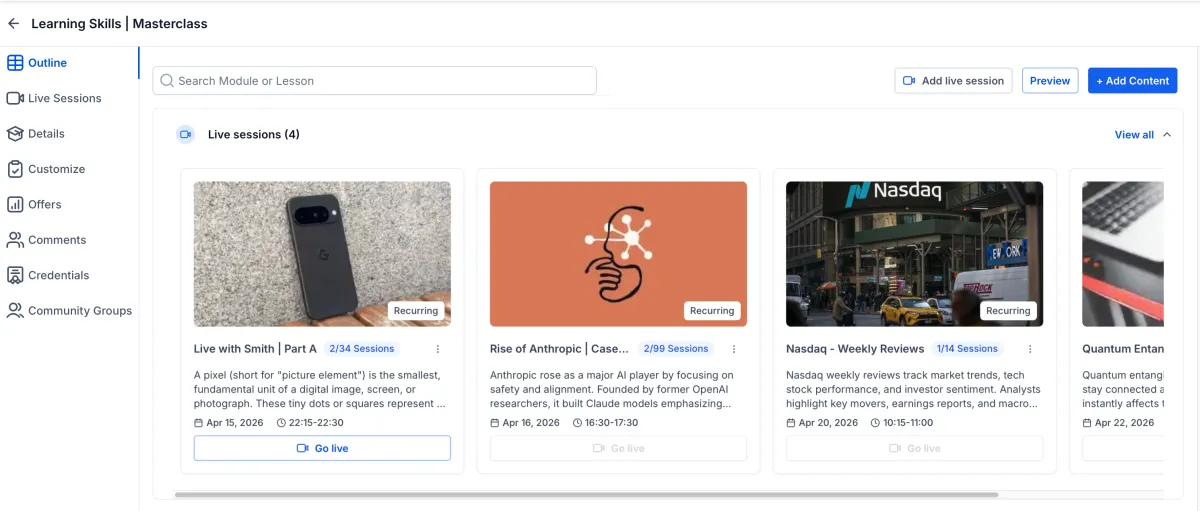
You schedule one-off sessions or a recurring series on daily, weekly or custom patterns, with full timezone support so an attendee in Perth sees their own local time. The Go Live button appears 15 minutes before the session, learners get reminder and go-live notifications, and afterwards the recording can be downloaded or added back into the course as a lesson. Available through Labs.

Community events run live video too. Zoom, Google Meet and custom links still work, but the built-in live room means nobody leaves or installs anything. A Meeting Room mode goes further than one-to-many broadcast: every participant can share audio, video and their screen, which suits workshops rather than lectures. Hosts grant or revoke microphone, video and screen-sharing permissions, remove participants and switch layouts.
Communities and the Client Portal also give you a permanent meeting room URL rather than a fresh link each time, and past sessions collect in a Recordings Hub. Any recording publishes into a community channel through Share as Post. Members enrolled in a course with live sessions join them inside the Kollab mobile app rather than switching to a browser.
What the learner actually experiences
Completion rates live or die on friction, and most recent work has gone here.
The video player auto-plays when a lesson opens, shows an Up Next overlay with the next lesson’s thumbnail and a countdown before advancing, and offers a Play Now button to skip the wait. Lessons complete themselves once enough progress has been made rather than waiting for the learner to tick a box, and text lessons complete on navigating away. You control auto-start, auto-play and auto-completion across every course at once.
Drip scheduling runs on hours as well as days. Content unlocks between 1 and 23 hours after enrolment, set from the course outline through the status pill on a lesson and Drip Hours, which makes a same-day intensive possible without overnight gaps. Post-login redirects also return someone clicking a shared lesson link to that lesson rather than the library homepage.
All of it sits inside one portal. Courses, Communities, Billing, Shared Files, Affiliates and Account Settings have been unified onto shared architecture, with a dashboard showing courses in progress under Continue Watching, community memberships, pending invoices and recently shared files. Content loads in around 0.4 seconds and public pages score 92 to 100 on Lighthouse against a previous 75 to 85. Generally available.

Communities, private channels and tiered membership
A course sells once. A membership site sells every month, and what keeps people paying is usually other members rather than more video.
Communities has been rebuilt inside the portal. The discussion feed shows comments, replies and attachments in the feed itself, members get six reaction options, and search runs across posts and members together. Admins moderate through a three-dot menu covering pinning posts, moving them between channels, disabling comments, banning users and deleting content, and existing content, members and courses transferred automatically.
Tiering is where courses and communities meet. A course can be restricted so only members of designated private channels see it in the Learning tab, with the access level set when the course is created or edited. A VIP channel unlocks advanced training the general membership never sees, which makes tiered membership workable without a separate platform.
The join form doubles as data capture. Membership questions map to CRM custom fields under Community Settings, Membership Questions, so answers land on the contact record and can drive approval automation, segmentation and follow-up. Community activity also starts workflows, through triggers for posts, comments, event registrations and rejected join requests. Comments on community posts also appear in Social Planner’s comment management alongside Facebook, Instagram, LinkedIn, TikTok, Threads and Bluesky.

Certificates and badges people can actually use
A CPD-style certificate is often why an agent’s office sends three staff to your workshop instead of one.
The Certificate Builder produces both certificates and badges, from scratch or from a template, with control over backgrounds, icons, borders and text effects plus an element library of shapes and graphics. A Layers tab shows the full canvas stack, where layers reorder by drag and drop and can be locked. Invalid custom field placeholders are flagged with an error pill and a manual save warns when any remain, which stops a broken merge field reaching someone on a document with their name on it.
Certificates and badges download as PDF for printing, PNG with transparency, or JPG for email and social sharing, so one credential is printed, embedded and posted without redoing the artwork. Members find everything they have earned in the Client Portal, where badges have their own tab.
Where a credential should lapse, it can. Certificates and templates support expiry set to Never, a fixed date, or 3, 6, 9, 12, 24 or 36 months from issue, with reminders ahead of expiry. That replaces the renewal spreadsheet for anyone issuing training or compliance certificates.
Selling the course and taking the money
Courses and communities in the creator marketplace get their own standalone sales page, with descriptions, outcomes and a one-click join or enrol action, so the flow runs from browsing to enrolment in one pass. A Kollab Studio dashboard holds every product in one place, where you preview sales pages, publish or unpublish a community and manage course visibility.
If you are also running a website or funnel page for the course, schema markup covers it: Course is one of 19 parent-level types available through Add Schema Markup.

Checkout handles Australian tax properly. Course offers calculate tax from the learner’s billing address and show a breakdown before purchase rather than a surprise at the last step. Tax-inclusive and tax-exclusive pricing are both supported, coupon codes still work, and tax applies after the discount. Nexus addresses and tax rules are set in Payments settings, and courses and communities can each use their own payment provider rather than one default. The wider invoicing and payments side of the platform covers what happens after the sale.
Seeing where people stall
Course analytics has been rebuilt into a single dashboard with course and enrolment date filters, reporting completion rate, average progress and time to complete against the previous period, alongside a learner journey funnel tracking Enrolled, Started and Completed. CSV export is supported.
Switch on New Course Progress Analytics in Labs, then find it under Memberships, Courses, Analytics, Course Progress. Assessment and revenue analytics are listed as coming. If module three is where half your buyers stop, this is what tells you.
What this costs against a dedicated course platform
Kajabi and Thinkific are the obvious comparison, and both are capable products. Indicatively, a comparable tier runs around $200 to $215 per month ex GST. That buys a course platform. It does not bring a CRM, a booking system or an invoicing tool with it, so those stay as separate subscriptions.
Clientflow is $345 per month including GST, or $313.64 ex GST if you are putting it next to the figures above. That is roughly $100 a month more than a standalone course platform, and it also brings the CRM, pipelines, booking calendars, invoicing, automations, email and SMS and websites, with unlimited users and contacts. Annual is $3,450, twelve months for the price of ten.
The unlimited part matters, because metering is where course platforms get expensive. Courses, communities and video hosting carry no cap, alongside users, contacts, funnels, forms, websites and automations, so a library of forty video lessons costs what four did. Our estimate of the scattered equivalent for a five-user Australian services business, adding the CRM, email platform, booking tool, invoicing and the course platform itself, is roughly $2,300 to $2,600 per month, though it is an estimate rather than a quote. The full list of what is included is on the pricing page, and the case for consolidating rests on subscriptions plus the integration work nobody budgets for.
Usage-based costs still apply where you use AI or messaging: Voice AI is US$0.032 per minute and Conversation AI US$0.03 per message, with SMS and calls paid directly to Twilio at carrier cost. Payment processing fees go to your provider as they do now.
What this looks like in practice
Dani is a buyers agent in Newcastle with two staff. She was repeating the same auction-strategy conversation to every first-home buyer, so she turned it into a course.
She described the structure to Ask AI, which produced the modules and lessons and set the drip. Two modules came out of an internal staff training course, imported with the video and quiz questions intact. A funnel page sits in module two, gating her suburb research template behind an opt-in.
The course sells for $249 through its own sales page, with tax calculated at checkout from the buyer’s billing address. Buyers land in a community with a general channel and a private channel for anyone who has also paid for a strategy session, where a course on negotiation is visible only to them.
Every second Wednesday she runs a live session, and the recording goes back in as a lesson the next morning. Finishing all six modules issues a certificate that expires after 12 months, which gives her a reason to be in touch again. Progress analytics showed 40 per cent of buyers stopping at module four, so she cut it in half. All of them are already contacts in her CRM, in a pipeline, followed up for full buyers agent work.
Frequently asked questions
Can I sell online courses without a separate course platform?
Yes. Clientflow includes an online course platform in the same account as your CRM, so you build courses, host video, run live sessions, issue certificates and take payment without a second subscription. Members exist as contacts in your CRM, so course activity can drive workflows, pipelines and follow-up.
How much does an online course platform cost in Australia?
Dedicated platforms such as Kajabi and Thinkific run indicatively $200 to $215 per month ex GST for a comparable tier. Clientflow is $345 per month including GST, which is $313.64 ex GST, and that flat rate also covers the CRM, booking calendars, invoicing, automations and websites, with unlimited courses, communities and video hosting.
Can I run live classes as well as recorded lessons?
Yes. Courses host live sessions natively, scheduled as one-offs or a recurring series, with full timezone support. The Go Live button appears 15 minutes before the session, learners receive reminder and go-live notifications, and the recording can be downloaded or added back into the course as a lesson. Live sessions are available through Labs.
Can I build a membership site with different paid tiers?
Yes. A course can be restricted so only members of designated private community channels see it in the Learning tab, with the access level set when the course is created or edited. A VIP channel unlocks advanced training the general membership never sees, and membership questions on the join form map to CRM custom fields.
Does Clientflow issue certificates when someone finishes a course?
Yes. The Certificate Builder produces certificates and badges, downloadable as PDF, PNG or JPG, and members find everything they have earned in the Client Portal. Certificates support expiry set to Never, a fixed date, or 3, 6, 9, 12, 24 or 36 months from issue, with reminders ahead of expiry.
Is there a limit on how many courses or how much video I can host?
No. Courses, communities and video hosting are unlimited on Clientflow’s flat $345 per month including GST, as are users, contacts, funnels, forms, websites and automations. There is no contact-count pricing and no per-student charge, so a library that grows over years does not change what you pay.
Already a Clientflow client? If you want any of this set up in your account, or want to know whether it suits how you work, get in touch with your usual contact on the Clientflow team.
Not yet a client? Book a call with the team, or see the full feature set on the platform capabilities page.
Clientflow is built on the HighLevel platform, delivered with Australian onboarding, support and expert implementation. Read how that works on our GoHighLevel Australia page.


